
Student with a phone or tablet
You want to add to your notes on the go and may need to switch between devices. Check that the keyboard works with your device and has the layout you need.


First, choose a keyboard that suits your phone, tablet or laptop, as well as the space you’ll have to type on the train. A separate Bluetooth keyboard can work with different devices, provided they’re compatible. A tablet keyboard case keeps the tablet and keyboard together, but is made for a specific model. Then weigh up how compact it is when packed against the key layout, the room you’ll need for your screen and the noise it makes. In the train’s quiet zone, it really does need to be quiet.
You want to add to your notes on the go and may need to switch between devices. Check that the keyboard works with your device and has the layout you need.
You want to carry your tablet and keyboard together as one setup. Check that the case is a precise fit for your tablet’s full model number.
You’re looking for a compact design when packed and want to consider whether a foldable keyboard, and potentially smaller keys, will suit the way you work.
First decide whether you need the flexibility to switch between devices or would prefer a dedicated tablet and keyboard setup. Then compare the packed size, the space available for typing and viewing your screen, and the practicalities of working in a shared train carriage.
Choose this if: you take notes on more than one device or want the option to switch to a different tablet or phone later. Logitech says the Pebble Keys 2 K380s can switch between three devices. Check that it supports your operating system and preferred keyboard layout.
Bear in mind: the screen isn’t attached to the keyboard, so you’ll need a suitable space for both.
Choose this if: a compact packed size is important and you can position your screen separately. The manufacturer of the iClever IC-BK08 describes it as having a three-part folding design and keys that are 90% of standard size.
Bear in mind: the stated key size is a trade-off for the compact design; on its own, it doesn’t tell you how comfortable the keyboard is to type on.
Choose this if: you have a compatible tablet and want to carry the tablet and keyboard together as one setup. Apple lists the Magic Keyboard Folio for iPad (A16) and iPad (10th generation); Samsung lists a separate version for Galaxy Tab S11.
Bear in mind: cases aren’t universal. The Consumentenbond also notes that a keyboard isn’t included with every tablet.
| What to consider | What should you check? | Who should pay particular attention? |
|---|---|---|
| Compatibility and connection | Check the supported operating system, connection type or exact tablet model, and whether the case fits. | I want to keep using my existing phone or tablet without choosing a case for a different model. Around 33% of consumers prioritise compatibility. |
| Packed size and workspace | Compare the dimensions and weight with the space the keyboard takes up when unfolded. Also check how the screen stays upright. | I have limited space in my bag, but still want enough room on the train to set up my screen and keyboard. Around 27% of consumers prioritise packed size. |
| Keys and noise | Check the key layout and bear in mind that typing may be audible. NS requires the quiet zone to be genuinely quiet. | I want to organise my notes without disturbing other passengers. Around 20% of consumers prioritise quiet, comfortable typing. |
| Use and maintenance | Check whether the keyboard is rechargeable or uses batteries, whether you need a stand, and what’s included with the tablet. | I want to know in advance what I’ll need to bring or buy separately for a complete setup. Around 20% of consumers prioritise running costs and maintenance. |
Apple and Samsung list compatibility by tablet model and case version. A case for a different model may not provide the setup you’re looking for.
Before ordering, compare your tablet’s full model number with the compatibility list for the exact case.
Logitech offers both separate, slim keyboards and compact models for use with multiple devices.
Trust describes the Nado II as a compact Bluetooth keyboard for use with multiple devices.
The IC-BK08 is a foldable option with an integrated touchpad.
The Magic Keyboard Folio is a model-specific option for certain iPad models.
Samsung offers Book Cover Keyboard Slim versions designed for specific Galaxy Tab models.
These Joybuy products include models for specific iPad Pro and iPad Air versions, as well as a foldable keyboard for different devices. Before buying, check compatibility and the exact version. For a model with a wireless connection, also check the CE mark on that specific version.
 Image unavailable
According to the product title, it fits iPad Pro 11-inch models with an M4 or M5 chip. Check your tablet’s full model number.
The description lists Bluetooth, 78 keys, a touchpad, backlighting, an aluminium casing and a weight of 0.85 kg. It also says the keyboard can connect to one device at a time.
Before ordering, check the CE mark on this exact wireless version.
 Image unavailable
A model-specific case for taking notes on an iPad Pro 13-inch (M4). Check the full model name.
The product description lists a Dutch QWERTY keyboard, a trackpad, backlighting, 14 function keys and adjustable viewing angles.
The description lists Bluetooth. Check the CE mark on this exact version before buying.
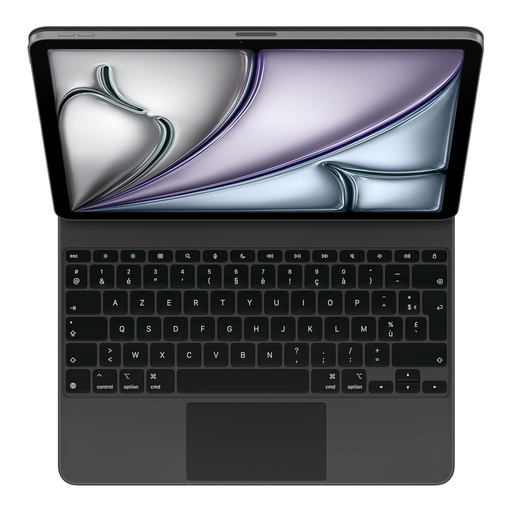 Image unavailable
For use with an iPad Air 13-inch (M3) and a French keyboard layout. Check the language version and tablet model.
The product description lists a trackpad, 14 function keys, a USB-C port for pass-through charging and a Smart Connector connection. It also mentions a protective case and adjustable viewing angles.
 Image unavailable
A model-specific case for taking notes on an iPad Air 11-inch (M3). Check the full model name.
The product description lists an integrated trackpad, adjustable viewing angles and a protective case. The product title specifies a Dutch keyboard layout.
Before buying, check the product information for details of the connection and, if this version has a wireless connection, the CE mark on the exact model.
 Image unavailable
A foldable option if you want to carry a keyboard for a phone, tablet or computer. Check that your device is supported.
The product description lists support for iOS, Android and Windows, 63 keys, a touchpad and folded dimensions of 152 × 97 × 12 mm.
Before buying, check the CE mark on this exact Bluetooth version.
No, keyboard cases are made for specific models. Apple lists the Magic Keyboard Folio for iPad (A16) and iPad (10th generation); Samsung lists the EF-DX730UBEGWW for Galaxy Tab S11. Compare your tablet’s full model number with the case’s compatibility information.
Follow the instructions for your chosen version and turn on Bluetooth on your device. The Logitech Keys-To-Go 2 instructions say to select the keyboard in your Bluetooth settings and, if prompted, enter the code shown using the keyboard.
The NS house rules consulted don’t specifically ban keyboards, but they do require the quiet zone to be genuinely quiet. Bear the sound of the keys and other passengers in mind. Not every keyboard will be quiet enough in every situation.
For a standard online purchase, ACM ConsuWijzer says you generally have up to 14 days after delivery to change your mind, subject to exceptions. You’re also covered by the legal guarantee if a product used normally doesn’t meet what you could reasonably expect. The seller must put this right in accordance with the applicable terms.
The Dutch Authority for Digital Infrastructure (Rijksinspectie Digitale Infrastructuur) states that equipment covered by the applicable requirements must carry a CE mark. Check the product information and marking for the exact version: a brand name or Bluetooth label alone doesn’t confirm that the version meets the requirements.