Start with the tasks you repeat frequently, the space you need for a mouse or graphics tablet, and the hand position you prefer. A compact, programmable keyboard may suit your custom shortcuts; a TKL model leaves out the number pad, while a split model offers a different key layout. Using two screens does not, by itself, require a special keyboard.
Who is this buying guide for?
Tileset creator who uses lots of shortcuts
You often switch between tools or edits while drawing. Aseprite lets users customise keyboard shortcuts, so first decide whether the settings in your drawing software are enough or whether your keyboard itself needs to be programmable.
Creator with limited desk space
You want to leave room for a mouse or graphics tablet and may not use the number pad very often. A more compact layout could work well, as long as your most-used keys remain within easy reach.
Creator who spends long hours at two screens
You pay attention to the position of your hands, keyboard and screens. A split layout changes the position of the keys, but your overall workspace setup matters too.
What should you consider when choosing?
Start by checking which shortcuts you use most often, then consider desk space, hand position and whether you need to switch between computers. Aseprite supports customisable shortcuts, so extra programmability on the keyboard itself is not always necessary.
| What to consider |
What to look for when buying |
Who this matters to |
| Shortcuts and customisation |
Check your software’s shortcut settings and make sure your frequently used keys are easy to reach on the layout you choose. Aseprite supports customisable shortcuts. |
If I carry out the same tasks frequently while working on tilesets, I want to know whether my programme’s settings are enough before programming extra keys. Around 36% of consumers prioritise shortcuts. |
| Hand position during long sessions |
Consider whether a standard or split layout suits your hands and setup; if possible, try the alternative key position for yourself. |
During long drawing and typing sessions, I mainly want to consider the position of my hands and keyboard in relation to the screens. Around 29% of consumers prioritise hand position. |
| Desk space and noise |
Check whether you need the number pad and whether the sound and connection are suitable for your workspace. CHERRY describes the keystrokes on the STREAM KEYBOARD TKL as quiet; the model is wired and has no number pad. |
If I want to leave room for a mouse or graphics tablet, I check whether I can do without the number pad and whether the keystrokes suit my workspace. Around 21% of consumers prioritise space and noise. |
| Devices and compatibility |
Check compatibility with your operating system, software and keyboard layout. Switching between devices is only relevant if you use multiple computers or other devices. |
If I use another device as well as my drawing computer, I want to know whether I can switch between them; two screens can also be connected to a single computer. Around 14% of consumers prioritise switching between devices. |
Common mistakes
-
Confusing two monitors with two computers
You do not automatically need a device-switching feature for a setup with two screens connected to the same computer.
Before buying, decide whether you want to control one computer or multiple devices.
-
Choosing a compact model without checking the shortcuts
A 75% or TKL layout does not give you the same direct access to keys as a full-size keyboard. This could matter if you use the same commands frequently.
Make a note of your most-used shortcuts and check the exact layout and model variant.
-
Taking ergonomic product claims as a guarantee against discomfort
Manufacturers’ comfort claims do not prove that a keyboard will prevent discomfort for everyone or for this particular workflow. Your screen setup and the rest of your workspace matter too.
Assess your whole workspace and, where possible, try the key position for yourself.
Relevant brands to consider
Keychron
The K3 Max is a compact, programmable option; the V6 Max is a separate full-size model with a number pad.
- Keychron lists key remapping for both models reviewed.
- The K3 Max saves space, but hot-swapping is only available on the RGB hot-swappable variant. The V6 Max has an ANSI full-size layout and takes up more space. Check the specifications for the exact model variant.
Logitech
The MX Keys S offers programmable functions and device switching; the ERGO K860 has a split layout.
- Logitech specifies device switching for the MX Keys S and a split design for the ERGO K860.
- The MX Keys S is full-size, while the ERGO K860’s different key position calls for a different set of considerations. Logitech’s claims about ergonomic benefits are not an independent assessment for tileset work.
CHERRY
The STREAM KEYBOARD TKL is a wired option with a compact main key block.
- According to CHERRY, this model has a scissor mechanism and no number pad.
- The description of its keystrokes as quiet is a manufacturer claim. Also check that doing without a number pad and using a cable will suit your work.
ZSA
The ErgoDox EZ is a split option with two separately positioned keyboard halves and a configurator.
- ZSA describes the model as fully split and lists a layout configurator.
- The different key layout may take some getting used to. The manufacturer’s comfort claims do not establish how the model will work for this tileset workflow.
Keyboards for a compact workspace
These product choices focus on compact and TKL keyboards for anyone who wants to leave space beside the keyboard; some models also offer programmable functions. Check the layout, connection and any required software for each model variant.
 No image available
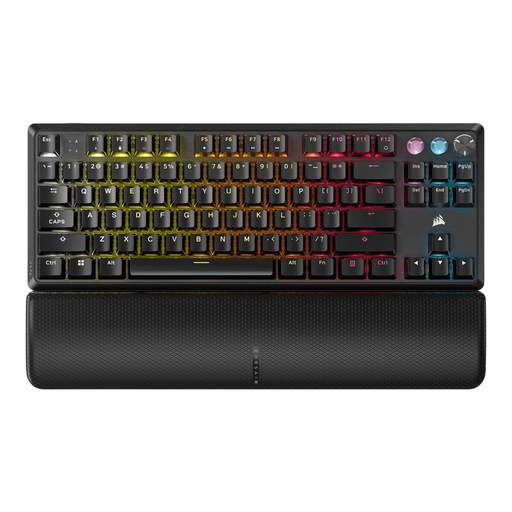
Corsair K70 PRO TKL Magnetic-Mechanical Gaming Keyboard, US QWERTY, MGX v2, black
A TKL option for anyone who wants to leave space beside the keyboard and customise key functions.
The product information lists magnetic mechanical switches, Rapid Trigger and a USB connection. Key remapping and macros are linked to Corsair iCUE. This model variant has a US QWERTY layout.
Joybuy
 No image available
Corsair K55 CORE TKL Gaming Keyboard, US QWERTY
A wired TKL option for anyone who can do without a number pad and wants to leave space beside the keyboard.
The product information lists membrane keys described as quiet, key remapping via Corsair iCUE and a USB connection. The model variant listed has a US QWERTY layout.
Joybuy
 No image available
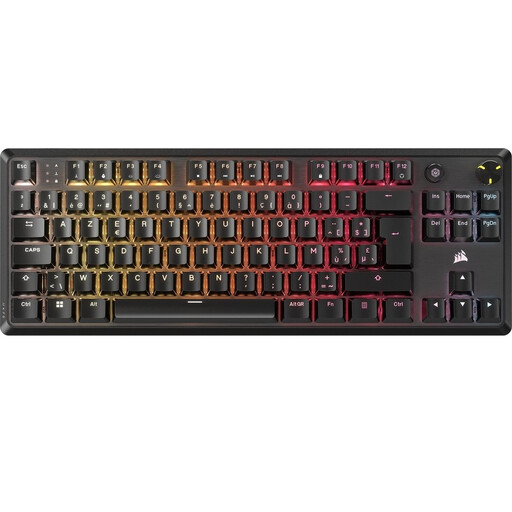
Corsair K70 CORE TKL Mechanical Gaming Keyboard, BE AZERTY, MLX Red, black
A wired TKL option for anyone who wants programmable keys in a layout without a number pad.
The product information lists MLX Red v2 mechanical switches, sound-dampening layers and storage for five profiles. Corsair iCUE is listed for macros and customised settings. This model variant has a BE AZERTY layout.
Joybuy
 No image available
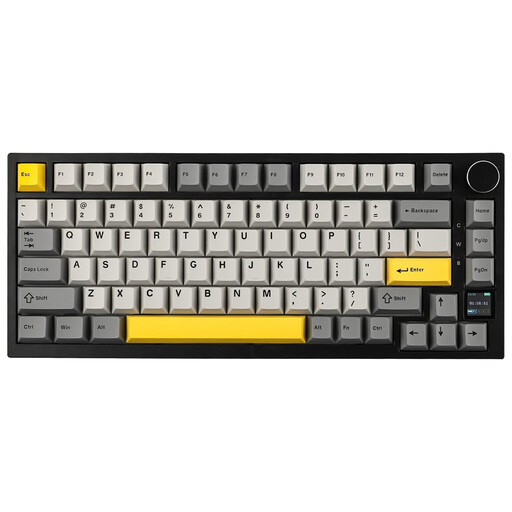
Ajazz AK820 Pro 75% Mechanical Tri-Mode Keyboard, US QWERTY
A compact 75% option for anyone who wants to save desk space while keeping the arrow and function keys.
The product information lists 82 keys, hot-swappable switches and connection via cable, Bluetooth or 2.4G. The model variant listed has a US QWERTY layout.
Joybuy
 No image available
Razer DeathStalker V2 Pro Tenkeyless Gaming Keyboard, US Layout
A wireless TKL option for anyone who wants to leave space beside the keyboard and customise keys or macros.
The product information lists Bluetooth, a USB-C cable and configurable keys with macro recording via Razer Synapse. This model variant has a US layout.
Joybuy
Frequently asked questions
Do I need a keyboard that can switch between devices for two screens?
No, not just because you use two screens: they could be connected to a single computer. A device-switching feature is most relevant if you also use a second computer or another device. Logitech lists this feature for the MX Keys S.
Do I need macro keys to create tilesets in Aseprite?
Not necessarily. Aseprite lets you customise keyboard shortcuts and lists shortcuts for tilemap editing. First check which commands you use frequently; for other software, check its own shortcut settings.
What should I check about the connection and layout?
Check the connection, compatibility with your operating system and the exact keyboard layout of the model variant. Logitech says the MX Keys S connects via Bluetooth or a receiver; the CHERRY STREAM KEYBOARD TKL is wired.
Are ergonomic claims enough reason to choose a split keyboard?
No, a manufacturer’s claims do not prove how the keyboard will work for you. A split layout changes the key position and may take some getting used to; consider your screen setup too, and try the layout for yourself if possible.
What are my rights if a keyboard I buy online is unsuitable or faulty?
For online purchases from a business, you generally have a 14-day cooling-off period, according to the Rijksoverheid; the applicable terms and conditions still matter. If a product is faulty, the seller is your point of contact for the legal guarantee. The Netherlands does not have a fixed statutory guarantee period that applies to every product.


