
Regular number entry
If you often copy tide times or water levels, consider whether a built-in number pad will fit your workspace or whether a separate one would suit the way you work better.


If you regularly enter times and water levels, start by considering a compact keyboard with an integrated number pad. If you mainly read or edit tables, a narrower model may leave you with more space. A separate number pad is another option if you only enter lots of figures during certain work sessions. Measure the space available and check the layout, connection and keys you use in your spreadsheet software.
If you often copy tide times or water levels, consider whether a built-in number pad will fit your workspace or whether a separate one would suit the way you work better.
If you mainly consult tables and want to keep space beside your keyboard free, pay attention to its width and the keys you actually use.
If you work with, for example, a computer and a tablet, check the connection options and whether the version you choose is compatible with your devices.
Entering lots of figures calls for a different layout from simply reading tables. First, compare the need for a built-in number pad with the space you want to keep free.
Choose this if: you regularly enter times or water levels and want a built-in number pad. BakkerElkhuizen lists the UltraBoard 960 V2 as a compact model with an integrated number pad.
Bear in mind: the number pad still takes up space next to the letter keys, so measure the space you have available.
Choose this if: you mainly read tables or add text, and having space beside your keyboard matters. Logitech lists the Pebble Keys 2 K380s as 279,5 mm wide.
Bear in mind: for entering lots of figures, you’ll need another input method or a separate number pad. Also check the position of the keys you need.
Choose this if: you only enter lots of figures during certain work sessions and want to be able to put the number pad away in between. Trust lists 22 keys on the Xalas, including Tab, Esc and Backspace.
Bear in mind: you’ll be using two devices and will need extra space for the separate number pad. The Trust Xalas uses a USB receiver.
Choose this if: a full layout is important to you and your desk can accommodate the width. CHERRY lists the KC 6000 SLIM as 440 mm wide.
Bear in mind: check that the keyboard fits alongside your mouse and other essentials, and make sure you choose the right regional layout.
| What to consider | What to look for | Especially useful for |
|---|---|---|
| Entering figures | Compare an integrated number pad with a separate one, and check the connection and keys you need. | If I often enter times and water levels, I want to be able to type figures without unnecessarily filling up my small workspace. Around 34% of consumers say number entry is their top priority. |
| Desk space | Measure the available width and compare it with the dimensions of the exact version. | I want to keep my mouse and notes beside the keyboard, even when space is limited. Saving space is the main purchasing concern for around 33% of consumers. |
| Table navigation | Check that the arrow, Tab, Enter, function and punctuation keys you use are included. | When editing tables, I want to be able to navigate using the keys I need. Around 20% of consumers say table navigation is their top priority. |
| Connections and devices | Check the available USB ports, Bluetooth support and connection type for the version you’re considering. | I switch between devices and want to know in advance whether the connection will suit my workspace. Switching between devices is the main purchasing concern for around 13% of consumers. |
A model without a separate number pad changes how you enter figures, even if it takes up little desk space.
Choose based on how often you enter figures, and check the layout of the exact version.
Trust describes a standalone Lyra keyboard, while Joybuy’s product listing is for a keyboard-and-mouse set.
Before buying, compare the full product name and the items included in the box.
CHERRY lists the KC 6000 SLIM as 440 mm wide, so its full layout doesn’t automatically mean it takes up little space.
Measure the space beside your mouse and compare it with the stated width.
Rijkswaterstaat states that calculated astronomical tide data doesn’t include the effects of weather. A different keyboard won’t change this limitation.
Check your tide data source and the data you use separately from your choice of keyboard.
The UltraBoard 960 V2 from BakkerElkhuizen is a compact keyboard with an integrated number pad, while the UltraBoard 950 V2 leaves out the traditional number pad.
The Pebble Keys 2 K380s is a compact Bluetooth keyboard for anyone looking to save space and switch between devices.
The Lyra is a compact keyboard for multiple devices, while the Xalas is a standalone number pad that you can add to a keyboard.
The KC 6000 SLIM is a full-size keyboard for anyone who values a familiar layout more than the smallest possible setup.
These keyboards are suited to compact workspaces. For each version, check that the layout and the keys for entering figures and navigating tables suit the way you work.
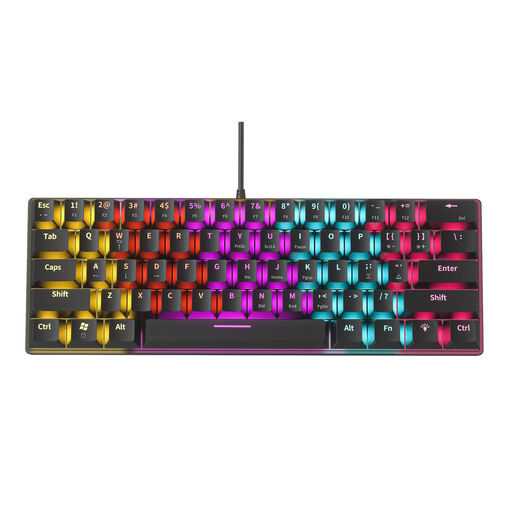 Image unavailable
The mini design may suit a workspace where saving space is a priority. Check that the key layout works for the way you enter figures and navigate tables.
The product name specifies a 61-key mechanical keyboard.
 Image unavailable
This compact model may suit you if you want to keep desk space free. Check that the US QWERTY layout and key positions work for your table tasks.
The product name specifies a wired connection and a US QWERTY layout.
 Image unavailable
This 75% model may be worth considering if you’re looking for a compact layout. Check that the keys you use to navigate tables are included and easy to reach.
The product name specifies Tri-Mode and US QWERTY.
 Image unavailable
The Mini design makes this an option to compare for a smaller workspace. Check that the US QWERTY layout suits the way you work.
The product name specifies Purple Switch and US QWERTY.
 Image unavailable
The Mini design may suit a limited amount of desk space. Check that the US QWERTY layout and key controls work for your table tasks.
The product name specifies the colour White and the US QWERTY layout.
No. First consider whether you mainly read data or enter lots of individual times and water levels. A compact keyboard without a separate number pad can save space; if you enter figures regularly, you could also consider a standalone number pad.
Check that you’re using the right tide data for your table. Rijkswaterstaat states that the astronomical tide data shown is calculated and doesn’t include the effects of weather. A different keyboard won’t change this limitation.
It depends on the model. According to Trust, the Xalas uses a USB receiver, so check that your device has a suitable USB port.
According to ACM ConsuWijzer, online purchases from a business generally come with a cooling-off period of up to 14 days after delivery, subject to exceptions. This is separate from your rights if a product breaks too soon under normal use: the seller must put things right free of charge, for example by repairing or replacing it, or refunding you.