
Frequent tide-table user
You regularly enter times and water levels and want to check first whether a numeric keypad will fit your workspace. Logitech includes one on the K780.


If you regularly enter times and water levels, look for a numeric keypad first. For a portable workstation, a compact keyboard may be a better fit. Then choose between replaceable batteries, rechargeable power and a cable, and check that your computer or tablet supports Bluetooth or has a spare USB port. A keyboard cannot verify tide data: check that the source shows the right location, period and time zone. Rijkswaterstaat notes that its calculated astronomical tide data do not include the effects of weather.
You regularly enter times and water levels and want to check first whether a numeric keypad will fit your workspace. Logitech includes one on the K780.
You work somewhere with few power sockets and are weighing up replaceable batteries against a rechargeable model.
You switch between a computer and tablet or put your keyboard away after use. A compact layout and a suitable connection may then matter more than a built-in numeric keypad.
| What to consider | What to look for | Who is this important to? |
|---|---|---|
| Power supply | Check the battery type or charging port, and whether USB charging suits your workspace. | If I can’t rely on having a charging point, I want to know how the keyboard is powered. Around 36% of consumers prioritise battery or charging convenience. |
| Entering numbers | Check whether the model has a numeric keypad and the navigation keys you need. | When entering times and water levels repeatedly, I want to be able to key in numbers quickly. Around 29% of consumers prioritise the number-key layout. |
| Workspace and storage | Compare the dimensions and key layout with the space available at your workstation. | If I want to move or put the keyboard away, the space it takes up matters. Around 21% of consumers say portability is their main consideration. |
| Connecting to devices | Check Bluetooth support, available USB ports and which receiver comes with the model. | When I switch between devices, the connection I choose needs to work with each one. Around 14% of consumers put device connectivity first. |
A wireless keyboard still needs power: you’ll need to replace its batteries or recharge its battery at a suitable time.
Choose replaceable batteries if charging is inconvenient, or decide in advance when you can connect a rechargeable model to a USB charging point.
Factor in the cost of replacing batteries, or the time and access needed to recharge the battery.
If you enter numbers manually a lot, losing a separate numeric keypad may matter more than the extra desk space you gain.
Look at photos of the exact model and check which number and navigation keys it has.
A USB receiver uses a port; Bluetooth only works if the device in question supports it.
Before buying, check the connection options and available ports on your computer or tablet.
A receiver may need a spare USB port, so check that your device has a suitable connection.
Rijkswaterstaat notes that calculated astronomical tide data do not include the effects of weather.
For passage planning, also check the relevant live water and route information. Changing your keyboard won’t resolve a difference between data sources.
According to Logitech, the K780 combines a numeric keypad with wireless use and switching between devices.
The compact Lyra is designed for anyone who wants to put their keyboard away or switch between devices.
The KW 9100 SLIM is a rechargeable keyboard with a conventional layout and a choice of wireless connections.
According to Rapoo, the E9500M is a wireless keyboard with a full-size layout and several connection options.
The K5 Max is a mechanical model for anyone looking for a full-size layout and the choice of wireless or wired use.
This selection at Joybuy ranges from a wired keyboard with a numeric keypad to wireless models with different layouts and connection options. Compare these features with your workspace and the devices you use.
 No image available
A wired option if you want to use a numeric keypad when entering numbers.
Full-size layout, QWERTY and plug-and-play operation.
 No image available
A 75% layout may suit you if you’re looking for a smaller keyboard. Check that it has the keys you need for your work.
US QWERTY layout; wired via USB-C, Bluetooth or 2.4 GHz. The description lists navigation keys.
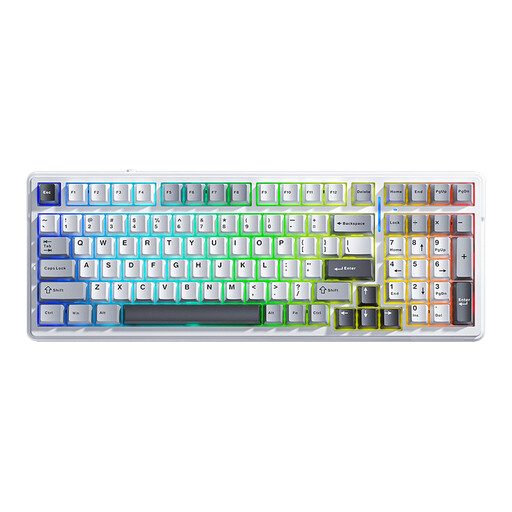 No image available
The 99-key layout is an option if you’re looking for a keyboard with plenty of keys.
Wired via USB-C, Bluetooth or 2.4 GHz; the product title mentions hot-swap and RGB lighting.
 No image available
The 75% layout is an option if you need your keyboard to take up less space. Check which keys you need beforehand.
Bluetooth, 2.4 GHz or wired via USB-C; the product title mentions RGB lighting and PBT keycaps.
 No image available
A 98% layout model to compare if you’re looking for a keyboard with plenty of keys.
The title lists a 10,000 mAh battery, wired use, Bluetooth and 2.4 GHz. The product information mentions USB-C charging.
Not while you’re using it wirelessly, but the keyboard still needs power. A model with replaceable batteries will eventually need new ones; a rechargeable model needs to be charged via USB at a suitable time.
That depends on how many numbers you enter manually and which layout you prefer. Compare the exact keys in photos or product information; a compact layout doesn’t necessarily have a separate numeric keypad.
For each device, check whether it supports Bluetooth or has a suitable spare USB port. A USB receiver uses a port and isn’t the same as Bluetooth; also check which receiver comes with the model you’ve chosen.
Check the location, period, time zone and reference level shown by the data source. Rijkswaterstaat notes that its calculated astronomical tide data do not include the effects of weather; a keyboard can’t correct for this limitation.
Don’t assume a model is liquid-resistant unless this is stated for the exact version. Check the manufacturer’s information and care instructions before using the keyboard somewhere it could be exposed to moisture.