
Detail-focused editor
You often move the cursor to correct names, dates and sentences, and want a familiar keyboard layout for the job.


Choose a keyboard you can navigate confidently and use to make corrections; then decide how much space you need beside your mouse and whether you prefer a quiet keystroke or a different hand position. A compact model can free up desk space, while a split layout offers a different hand position but may take some getting used to. Arboportaal stresses that choosing a keyboard is no substitute for a properly set-up workstation and varying your posture.
You often move the cursor to correct names, dates and sentences, and want a familiar keyboard layout for the job.
You alternate between sitting and standing, and want to keep enough room for your mouse and hands while editing. A smaller keyboard is one option, but your workstation set-up matters too.
You want quiet keys that won’t disturb others in the room, or you’d like to try a different hand position. Key noise and layout vary between models.
Start with the keyboard layout you use for corrections, then consider desk space, keystroke feel and connectivity. A smaller model is no substitute for a properly set-up workstation or varying your posture.
| What to consider | What should you check? | Who is this important for? |
|---|---|---|
| Corrections and navigation | Check the position of the arrow keys, Delete and the shortcuts you use. | If I often edit sentences while working, I don’t want to have to hunt for the navigation keys. Around 36% of consumers say corrections and navigation are their top priority. |
| Space for your mouse and hands | Compare the dimensions and layout; check where your mouse sits at both sitting and standing desk heights. | When I switch between sitting and standing, I want to be able to reach my keyboard and mouse comfortably. For around 29% of consumers, space and posture come first. |
| Keystroke feel and hand position | Consider how noisy the keys are and, if possible, try out the key travel and any split layout. | In a shared space, I want to be mindful of key noise; a different layout may also take some getting used to. Around 21% of consumers prioritise quiet keys or a different hand position. |
| Connecting to devices | Check that your device supports the connection, which port or receiver you need, and which layout the model has. | If I work on different devices, I want to switch between them easily without choosing an incompatible connection. Around 14% of consumers say switching between devices is their top priority. |
A compact model can free up space beside your mouse, but your workstation set-up and varying your tasks still matter.
Check the position of your keyboard and mouse while sitting and standing. Don’t treat ergonomic product claims as a personal health guarantee.
When you make lots of small corrections, saving space isn’t the only thing that matters: key placement matters too.
Compare the exact model with the keys and shortcuts you use while editing.
A different keyboard layout may take some getting used to at first.
According to the Dutch Government, there is no general fixed period for the statutory guarantee in the Netherlands, and it is separate from any additional manufacturer’s or retailer’s warranty.
Keep your proof of purchase and report any fault to the retailer. Check the terms of any additional warranty separately.
The STREAM KEYBOARD TKL is a wired model without a numeric keypad, while the larger STREAM includes one.
The MX Keys Mini is a compact wireless option; the larger MX Keys S has a numeric keypad.
Trust says the Keyra has a split layout and wrist rest, while the Lyra is a keyboard and mouse set for multiple devices.
These Joybuy products include compact and full-sized layouts, with wired and wireless options. When choosing, pay particular attention to the navigation keys you need, the keyboard layout and connectivity.
 No image available
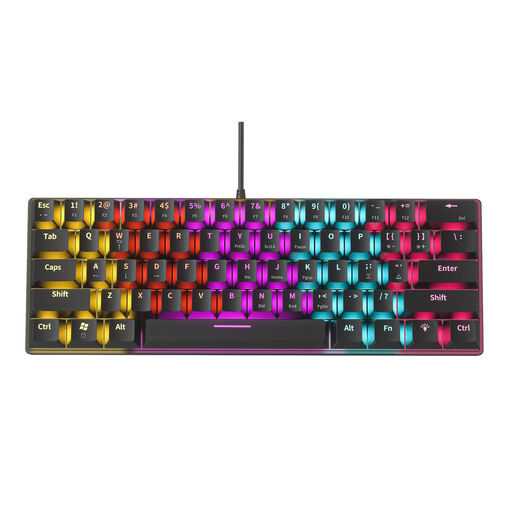
The compact 61-key layout could be a good fit if you want to keep some desk space free.
Mechanical keyboard with 61 keys and 12 RGB lighting effects. The product information lists blue switches with an audible click, so bear that in mind if quiet keys are important to you.
 No image available
An option if you’re looking for a compact layout and a choice of connection types.
75% layout; wired, Bluetooth or 2.4G. The title specifies a QWERTY US layout, so check that it suits your needs.
 No image available
The 75% layout could suit you if you’re looking for a more compact model; check first that the key positions work with the shortcuts you use for editing.
Wired model with HE magnetic switches and a 75% layout.
 No image available
An option if you want a compact keyboard with a choice of connection types.
75% layout with wired, Bluetooth and 2.4G connectivity. The title specifies QWERTY US; check that this layout suits your editing work.
 No image available
An option if you want to keep a full-size layout with a numeric keypad; this model won’t save as much space as a compact keyboard.
Wireless keyboard with scissor keys and a QWERTY US layout. Check that the layout suits your needs.
Not just because you work at a sit-stand desk. According to Arboportaal, for employees who use a screen for more than two hours a day, the screen and keyboard must not be attached to each other. If you use a laptop, a separate screen or keyboard must be available; this does not mean you have to buy a specific keyboard model.
Arboportaal says there are no explicit legal requirements for standing work. Employers still need to follow ergonomic principles and take standing work into account in their risk assessment and evaluation; a keyboard does not remove those responsibilities.
Adjust your workstation for both positions and check that your keyboard and mouse are within easy reach. Arboportaal advises employees to break up screen work with other tasks or a break; the precise set-up depends on your workstation.
Check that your device supports the Bluetooth connection or USB receiver supplied, and that the keyboard layout is right for you. Trust lists a USB receiver and two Bluetooth connections for the Lyra set; this does not tell you which connections other models support.
When you buy online from a business, the Dutch Government says you generally have a 14-day cooling-off period, although there are exceptions. You are also entitled to a product that works as it should in the Netherlands; there is no general fixed statutory guarantee period. If a product is faulty, contact the retailer to find a solution.