
Terminal user who relies on shortcuts
Wants characters, arrow keys and custom commands within easy reach when building and testing a command-line tool.


Start by checking the physical key layout and your operating system’s input settings, so you know how to type the terminal characters you use most. Then choose between a familiar, low-profile key feel, customisable keys or an adjustable split layout. None of these features makes one keyboard right for everyone.
Wants characters, arrow keys and custom commands within easy reach when building and testing a command-line tool.
Wants to position both hands to suit their working posture and also considers the setup of their entire screen-based workstation.
Wants a familiar typing feel with as little distracting noise as possible when working from home, and compares specific models to find it.
Start with the physical layout and input settings. Then decide whether direct access to keys, an adjustable position, noise levels or customisation matters most to you.
Best for: anyone who wants familiar key positions and a low-profile key feel.
Bear in mind: the two halves cannot be moved independently. Claims about reduced noise are specific to Logitech models.
Best for: anyone who wants to customise keys and is looking for a compact layout with arrow keys and a function row.
Bear in mind: check which characters are directly accessible and whether the exact variant suits your system and preferred typing feel.
Best for: anyone who wants to adjust the position of both hands. Compare separate halves with a fixed, curved keyboard.
Bear in mind: a different key layout may take time to get used to. An ergonomic keyboard is not a medical treatment.
| What to consider | What should you check? | Who should pay particular attention? |
|---|---|---|
| Key layout and reach | Check the physical variant and try typing your terminal characters with the active input layout. Also check whether the arrow keys and function row are within easy reach. | If you often use characters and navigation keys, you’ll want to avoid unexpected key combinations. Around 33% of consumers say easy-to-reach keys are their top priority. |
| Adjustable working posture | Compare a fixed keyboard with models whose halves can genuinely be positioned separately. Check that you have enough desk space, too. | If you want to choose the distance between your hands, look at the positioning options and the rest of your workspace. Around 27% of consumers put an adjustable working posture first. |
| Typing noise and feel | Compare the sound and feel of the exact model. Don’t judge noise levels by the switch type alone. | If you type in a shared or quiet home workspace, a familiar typing feel may matter more than extra customisation. Around 20% of consumers prioritise quieter typing. |
| Programmability | Check which keys or commands you can customise, and whether the features work with your operating system and variant. | If you want to assign recurring commands to keys, check compatibility with your system first. Around 20% of consumers prioritise customisable commands. |
The physical key layout and the selected input layout together determine which characters you type. The keycap labels and the characters you enter may not match.
Check the full variant name and try typing the terminal characters you use most with your own system’s input settings.
For the Keychron K3 Max, the stated hot-swappability applies only to the specified RGB Hot-Swappable version and compatible mechanical low-profile switches.
Check both the exact keyboard version and the switch type before choosing replacement switches.
A keyboard is just one part of your workspace. Kinesis states that an ergonomic keyboard is not a medical treatment and cannot cure symptoms or prevent injury.
Consider how much flexibility you have to position the keyboard alongside your chair and screen. If symptoms persist, seek appropriate professional advice.
Your statutory warranty already applies. According to the Dutch government, the retailer is your point of contact if there’s a problem with a product.
Check what extra rights additional cover actually provides, and contact the retailer first if there’s a fault.
The MX Keys S is an option if you’re after a familiar, low-profile typing feel; the ERGO K860 has a curved, split key frame.
The K3 Max ISO variants are aimed at anyone comparing compact, programmable mechanical keyboards with multiple connection options.
The Split Break is worth comparing if you’re looking for two separately positionable halves and a low-profile scissor-switch feel.
The Freestyle2 is an option to compare if you want two adjustable halves with a mostly familiar key layout.
These keyboards at Joybuy are worth considering if you’re choosing between a familiar layout and a compact mechanical model for terminal work.
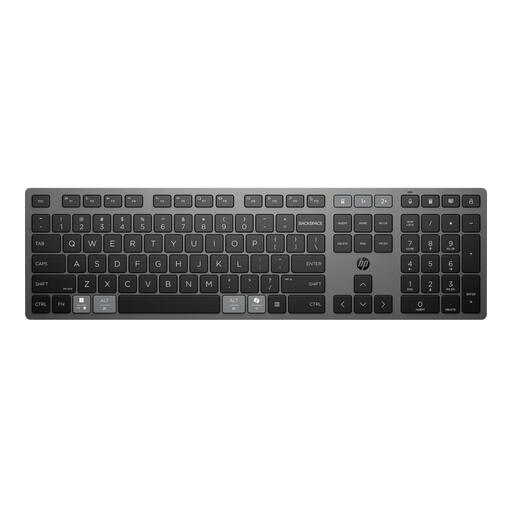 Image unavailable
An option for home or office use. Check that the layout and the terminal characters you need work with your input settings.
The product name describes a rechargeable wireless keyboard for multiple devices.
 Image unavailable
A compact mechanical model to consider if you’re looking for a 75% layout. Check that the US QWERTY version suits the characters you use.
The product name describes a wireless mechanical keyboard with a US QWERTY layout.
 Image unavailable
An option if you’re looking for a full-size layout with a number pad. Compare the typing feel and key layout with the way you use the terminal.
The product name describes a wireless keyboard with a number pad and scissor keys.
 Image unavailable
A compact mechanical model to compare if you’re looking for a 75% layout with arrow keys and a function row.
The product name lists QWERTY US and wired, Bluetooth and 2.4GHz connectivity.
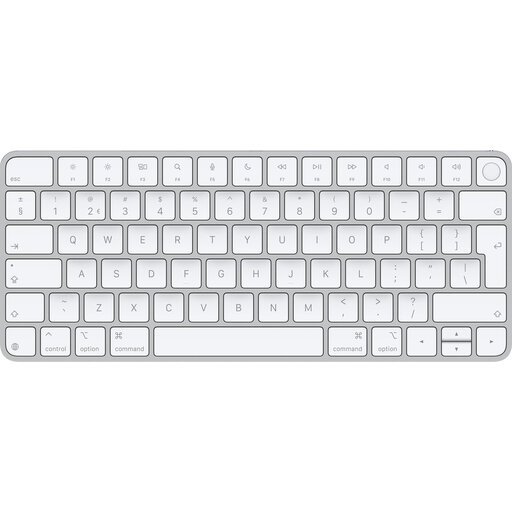 Image unavailable
An option if you’re looking for a Dutch QWERTY version for a compatible Mac.
The product description states that full functionality is limited to Mac models with Apple silicon and macOS 11.4 or later. Check these requirements before buying.
Not necessarily. Choose the physical layout that suits the way you work, and check your operating system’s active input layout as well. Windows treats the input layout as a separate setting, so try typing your own terminal characters before choosing a version.
Check how the exact version connects, then set the input layout in your operating system. The manual for the wireless R-Go Split Break describes its Bluetooth channels; Keychron lists both wired and wireless connection options for the K3 Max.
For a fault, the Dutch government says the retailer is your point of contact for your statutory warranty. For online purchases made by consumers from a business, a 14-day cooling-off period also applies in many cases. Check the relevant terms and exceptions. A fault and a typing feel that you personally find uncomfortable are not the same thing.
Arboportaal states that for employees who do more than 2 hours of screen-based work a day, the screen and keyboard must not be attached to each other. When using a laptop, it must be possible to use a separate screen or keyboard. This requirement does not automatically apply to everyone buying for their own home.