
Anyone who often corrects figures
If you regularly check numerical responses, consider the layout and whether the keyboard has a numeric keypad. CHERRY, Kensington and Dell all describe keyboards with numeric keypads.


For frequent corrections to numerical data, a full-size keyboard with a numeric keypad is a practical choice. If you mainly check text, key feel and available desk space may matter more. Then compare the noise, connection and cleaning instructions: a spill-resistant keyboard is not automatically washable, and Kensington says only its specific washable model can be immersed, with the USB connector kept dry.
If you regularly check numerical responses, consider the layout and whether the keyboard has a numeric keypad. CHERRY, Kensington and Dell all describe keyboards with numeric keypads.
If colleagues work nearby or use the same keyboard, key noise, the connection and the permitted cleaning method are all worth considering. Microsoft Support recommends disconnecting a keyboard before cleaning it.
For extended periods of proofreading, the keyboard’s shape and your workstation set-up may also matter. Arboportaal also highlights the importance of varying your activities and taking breaks when working at a screen.
Start with your main task: entering lots of figures calls for different considerations from comfortable typing or thorough cleaning. Then check that the layout, connection and cleaning method suit your shared workspace.
| What to consider | What should you look for? | Who might find this more important? |
|---|---|---|
| Numbers and layout | Check whether there is a numeric keypad and whether the key layout matches the Dutch QWERTY version you need. | If I often correct numerical responses, I want to enter figures quickly without surprises from the key layout. Around 33% of consumers give entering figures their highest priority. |
| Key noise | Consider the noise in your workplace, and check whether a wired or wireless connection is permitted. | If I work close to colleagues, I want to type without keystrokes becoming an unnecessary distraction. Around 27% of consumers put keeping things quiet for colleagues first. |
| Cleaning | Follow the instructions for the specific model and check which parts need to stay dry. | If several people use the same keyboard, I want to know which cleaning method is permitted. Around 20% of consumers give cleaning their highest priority. |
| Typing comfort | Consider the shape, key spacing and any wrist rest alongside the available space and how adjustable your workstation is. | If I check text for long periods, I want a shape that suits the way I type. Around 20% of consumers put personal typing comfort first. |
The Dell KB216 is available in several country layouts. The Belgian AZERTY version is not the same as the Dutch QWERTY version.
Before buying, check the full product title and the keyboard layout shown in the image.
Logitech describes the Signature K650 as spill-resistant. Kensington says only its specific washable model can be immersed, and excludes its USB connector.
Choose according to the cleaning method you actually need, and follow the instructions for your chosen model.
A split design may take some getting used to and won’t necessarily suit every hand. Arboportaal also emphasises workstation set-up, varying your activities and taking breaks.
Consider the keyboard shape for yourself, while also looking at your workstation as a whole.
CHERRY offers a wired office option with a numeric keypad, as well as a separate product range designed with cleaning in mind.
Kensington offers both a specific washable USB keyboard and a wireless, split-design Pro Fit Ergo model.
The wired KB216 is an office option with a numeric keypad; check carefully which country layout is right for your workspace.
Logitech describes the Signature K650 as a wireless keyboard that is easy to clean and spill-resistant. The MX Keys S also has programmable features.
This Joybuy selection includes keyboards for data entry and shared workspaces, from wired models to more compact layouts and versions with wireless connectivity. Check that each model’s layout and connection suit the computer you use.
 Image unavailable
The wired QWERTY version with a numeric keypad is a good fit for a workspace where figures are entered regularly.
The product title specifies a full-size design and plug-and-play functionality.
 Image unavailable
The 75% layout may suit you if you’re looking for a more compact set-up; check that the US keyboard layout is suitable for the shared computer.
The product title specifies a mechanical keyboard with wired, Bluetooth and 2.4G connectivity.
 Image unavailable
The product description lists typing and data entry as suitable uses for this wired keyboard.
The product title specifies a metal case and wrist rest; the description says the wrist rest is detachable.
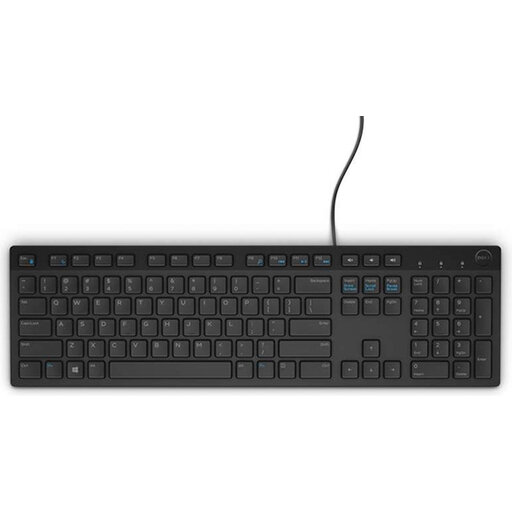 Image unavailable
This wired USB keyboard has a numeric keypad; choose this version only if you need the Belgian AZERTY layout.
The product title specifies a black version.
 Image unavailable
The 75% layout is a compact option for a workspace where you need a wired keyboard; check that the US layout suits your computer.
The product title specifies a wired mechanical keyboard with magnetic switches.
According to Arboportaal, if you work at a screen for more than two hours a day, the screen and keyboard must not be attached to each other. For laptop users, this means they must be able to use a separate screen or keyboard; this requirement does not specify a particular keyboard model.
Not simply because it is spill-resistant. Kensington permits immersion for its specific Pro Fit Washable USB Keyboard, but the USB connector must not get wet. For other models, follow their own cleaning instructions.
Follow the manufacturer’s instructions for the model in question. For its own mice and keyboards, Microsoft Support recommends, among other things, disconnecting the device before cleaning, not applying liquid directly and using a lightly dampened lint-free cloth. These are not cleaning instructions for other brands.
No. The Dutch government describes manufacturer or seller warranties as additional to consumers’ statutory rights and states that the Netherlands has no fixed statutory guarantee period. When buying for an office, check whether it is a consumer or business purchase, and which sales and warranty terms apply.