
Student with limited desk space
A compact keyboard can leave room for a mouse, notes or textbooks. Check that the layout and connection suit your device.


A compact keyboard is a better fit for a small desk. If you have a permanent workstation, a wired model may be more convenient because you won’t need a wireless connection or batteries. If you share a room, look for keys described as quiet, but treat this as a manufacturer’s claim rather than a measured comparison of noise levels. Also check the keyboard layout and whether your device supports Bluetooth, USB-A or USB-C.
A compact keyboard can leave room for a mouse, notes or textbooks. Check that the layout and connection suit your device.
If you want to disturb others less, look for keys described as quiet or low-profile. Without comparable measurements, this doesn’t guarantee a particular noise level.
A wired keyboard may be a good fit if you want to type without a wireless connection and have a suitable USB port. Just bear in mind that you’ll need to manage the cable and make room for it on your desk.
First, consider how much space you have on your desk and which connections your device supports. Then compare the keyboard layout and, if you share a room, the noise claim for the specific model.
| What to consider | What should you check? | Who is this important for? |
|---|---|---|
| Desk space | Compare the dimensions and consider whether you need a numeric keypad. | If my desk also needs to fit a mouse or study materials, I’d prioritise a compact model. Around 29% of consumers put desk space first. |
| Quieter typing | Check whether the specific model is described as having quiet keys; try the feel of the keys yourself if possible. | If I share my room, I want to be considerate of others while typing. Around 29% of consumers give quieter typing their highest priority. |
| Connection | Check for Bluetooth support or an available USB port, as well as the layout of the model. | If I want to use the keyboard with my laptop, PC or tablet, the connection needs to be compatible. Around 21% of consumers make device compatibility their top priority. |
| Simplicity and maintenance | Check whether you need a suitable USB port, have to replace batteries or need software for an extra feature. | If I only want to edit a short piece of text, I don’t want to deal with management or features I don’t need. Around 21% of consumers prioritise simplicity and less extra maintenance. |
Bluetooth and a USB receiver work differently. So a wireless model won’t necessarily be compatible with the connections available on your device.
Before buying, check which type of connection the keyboard uses and which ports your laptop, PC or tablet has.
A description such as “quiet” doesn’t tell you how large the keyboard is. A break reminder also doesn’t prove that a model prevents physical discomfort. For screen-based work, Arboportaal recommends changing your posture, looking away from the screen regularly and taking short breaks.
Choose based on the noise description, size and features you want; take breaks if you spend long periods working at a screen.
A product name may refer to a specific layout or a bundle with extra accessories. This may differ from what you need for your workstation.
Check the full product name, keyboard layout and what’s included with that model.
The Pebble Keys 2 K380s is a compact Bluetooth option for anyone who works across multiple devices.
The Ody II and Primo models reviewed offer different wireless and wired connection options.
The Compact Break is a compact wired model with a software-controlled break indicator.
The KC 1000 is a full-size wired keyboard for anyone who wants separate cursor and number keys.
The Joybuy keyboards below vary in size, layout and connection. Check that each version is compatible with your device and suits your workspace.
 No image available
The compact layout may suit a desk with limited space; check whether the US layout works for you.
68 keys; US layout; metal top plate.
 No image available
A wired model with a compact layout to consider if you’re looking for a smaller keyboard.
82 keys; wired model.
 No image available
The compact layout may free up space on a small desk; check whether the US QWERTY layout suits you.
83 keys; wired model; linear, replaceable switches.
 No image available
An option to consider if you use a Mac model with Apple silicon and want a Dutch layout.
Touch ID; Dutch layout.
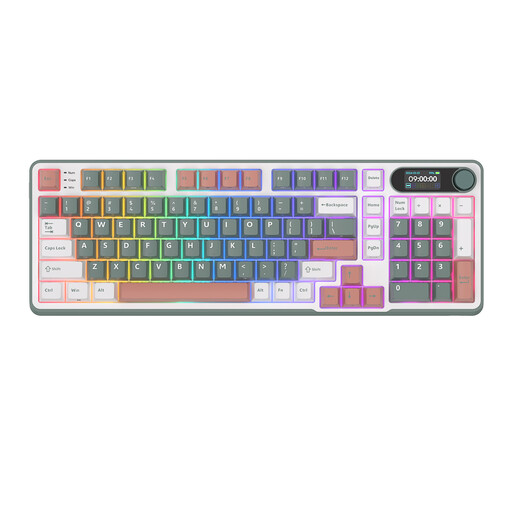 No image available
The layout combines a compact size with a numeric keypad; consider this model if you’re looking for both.
98 keys; Bluetooth, 2.4G and USB-C; Blue Switch.
You don’t necessarily need a separate numeric keypad for writing mainly continuous text. If you also enter numbers often, compare a compact model with a full-size keyboard such as the CHERRY KC 1000, which the manufacturer says has a numeric keypad.
It varies by model: the Logitech Pebble Keys 2 K380s uses Bluetooth, the Trust Ody II uses a USB receiver, and the wired Trust Primo has a USB-C cable with a USB-A converter included. Logitech says the K380s can switch between three paired devices. Check which connections your own device supports.
It depends on the model. According to Logitech, the Pebble Keys 2 K380s comes with two replaceable AAA batteries; the stated battery life of 36 months applies under standard conditions.
For online purchases, you generally have a statutory 14-day cooling-off period from delivery, but check whether an exception applies. ACM ConsuWijzer explains that if a product develops a fault too soon under normal use, you also have statutory rights: the seller must resolve the problem free of charge under the law. This is separate from any manufacturer’s warranty.