
Designer with a small desk
You need space for a mouse alongside your laptop, and you’d sometimes like to take your keyboard with you. Compare its dimensions with your workspace and consider which keys you use most often.


For a small desk or use with multiple devices, a compact wireless keyboard is often a better fit. A larger wired model may make more sense if you want more keys readily available and have enough space. For either option, check the physical key layout, connection and compatibility with your laptop or tablet. A separate keyboard lets you arrange your workspace differently, but it won’t solve an unsuitable setup on its own.
You need space for a mouse alongside your laptop, and you’d sometimes like to take your keyboard with you. Compare its dimensions with your workspace and consider which keys you use most often.
You type while someone else in the room is working or resting. A description such as ‘quiet’ may be a factor, but it won’t tell you which model will be least noticeable in your room. Also consider the layout and connection.
You may want to position your screen and input devices separately. Consider the keyboard, screen, mouse and position of your arms as part of one complete workspace setup; a separate keyboard alone is no guarantee against discomfort.
A good fit if: you have limited desk space, want to take your keyboard with you or switch between devices.
Trade-off: a compact layout may leave fewer keys readily available; also check that the wireless connection works with your devices.
A good fit if: the keyboard will stay in one place and you want more keys within easy reach.
Trade-off: measure the space needed for both the keyboard and mouse, and check that your computer has the required USB port.
Start by considering the dimensions and the keys you use often for design and writing. Then compare the sound, layout and connection of the specific model.
| What to consider | What to check | Who is this important for? |
|---|---|---|
| Desk space and access to keys | Measure the space for your keyboard and mouse; check that the layout includes the keys you use often. | If I design at a small desk, I want to leave room for my mouse without losing access to frequently used keys. Around 31% of consumers give desk space and easy access to keys top priority. |
| Typing noise | Check the stated key mechanism and treat ‘quiet’ as a preference, not a comparative noise measurement. | If someone else in the room is working or resting, I want to take audible typing into account without relying on a product description alone. Around 25% of consumers prioritise quiet typing. |
| Working posture | Consider where the screen, keyboard, mouse and your arms will be positioned in the complete setup. | If I work on a laptop for long periods, I want to be able to position the screen and input devices separately and assess my whole workspace. Around 25% of consumers give the option to rearrange their workspace top priority. |
| Key layout and connection | Compare the physical keys with your selected input language and check for Bluetooth, a receiver or the required port. | If I want the characters on screen to match the key labels and work with my devices, I want to check the layout and connection in advance. Around 19% of consumers prioritise suitable keys and connectivity. |
Compact and full-size models meet different needs. With a smaller layout, some keys may be less readily available.
Work out which keys you use often for design and typing, then measure the space on your desk.
You may need to use key combinations more often or later wish you had a separate number pad.
Manufacturers describe some keyboards as quiet, but these descriptions aren’t directly comparable noise measurements.
Consider quietness as a preference, not as an established ranking of keyboards.
Keyboards can differ in their physical labels and connections. In Windows, you can set the input layout separately.
Check the model, physical keys, software settings and ports on your device.
If your device doesn’t have a suitable port, you may need an adapter. Different labels or settings can also make characters appear differently from what you expect.
The Pebble Keys 2 K380s and MX Keys Mini are examples of compact keyboards. According to Logitech, the MX Keys Mini has backlit keys.
The Trust Lyra is an example of a compact wireless keyboard with low-profile scissor keys and the option to switch between devices.
The KC 6000 SLIM is an example of a low-profile, full-size wired keyboard for a fixed workspace.
This selection focuses mainly on compact keyboards for a small design workspace, including wired and wireless models with different key layouts.
 No image available
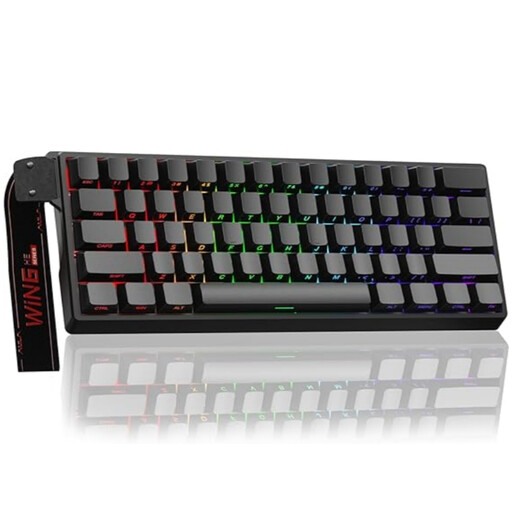
The 60% layout may suit you if you have limited desk space and are looking for a compact wired model.
The product name lists Hall Effect magnetic switches, Rapid Trigger, an 8K polling rate, adjustable actuation from 0.01 mm and RGB lighting. The compact layout has fewer readily available keys than a full-size model.
 No image available
The compact wired layout may suit a small desk. Check in advance that the US layout works for the characters you use.
The product name lists magnetic switches, Rapid Trigger and a metal top plate. The description mentions RGB lighting. The layout has fewer keys than a full-size model.
 No image available
This set may suit you if you’re looking for a compact keyboard with a wireless connection to your devices.
The description lists a USB receiver, Bluetooth and a connection to up to three devices. It also mentions low-profile, quiet scissor keys; this isn’t a comparative noise measurement. The set has no separate number pad.
 No image available
The compact layout may suit you if you want to save desk space and have both wired and wireless connection options.
The description lists 82 keys, with arrow and function keys retained, RGB lighting and hot-swappable switches. The connections listed are USB-C, Bluetooth and 2.4G.
 No image available
The compact wired layout may suit a small, fixed workspace. Check that the US layout works with your input settings.
The product name lists RGB lighting and a mechanical-feel design. The description mentions membrane keys and no number pad.
The guidance referred to doesn’t require students to use a separate keyboard just because they’re working on a landing page. Arboportaal outlines requirements for employees: if they work with a screen for more than two hours a day, the screen and keyboard must not be attached to each other. For your own studies, a separate keyboard may be an option if you want to position the screen and input devices differently.
Check the input layout selected in your operating system and compare it with the physical key labels. Microsoft Support explains how to view, add and change keyboard layouts in Windows.
Follow the instructions for your exact model. For its devices, Logitech recommends gently wiping the keys with a soft, lint-free cloth lightly dampened with water. Make sure no liquid gets inside the device.
For eligible online purchases from a business, the Government of the Netherlands says that in many cases you have a 14-day cooling-off period; check the terms and exceptions. You’re also entitled to a product that works properly, and the seller is your point of contact if it doesn’t. There is no fixed statutory warranty period in the Netherlands.