Start by choosing a keyboard with a layout and accessible navigation keys that suit your computer and writing software. Having two editor panes on screen doesn’t mean you need a physical split keyboard. Literature & Latte describes splitting the editor as a way to view documents side by side. Then compare a fixed split design, two separately positionable halves, and a compact or conventional model, considering your hand position, desk space and what you’re used to. No keyboard is a substitute for a suitable workstation or regular breaks.
Who is this relevant to?
Reviewing scenes side by side
You write in one editor pane and refer to dialogue, earlier scenes or notes in the other. In that case, a suitable layout and easily accessible navigation keys may matter more than having a physical split keyboard. Literature & Latte describes this editor feature for Scrivener.
Adjusting your hand position
During longer writing sessions, you may want to adjust the shape of the keyboard or the distance between its key sections to suit your workstation. Arboportaal also recommends changing posture and taking micro-breaks, so the keyboard’s shape alone won’t determine your overall working posture.
Working with limited desk space
You want to leave room beside your keyboard for a mouse or work materials, for example. BakkerElkhuizen states that the S-board 840 has no numeric keypad; weigh this against how often you enter numbers.
What should you look for?
First, check which keys you use most when writing and editing. Then compare hand position, noise and size.
| What to consider |
What to look for |
Who is this important for? |
| Navigation and rewriting |
Check the position of the arrow, navigation, function and modifier keys, and try the shortcuts in your own editor and operating system. |
If I switch between scenes and notes often, I want to find the keys I need without losing focus on my writing. Navigating between text and references is the main priority for around 33% of consumers. |
| Hand position |
Compare a fixed curved design with two separately positionable halves, and consider how much room the setup requires. |
During long typing sessions, I want to adjust the distance and angle of my hands to suit my workstation. This is the top priority for around 27% of consumers. |
| Key noise |
Trust describes the Keyra’s keys as quiet. Assess the sound and feel of the specific model rather than relying on the product description alone. |
If I work next to someone else or listen to recordings while writing, key noise may matter. Quiet typing is the top priority for around 20% of consumers. |
| Space and layout |
Compare the keyboard’s width and key positions with your desk, and check the exact physical layout variant. |
If I want to make room for a mouse or work materials, I need to know whether I need a numeric keypad and whether the key positions feel familiar. Size and layout are jointly the main priority for around 20% of consumers. |
Common pitfalls
-
Assuming a split-screen editor means you need a split keyboard
The software can display two documents or sections of text at once, regardless of your keyboard’s physical design.
Choose the keyboard design after deciding which navigation keys you use and which hand position suits your workstation.
-
Assuming ‘ergonomic’ means it prevents discomfort
A keyboard design alone won’t determine your overall working posture. Arboportaal also recommends changing posture and taking micro-breaks.
Assess the keyboard in your own setup and take breaks; don’t treat a manufacturer’s claims as a personal health outcome.
-
Focusing only on ‘QWERTY’
The physical position of characters and modifier keys can matter when you type a lot of dialogue and punctuation or use shortcuts.
Check the exact variant and key layout before choosing.
Brands to compare
Logitech
Worth comparing if you’re weighing up a fixed split keyboard against a conventional model with configurable keys.
- According to Logitech’s product specifications, the ERGO K860 has a curved, split keyboard frame and an adjustable palm rest position.
- The halves of the ERGO K860 can’t be positioned separately. The MX Keys S has programmable keys, but no physically split layout.
Trust
The Keyra is worth considering if you want a fixed split layout and the ability to switch between devices.
- Trust states that it connects to up to three devices and describes the keys as quiet.
- The two key sections can’t be positioned separately, and the sound description isn’t based on an independent noise measurement.
R-Go Tools
The Split Break is worth considering if you want to position the two keyboard halves separately.
- According to the product information, the wired RGOSP-USWIBL variant has a QWERTY-US layout.
- R-Go says the break indicator works with R-Go Break software. Check whether you want to use this feature and can install the software.
BakkerElkhuizen
The S-board 840 is a compact, wired alternative if desk space matters more to you than physically split key sections.
- The manufacturer lists a scissor mechanism, shortcut keys and two USB ports.
- This model has no numeric keypad and isn’t a physically split keyboard.
Perixx
The PERIBOARD-429 is a compact, wired alternative with a scissor mechanism and backlighting.
- The manufacturer lists a 70% layout without a numeric keypad and a USB-A cable.
- This model isn’t physically split. Check the exact layout variant too.
Keyboards at Joybuy
These models are designed for everyday typing. Check the physical layout, connection type and any programmable keys for each model.
 No image available
Logitech MX Keys for Business, QWERTY US
Suited to anyone who wants to keep a full-size layout and customise frequently used actions.
The title specifies QWERTY US; the product description lists a full-size layout, wireless connectivity and programmable keys.
Joybuy
 No image available
HP 725 Multi-Device Rechargeable Wireless Keyboard
Could suit anyone looking for a full-size layout and programmable keys for writing.
The product description lists a full-size layout, wireless connectivity, a low-profile design and the ability to switch between multiple devices.
Joybuy
 No image available
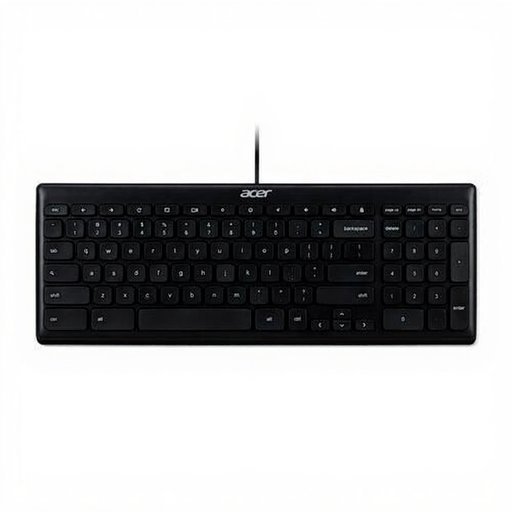
Acer GP.KBD11.00S Office Keyboard, QWERTY US International
Suited to a fixed computer setup if you’re looking for a full-size layout and a wired connection.
The product information lists a full-size QWERTY layout, USB connection and a 1.8-metre cable. The specified variant is QWERTY US International.
Joybuy
 No image available
Logitech K120 Wired Keyboard, black
Suited to anyone who wants a wired, full-size layout with a numeric keypad.
The product information lists a USB connection, a 1.5-metre cable and a QWERTY US International layout.
Joybuy
 No image available
Trust Vaiya Wireless Keyboard, QWERTY US
Suited to anyone looking for a full-size layout with a numeric keypad and the ability to switch between devices.
The product description lists scissor-switch keys, USB-C charging and connection to up to four devices. The specified variant is QWERTY US.
Joybuy
Frequently asked questions
Do I need to buy a physical split keyboard if my writing software displays two editor panes?
No. Two editor panes are a software display feature. Choose a physical split keyboard only if its shape and positioning options suit the way you type.
How can I check that I can move easily between scenes and references?
Check which navigation and modifier keys you use in your own writing software and operating system. Then compare their physical positions on the exact keyboard variant. The editor feature Literature & Latte describes for Scrivener is one example, not an assumption about the software you use.
Is an ergonomic keyboard enough for long writing sessions?
No. Arboportaal recommends varying your tasks, changing your posture and taking micro-breaks. There are also workplace regulations for employees who spend more than two hours a day working with display screens; this requirement doesn’t automatically apply to every individual writer.
What are my rights if a keyboard I bought online isn’t suitable or breaks down too soon?
For distance purchases, you’re usually entitled to a 14-day cooling-off period after delivery, subject to legal exceptions. If a product is faulty, you can assert your statutory rights with the seller. ACM ConsuWijzer explains that the statutory guarantee in the Netherlands doesn’t have a fixed term of exactly two years; it depends on what you could reasonably expect from the product.


