
Quiet home practiser
You want to practise an intro while other people are at home. Check that the version has a suitable headphone socket and, if needed, agree on practice times.


Start with a standalone keyboard, checking that the exact version has a headphone socket and the power supply you need. Headphones muffle the electronic sound, but they won’t make the keys silent. Then choose based on the range and touch your intro requires: 61 keys may be practical, while learning or accompaniment features are only useful if you’ll use them. Also check that the instrument fits your playing and storage space, and what’s included with the UK offer.
You want to practise an intro while other people are at home. Check that the version has a suitable headphone socket and, if needed, agree on practice times.
You want to practise notes, timing and dynamics. Compare the keyboard’s range and touch with what your intro requires, and consider which practice features you’ll actually use.
You share your living space and want to move or put away the keyboard after practising. Measure the space available for playing and storage, then compare it with the instrument’s dimensions and weight.
Choose this option if: you want to learn the intro directly on the keyboard and use repeat or lesson-support features.
Bear in mind: 61 keys are enough only if the range covers the notes in your music.
Choose this option if: playing and storage space are limited; Casio lists the CT-S300 as measuring 930 × 256 × 73 mm and weighing 3.3 kg.
Bear in mind: check the headphone socket and included power supply for the UK version.
Choose this option if: you want to try an intro with different sounds or chord accompaniment; Roland describes these features for the GO:KEYS 3.
Bear in mind: extra features are less relevant if you only want to practise a short intro.
| What to consider | What to look for | Who should consider this? |
|---|---|---|
| Practising with minimal disturbance | Check the exact version’s headphone output, plug type and what happens to the built-in speakers when you connect headphones. | If I want to practise an intro while other people are at home, I want to hear the electronic sound through suitable headphones. Around 36% of consumers give top priority to practising with as little disturbance as possible. |
| Notes, timing and dynamics | Compare the lowest and highest notes in your intro with the keyboard’s range; also check whether you need touch sensitivity or a repeat function. | If you want to learn the intro step by step, you may want to prioritise range, timing and dynamics. Around 29% of consumers put learning the intro first. |
| Space and storage | Measure your playing and storage space, then compare it with the keyboard’s dimensions and weight. | If I want to move or put away the instrument after practising, I consider how much space it takes up. Around 21% of consumers let the space available guide their choice. |
| Sounds and accompaniment | Decide whether you want to use different sounds or accompaniment, then check which features the exact model offers. | These features may matter if you want to try an intro with different sounds or with accompaniment. Around 14% of consumers prioritise sound selection and accompaniment. |
The number of keys alone doesn’t tell you whether a product is an instrument you can play a song intro on.
Check the product category and make sure it’s a musical instrument that produces musical sounds.
Plug types can vary between models, so your headphones may not connect directly.
Compare the socket on the exact version with your headphones and check whether you need an adapter.
If the plug doesn’t fit, you may need a suitable adapter or a different pair of headphones.
Specifications or bundle contents for a version sold in another region don’t confirm what’s included with a UK offer. Roland notes that power cords can vary by region.
Check the specific offer to see which accessories are included and which power supply comes with that version.
The PSR-E383 is an example of a standalone practice keyboard with touch-sensitive keys and lesson features.
The CT-S300 is an option for anyone looking for a portable keyboard with touch-sensitive keys.
The GO:KEYS 3 is an option for players who want to explore an intro with different sounds and accompaniment.
These products are 61-key keyboards or sets for practising at home. Compare the listed features and bundle contents with your own space, and check the selected offer to see which socket and accessories are included.
 No image available
Could suit you if you’re looking for a 61-key model to practise an intro on; check that the version has the headphone socket you need.
The product name lists a metronome, recording function, speakers, MIDI controller and music stand.
 No image available
Could suit you if you’re looking for a 61-key keyboard with a set of accessories for practising at home; check the contents of the specific offer.
The product name lists 300 tones, 300 rhythms, a 3-level learning mode, an LCD screen and USB-MIDI. A music stand is also mentioned.
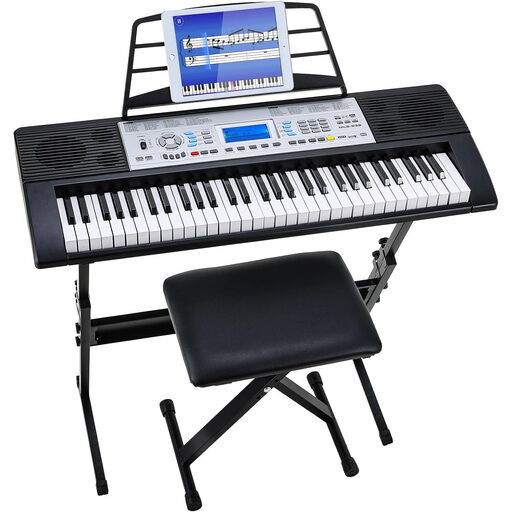 No image available
Could suit you if you’re looking for a 61-key keyboard set with a learning mode; check that the listed accessories fit your playing space.
The product name lists 500 sounds, a 3-level learning mode, two speakers and an LCD screen. A stand and stool are also mentioned.
Not necessarily: suitable headphones muffle the electronic sound, but won’t make the keys silent. Agree on practice times if needed; the Dutch government advises people to try to agree on how to deal with noise disturbance. This isn’t nationwide permission to practise at a particular time.
It depends on the exact version and offer. Yamaha specifies a standard stereo headphone socket for the PSR-E383; the US Casio CT-S300 specifications consulted list a stereo mini-jack. Check the UK offer to see which socket and power supply are suitable and what’s included. Roland notes that power cords vary by region.
Contact the seller. According to the Dutch government, there’s no fixed statutory warranty period in the Netherlands; what matters is what you could reasonably expect from the product. A manufacturer’s warranty is in addition to those statutory rights.
Using headphones doesn’t automatically mean you can ignore your housemates or any applicable rules. For noise disturbance, the Dutch government advises people to try to agree on how to deal with it first. Whether you can practise at a particular time depends on your circumstances and the rules that apply to your home.