
Quiet practice
You share your practice space or don’t want to disturb others. Look for a headphone socket and check what happens to the speakers when you plug in headphones.


Start by considering the range your intro requires, whether touch sensitivity matters and whether you want automatic accompaniment. If you want to practise without a computer, a standalone keyboard with built-in sounds is a practical choice. Also check that its dimensions, headphone socket and controls suit your small practice space.
You share your practice space or don’t want to disturb others. Look for a headphone socket and check what happens to the speakers when you plug in headphones.
You want to practise playing notes softly and loudly. Look for touch sensitivity and check that the keyboard has enough keys for your part.
You put your instrument away after practising. Compare its full external dimensions and weight, not just the number of keys.
First, count how many keys your intro needs and decide whether you want to practise quietly, with touch sensitivity or with accompaniment. Then measure your playing space and consider whether a standalone keyboard or a MIDI controller suits the way you play.
| What to consider | What to look for | Who is this important for? |
|---|---|---|
| Practising quietly | Check the headphone output on the exact model and whether plugging in headphones switches off the speakers. | If you often practise in a shared space, you won’t want to disturb others. Around 33% of consumers put quiet practice first. |
| Key range and touch response | Count the range your intro needs and try the keys; don’t confuse touch sensitivity with a weighted piano keyboard. | If the notes and dynamics of your intro are your priority, you’ll want a keyboard that suits your part and playing style. Around 27% of consumers choose this as their main consideration. |
| Fitting in and storage | Measure the width and depth of your playing space, allowing room for a music rest, cables and your playing position. | If space is limited or you want to put the instrument away afterwards, its full dimensions and weight matter. Around 27% of consumers prioritise space and storage. |
| Accompaniment and sounds | Decide whether you need automatic accompaniment and check how to start, stop and adjust it on the model. | If your intro calls for a rhythm, chord part or specific sound, you’ll want to know which features you’ll actually use. Around 13% of consumers prioritise accompaniment and sound selection. |
A standard MIDI controller doesn’t produce sound on its own. So, if you want to play without a computer, it isn’t the same as a keyboard with built-in sounds.
If you want to practise without a computer, check that the instrument has built-in sounds and find out which audio output you can use.
You may also need a computer with compatible software to hear sound from a controller.
Keyboards with the same number of keys can differ in depth and weight. These factors can affect whether they fit your playing space and are easy to store.
Measure the space available and compare the full external dimensions, including room for the music rest and cables.
What’s included varies by model and bundle; headphones, a stand or an adapter aren’t necessarily included with every version.
Compare the contents of the exact version on offer with the accessories you already have.
The PSR-E383 is a useful reference if you’re looking for a standalone 61-key keyboard with touch sensitivity, lesson functions and accompaniment.
The CT-S300 is worth considering when set-up and storage space are important.
The EK-50 is an option if you want to develop an intro with automatic accompaniment.
The GO:KEYS 3 is worth considering if you want to explore sounds and chord progressions while practising.
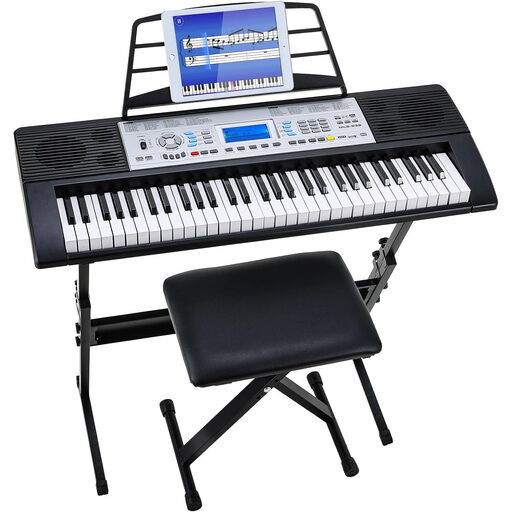
The Harmony 61 MK3 is a useful reference if you’re considering a starter bundle with headphones, a stand and a stool.
These keyboard options are suited to practising an intro on a standalone 61-key instrument. Check that the features and dimensions of each version suit your practice space.
 No image available
Suitable for practising with built-in sounds and speakers, without needing a computer for the features listed.
The product title describes it as having weighted keys. The product description lists touch-sensitive keys, 300 sounds, 300 rhythms, automatic bass chords and a headphone socket.
 No image available
The metronome may be useful for practising the timing of an intro; the keyboard also has built-in speakers.
The product description lists a headphone socket, recording function and three-step learning system.
 No image available
This set is designed for practising with a permanent set-up; allow for the space taken up by the stand and stool.
The product description lists 300 tones, 300 rhythms, recording and playback functions, a headphone socket and a three-step learning system.
 No image available
The product title describes a set with a stand and stool; check that this set-up fits in your practice space.
The product description lists 500 built-in sounds, an LCD screen and a three-step learning mode.
Not if you want to hear sound on its own: a standard USB/MIDI controller doesn’t produce sound itself. Choose a keyboard with built-in sounds instead; a MIDI controller operates other equipment or software.
Compare the keyboard’s width and depth with the space available, and allow room for a music rest, connection cables and your hands. For example, the stated height of the Korg EK-50 doesn’t include the music rest.
It varies by model and bundle. Korg lists an adapter as included with the EK-50, with AA batteries sold separately; Alesis describes the Harmony 61 MK3 bundle as including items such as headphones and an adapter. So, check the contents of the exact version.
A legal guarantee applies in addition to any manufacturer’s or seller’s guarantee. According to ACM ConsuWijzer, the seller is responsible for providing a suitable solution free of charge if a product proves faulty under normal use; the legal guarantee in the Netherlands does not have a fixed two-year term.
No. The Netherlands Enterprise Agency explains that, for products subject to mandatory rules, a CE marking indicates conformity; it is not an independent quality mark or a guarantee of safety. The requirements depend on the type of device, so check the product information and instructions for the specific version.