
Writer with limited desk space
You write and edit long documents, while also needing room for a mouse and application paperwork. Start by assessing the dimensions and layout of your whole workspace.


For writing a grant application at a small desk, a compact keyboard is a sensible starting point if you mainly write and need space beside the keyboard. Be sure to check the layout, arrow keys and connectivity of the exact model, though. If you enter a lot of budget figures, weigh up whether a number pad is worth the extra width. Key feel and noise are personal preferences and don’t prove that a keyboard will make you more productive.
You write and edit long documents, while also needing room for a mouse and application paperwork. Start by assessing the dimensions and layout of your whole workspace.
You often move between paragraphs, tables and appendices. Check that the arrow keys, function keys and preferred physical layout are readily accessible.
You may want to switch between a laptop and tablet, or connect without a receiver. Check the connectivity options of the exact model.
Start with the desk space available and the keys you need for writing, editing or working on a budget. Then compare the key feel and connectivity you want with the way you work.
| What to consider | What should you check? | Who should give this more weight? |
|---|---|---|
| Space for your work | Measure the available width, including room for a mouse, and decide whether you need a number pad. | If you also need room for a mouse and application paperwork on a small desk, the overall setup matters more than the ‘compact’ label. For around 36% of consumers in this situation, space is the top purchasing priority. |
| Key feel and noise | Compare the feel and noise of the switch type you’re considering. | For long writing and editing sessions, you’ll want keys that suit your preferences for feel and noise. Around 29% of consumers in this situation put this first. |
| Keys within easy reach | Check the exact layout, including the arrow keys, function keys and, if relevant, a number pad. | If you often work on revisions or budget tables, you’ll want the keys you need to be readily accessible. Around 21% of consumers in this situation prioritise this. |
| Connecting to devices | Check Bluetooth support, available USB ports and the connections offered by the model. | If you switch between devices or want to connect without a receiver, connectivity is a key consideration. Around 14% of consumers in this situation put it first. |
CHERRY describes the KC 6000 SLIM as a full-size keyboard measuring 440 mm wide. So ‘slim’ doesn’t mean it lacks a number pad.
Check the external dimensions and layout of the exact model before deciding whether it will fit alongside your mouse and application paperwork.
Compact designs can arrange arrow keys and function keys differently, and may offer different levels of direct access to numbers. This can matter if you work on lots of revisions or budget tables.
Check an image of the exact layout beforehand and make sure the keys you use often are readily accessible.
Scissor mechanisms and mechanical switches are different designs. A product specification can’t predict which key feel you’ll find comfortable.
Check the switch type and, where possible, try the keyboard before you choose.
Logitech offers writers a choice of compact wireless models, including the MX Keys Mini and Pebble Keys 2 K380s.
According to Trust, the Lyra is a compact model with low-profile scissor keys and support for multiple operating systems.
CHERRY offers compact models as well as a low-profile, full-size alternative with a number pad.
The K3 Max is a compact, low-profile mechanical keyboard with a 75% layout.
This selection includes compact keyboards for writing at a small desk, as well as a full-size model with a number pad.
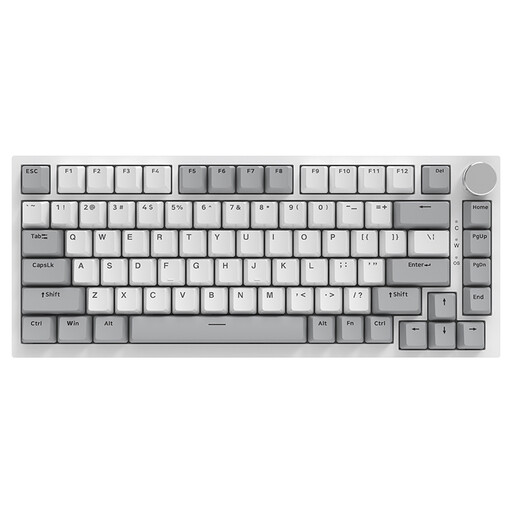 No image available
Suited to anyone looking for a compact mechanical layout with a wired connection who uses QWERTY US.
75% layout, mechanical, wired and QWERTY US.
 No image available
An option if you’re looking for a compact mechanical layout and want to choose between the listed connection types.
75% layout, wired, Bluetooth and 2.4 GHz; QWERTY US layout with Flying Fish Switch.
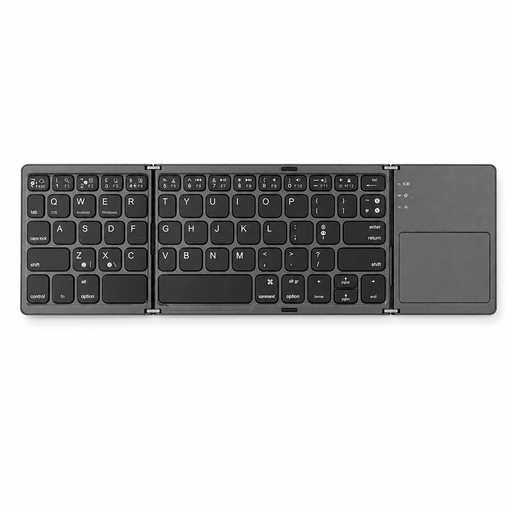 No image available
A good fit if you’re looking for a foldable keyboard that you can also use with its integrated touchpad.
Bluetooth and integrated touchpad; the product name indicates compatibility with tablets, smartphones and computers.
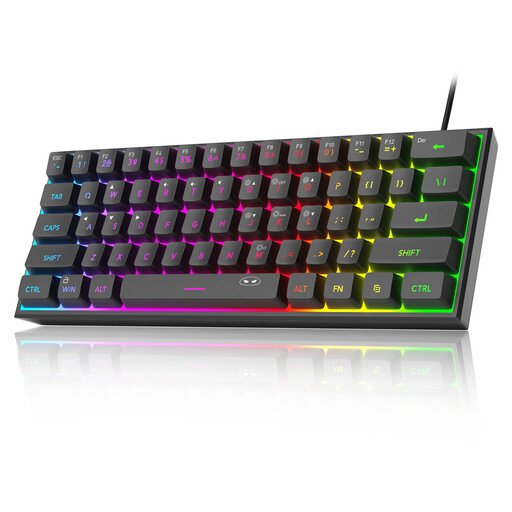 No image available
An option if you want to free up desk space and are looking for a wired connection with QWERTY US.
60% layout and 61 keys. This model doesn’t have a number pad.
 No image available
Best suited if having a number pad readily accessible matters more to you than having the most compact layout possible.
Full-size, wireless, with number pad, scissor keys and QWERTY US layout.
Arboportaal recommends using a separate keyboard and mouse with a laptop, so you can position the screen and keyboard independently. Vary your posture too; changing the keyboard alone won’t automatically make your workspace well set up.
Not if you’re an employee doing screen work for more than 2 hours a day: according to Arboportaal, the screen and keyboard must not be attached to each other in that case. This requirement doesn’t mean every individual writer has to buy a separate keyboard.
First, check whether your computer has Bluetooth or a suitable USB port. According to CHERRY, the KW 7100 MINI BT connects via Bluetooth without a dongle; CHERRY says the KW 9200 MINI also supports 2.4 GHz and a cable. Always check your chosen model and the items included.
If a product is faulty in the Netherlands, the seller is your point of contact for a solution, according to the Dutch government. For a standard online consumer purchase, you’ll generally also have a 14-day cooling-off period after delivery, according to ACM ConsuWijzer. Check the applicable terms before returning the product.
According to the Dutch Digital Infrastructure Inspectorate, wireless devices are subject to European requirements covering areas such as safety and interference. Only compliant products bearing the CE mark may be sold in Europe. A product listing alone doesn’t show that a particular model meets these requirements.