For cataloguing sheet music data and source files on a computer, a full-size keyboard with a numeric keypad is practical if you enter numbers frequently. Customisable keys are most useful when your catalogue software supports the shortcuts you need. For long working sessions, a compact or split design and the space available for your mouse may matter more than an integrated numeric keypad.
Who is this relevant to?
Catalogue users entering lots of metadata
If you enter titles, details and numbers one after another, it’s worth considering a familiar layout, navigation keys and the position of the numeric keypad. Microsoft Support explains, among other things, how to insert a link in Excel using Ctrl+K.
People managing linked scans
If you often switch between catalogue entries and source files, check which shortcuts and customisable actions work with the software you use. Microsoft Support explains how to use Ctrl+K for file links in Excel, while Logitech lists Smart Actions for the MX Keys S through Logi Options+.
People who work at a screen for long periods
If you have long data-entry sessions, you may also want to consider mouse distance and the amount of space available on your desk when choosing a layout. Arboportaal describes repetitive hand movements and static strain associated with screen-based work.
What should you look for?
Full-size, conventional keyboard
Choose this if: you enter numbers regularly and want a numeric keypad close to hand.
Consider: a full-size model takes up more desk space. Check the connection and keyboard layout, too.
Keyboard with customisable actions
Choose this if: you repeat the same tasks and your software supports the shortcuts you need.
Consider: setting up actions takes time, and the keyboard won’t create or maintain file links by itself.
Compact or split keyboard
Choose this if: space for your mouse or a split layout matters more to you than a built-in numeric keypad.
Consider: a compact model may require a separate numeric keypad, and you may need time to get used to a different layout.
| What to consider |
What to look for when buying |
Who is this most relevant to? |
| Entering catalogue details |
Check the keyboard layout and whether the version has a numeric keypad. CHERRY describes the KC 6000 SLIM as a full-size model with USB-A for Windows. |
If I enter titles and numbers one after another, I want a familiar layout and easy access to the number keys; around 33% of consumers prioritise quick data entry. |
| Repeated linking tasks |
Test shortcuts in your own software. Microsoft Support lists Ctrl+K for file links in Excel, while Logitech describes Smart Actions for the MX Keys S through Logi Options+. |
If I regularly switch between catalogue entries and scans, I want to know which steps my software actually supports; around 27% of consumers prioritise repeated file and linking tasks. |
| Posture and mouse space |
Compare the space beside the keyboard and the distance to your mouse. R-Go describes the Compact Break as a compact model; Logitech describes the ERGO K860 as a split-layout keyboard with a numeric keypad. |
For long data-entry sessions, I want to arrange my workspace so typing and using the mouse work well together; around 20% of consumers focus mainly on their working posture. |
| Connections and devices |
Check the connection, operating system and keyboard layout for the version on offer. CHERRY lists USB-A for the KC 6000 SLIM, while Logitech describes device switching for the MX Keys S. |
If I use a fixed workstation or switch between devices, I only want to pay for the connections and features I need; around 20% of consumers focus mainly on their workspace and devices. |
Common buying mistakes
-
Expecting a programmable keyboard to act as catalogue software
The keyboard can perform supported actions, but it won’t create or manage a link to a scan by itself.
First, create a few links using your current keyboard and test which steps you repeat in your catalogue software.
Allow time to set up actions and check your test links.
-
Choosing a compact model without considering how often you enter numbers
Having more space beside your keyboard and easy access to lots of number keys may call for different layouts.
Compare how often you enter numbers with how much space you want to leave beside the keyboard for your mouse.
Some compact models may benefit from a separate numeric keypad.
-
Assuming every version has the same keyboard layout
CHERRY lists different country layouts under different product numbers; the version you choose determines which keys you get.
Check the product number and look at the layout of the version on offer before placing your order.
Brands and models to consider
CHERRY
The KC 6000 SLIM is a wired, full-size keyboard with USB-A for a Windows workstation. It’s worth considering if you’re looking for an integrated numeric keypad.
- CHERRY lists a scissor mechanism, full-size layout and USB-A for this model.
- Check the product number to confirm the layout for your country.
Logitech
The MX Keys S and ERGO K860 are different options: according to Logitech, the former has Smart Actions, while the latter has a split layout and numeric keypad.
- Logitech lists Smart Actions through Logi Options+ for the MX Keys S.
- These model features don’t prove that the keyboard will save time or ease discomfort.
R-Go Tools
The Compact Break is a compact option. If you enter lots of numbers, a separate numeric keypad may be a useful addition.
- R-Go describes the Compact Break as having a compact design and a break indicator.
- Check the version and connection. A break indicator isn’t a treatment for discomfort.
Keychron
The V6 Max is a full-size mechanical keyboard for anyone looking for customisable keys and a different typing experience.
- Keychron specifies 2.4GHz and Bluetooth connections and a full-size layout for this model.
- Check the version and layout on offer; these features don’t necessarily apply to other Keychron models.
Keyboards on Joybuy
This selection includes keyboards for entering catalogue details, using customisable shortcuts and working with multiple devices.
 Image unavailable
HP 725 Wireless Multi-Device Keyboard
An option if you want to use customisable keys and switch between devices.
The description lists two Bluetooth devices and one device via a 2.4GHz receiver. It charges via USB-C.
View on Joybuy
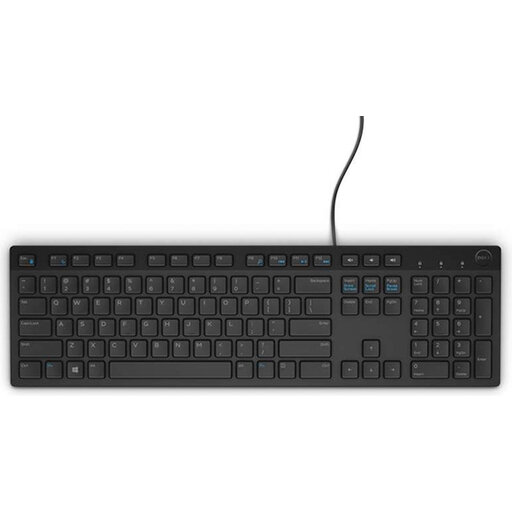 Image unavailable
DELL KB216 USB Keyboard, Belgian AZERTY
A wired option if you’re looking for a full-size keyboard with a numeric keypad for a fixed workstation.
The description lists USB, a full-size layout, chiclet keys and quiet keys. The title specifies a Belgian AZERTY layout.
View on Joybuy
 Image unavailable
HP 450 Programmable Wireless Keyboard
An option if you want to combine customisable shortcuts with a numeric keypad.
The description lists more than 20 programmable keys, a wireless USB receiver and adjustable feet up to 6 degrees. It names HP Accessory Center for customisation and also mentions Windows 11.
View on Joybuy
 Image unavailable
Trust Vaiya Wireless Keyboard, Full Size
An option if you want a full-size keyboard with a numeric keypad and switch between devices.
The description lists scissor keys, a rechargeable battery and connection to up to four devices. The title specifies a US QWERTY layout.
View on Joybuy
 Image unavailable
Apple Magic Keyboard with Touch ID and Numeric Keypad
An option if you want a numeric keypad and document navigation keys for a Mac with Apple silicon.
The description lists Bluetooth and a rechargeable battery. The title specifies a Dutch version with white keys and limits compatibility to Mac models with Apple silicon.
View on Joybuy
Frequently asked questions
Can a keyboard link scans or other source files to a catalogue by itself?
No, that function belongs to the software you use. Microsoft Support explains how to use Ctrl+K in Excel to insert a link to an existing file. Check which features your catalogue system offers.
When is a separate keyboard important when working on a laptop?
For employees who spend more than 2 hours a day working at a screen, Arboportaal states that the screen and keyboard must not be attached to each other. This is a conditional workplace rule, not a requirement for every private buyer.
What if a keyboard bought online is uncomfortable to type on or breaks early?
According to ACM ConsuWijzer, online consumer purchases generally come with a cooling-off period of up to 14 days after delivery. If a product breaks sooner than you could reasonably expect under normal use, the seller must put things right, according to ACM ConsuWijzer. Check the terms separately for business purchases.


