If you write alongside other people, start with a keyboard whose manufacturer describes its keys as quiet, and check that the layout suits the kind of writing you do. Then decide whether you need a compact model to take with you, one that leaves room for your mouse, or a keyboard with the features you use most. None of these choices is a substitute for a well-set-up workstation.
Who is this guide for?
Writing alongside colleagues
You work on text while other people are at the same desk or nearby, so keyboard noise is your first consideration. Logitech and CHERRY describe the keys on the models mentioned as quiet, but these claims are not based on comparable sound measurements.
Writing for long periods
You type and edit for extended periods and want to consider the size, distance to your mouse and workstation set-up together, without viewing a keyboard as a treatment for aches and pains. Arboportaal recommends alternating screen work with tasks that do not require a screen.
Moving between desks
You pack away your workspace or switch between devices, so portability and connectivity are important too. Logitech and HP describe the option to switch between devices for specific keyboard models.
What should you look for when choosing?
Start with what matters most at your shared desk: quieter key presses, room for your mouse, the freedom to move between workspaces or features for editing text. Then check the layout and connection of the exact model.
| What to consider |
What should you check? |
Who is this important for? |
| Keyboard noise |
Check whether the manufacturer describes the keys on the exact model as quiet. Don’t compare noise levels unless they are based on the same measurement method. |
If I write alongside colleagues, I want to minimise key presses that might disturb them. Around 36% of consumers rank keyboard noise as their top priority. |
| Working posture |
Consider whether you need a number pad, and assess the keyboard, mouse distance and workstation set-up together. |
When writing for longer periods, I want a set-up that suits my work and keeps the mouse within easy reach. Around 29% of consumers rank working posture as their top priority. |
| Portability and switching |
Check the connection and supported devices for the version you have chosen, and make sure the layout suits you. |
If I pack away my workspace or write on different devices, I want to be able to take my keyboard with me or switch between devices easily. Around 21% of consumers rank portability as their top priority. |
| Layout and text features |
Check whether you need QWERTY or AZERTY, and whether you use programmable keys, backlighting or a number pad. |
When doing a lot of rewriting, I want a familiar layout and features I’ll actually use. Around 14% of consumers rank layout and text features as their top priority. |
Pitfalls to avoid when choosing
-
Relying on the product family name alone
The same model range may be available in different layouts. For example, a Joybuy page for an HP 350 lists Belgian AZERTY, so check the full product number and keyboard layout.
Before ordering, compare the listed layout with the one you’re used to. A different layout may take time to get used to, or mean you need to exchange the keyboard.
-
Assuming ‘ergonomic’ means it will prevent discomfort
A keyboard is not the only thing that affects how your workspace feels. Screen and mouse placement, your posture and taking breaks from screen work all matter too.
Choose a suitable size and set up your whole workstation properly. If you start to experience discomfort, ask for advice on your workstation.
-
Assuming ‘quiet’ means the noise levels are comparable
Manufacturers describe the keys on specific models as quiet, but these descriptions are not based on a shared measurement that lets you rank the models by noise level.
Use the claim as a first filter and, if possible, assess the key noise and feel in your own working environment.
Brands to compare
Logitech
The Pebble Keys 2 K380s is a compact Bluetooth option, while the MX Keys S focuses on backlighting and programmable keys.
- Logitech says the K380s can switch between three devices. For the MX Keys S, the brand describes key stability that reduces noise.
- These product descriptions are not a comparative measurement of noise levels between the models.
CHERRY
The wired STREAM KEYBOARD is an option for a fixed workspace if you want a model with quiet keystrokes.
- CHERRY specifies SX scissor switches and describes the STREAM KEYBOARD’s keystrokes as quiet.
- A permanently connected keyboard is less practical if you clear your desk regularly.
BakkerElkhuizen
The wired S-board 840 has no separate number pad and is designed to be used with the mouse closer to the keyboard.
- BakkerElkhuizen specifies a scissor mechanism, two USB ports and several layout options.
- The manufacturer’s claims about ergonomic benefits do not guarantee relief from discomfort; your entire workstation still matters.
HP
The 350 Compact Multi-Device is a Bluetooth option for switching between devices and workspaces.
- For the Dutch version reviewed, HP specifies connections to three devices and includes AAA batteries.
- Check the exact product number and layout: one version at Joybuy is listed as Belgian AZERTY.
Keyboards at Joybuy
This selection includes keyboards for writing at a shared desk, with options for switching between devices, a fixed wired set-up, and compact or full-size layouts.
 Image unavailable
HP 725 Multi-Device Rechargeable Wireless Keyboard
Worth considering if you want to work wirelessly and value features for editing text.
Rechargeable and wireless; the product name specifies use with multiple devices. Check that it connects to your devices.
View at Joybuy
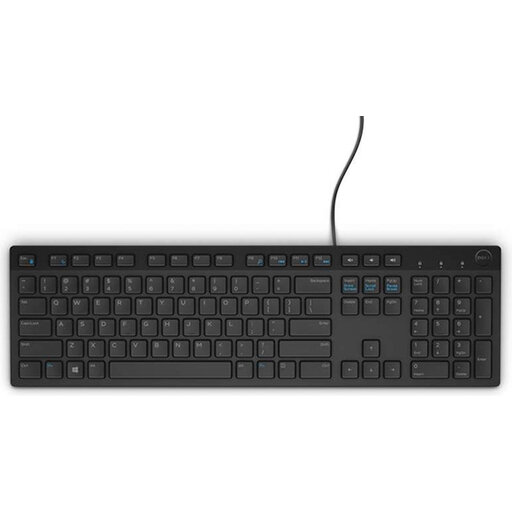 Image unavailable
DELL KB216, USB, Belgian AZERTY
An option if you’re looking for a full-size wired keyboard and Belgian AZERTY suits you.
The product name specifies USB and a Belgian AZERTY layout. Check that the layout is right for you before ordering.
View at Joybuy
 Image unavailable
Trust Ody II, wireless, full-size, US QWERTY
Worth considering if you’re looking for a wireless keyboard with a number pad for a shared desk.
The product name specifies quiet keys, a full-size layout with a number pad and US QWERTY. The description ‘quiet’ is not a comparative noise measurement.
View at Joybuy
 Image unavailable
Trust Vaiya, wireless, full-size, US QWERTY
An option if you want to work wirelessly and switch between devices; also consider whether a full-size keyboard will fit your desk.
The product name specifies a full-size layout with a number pad and scissor keys. Check whether the US QWERTY layout suits you.
View at Joybuy
 Image unavailable
AJAZZ AK820, wired mechanical keyboard, 75%, US QWERTY
An option if you want a compact layout and have specifically chosen a mechanical keyboard.
The product name specifies 83 keys, hot-swappable linear switches and white backlighting. Check that the US QWERTY layout suits your preference.
View at Joybuy
Frequently asked questions
Should I use a separate keyboard with a laptop?
For employees who work with a screen for more than two hours a day, Arboportaal says the screen and keyboard must not be attached to each other; it must be possible to use a separate screen or keyboard. This is a conditional workplace rule, not a general product specification for every buyer.
How should I set up a shared desk for longer writing sessions?
Adjust your workstation to suit you and alternate screen work with tasks that do not require a screen. A compact keyboard can leave more room for your mouse, but it is no substitute for a suitable workstation set-up or taking breaks.
What should I check before connecting a wireless keyboard?
Check that the connection and supported devices for the exact version are compatible with your computer or tablet. HP describes the HP 350 version reviewed as using Bluetooth 5.2 and including two AAA batteries; the wired CHERRY STREAM KEYBOARD uses a different type of connection.
What are my rights when buying online in the Netherlands?
For eligible distance purchases, you generally have a 14-day cooling-off period, according to the Dutch Government. You also have statutory rights if a product is faulty; there is no fixed statutory warranty period in the Netherlands. Check the terms of your specific purchase and distinguish between the cooling-off period and your rights if a product is faulty.


