
Writers working alongside colleagues
If other people are working nearby, the sound of your typing may be distracting. Manufacturers describe some models as quiet, but this isn’t an independent comparison.


Start by considering the sound of the keys and how much space you have on the shared desk. Then choose a layout and connection that suit the computer you write on. Some manufacturers describe their keyboards as quiet, but this doesn’t mean they’ve been compared in a sound test. For long sessions, the set-up of your whole workstation matters too, not just the keyboard.
If other people are working nearby, the sound of your typing may be distracting. Manufacturers describe some models as quiet, but this isn’t an independent comparison.
A shared desk may leave little room for script pages or a mouse. A compact keyboard can free up space, but check which keys you’ll be giving up.
For long writing sessions, both the feel of the keys and your workstation set-up matter. Arboportaal advises adjusting your workstation when you sit somewhere new.
Compare the feel of the keys and the space available first, then check the layout and connection against the computer you use.
| What to consider | What should you check? | Who will this matter most to? |
|---|---|---|
| Key noise | If possible, try typing in a similar room and check the specific model. | If I write while other people are working nearby, I want my typing to disturb them as little as possible. Around 36% of consumers prioritise key noise. |
| Desk space | Compare the dimensions and see whether the arrow, function and navigation keys suit the way you work. | If I share the desk with documents or a mouse, I want to save space without making important keys awkward to use. Around 29% of consumers put desk space first. |
| Working posture | Adjust your workstation and check whether your hands and forearms can rest comfortably. | For long writing sessions, I want to be able to set up my workstation properly and remember to take breaks. Around 21% of consumers prioritise their set-up and posture. |
| Connectivity | Check which USB ports are available, Bluetooth compatibility, permitted software and the physical keyboard layout. | If I switch between computers, I want to know whether I can connect and configure the keyboard with each device. Around 14% of consumers prioritise connectivity and switching between computers. |
Manufacturers may describe a model as quiet, but that doesn’t tell you how its sound compares with other keyboards.
Try typing on it yourself if you can, and assess the description for each model rather than treating it as a ranking.
According to CHERRY, the CHERRY STREAM KEYBOARD TKL leaves out the number pad. Other keys may also be less accessible on compact models.
Check which keys you use for writing and editing before choosing a smaller size.
If you often enter numbers later on, a separate number pad can take up extra space.
Customisable keys and the break indicator on the R-Go Compact Break depend on software and settings.
Check in advance whether the required software is available on the shared computer and whether you’re allowed to install it.
CHERRY offers the STREAM KEYBOARD as a wired model and the STREAM KEYBOARD TKL without a number pad.
The MX Keys Mini is a compact option with programmable keys, while the MX Keys S is a full-size model.
The Compact Break is a compact keyboard with a break indicator that, according to the manufacturer, is controlled by software.
The HP 230 is a full-size wireless keyboard for anyone who wants to keep a number pad.
The K3 Pro ISO is a compact mechanical option for anyone looking for mechanical keys and customisable features.
These Joybuy picks include compact mechanical and scissor-switch models, a compact keyboard designed for Mac, and full-size keyboards. Check whether each model’s layout, connection and any required software suit your shared writing space.
 Image unavailable
The 75% layout is a compact option if you want to free up desk space while keeping essential navigation keys.
The title describes a mechanical keyboard with a QWERTY US layout and wired, Bluetooth and 2.4G connectivity options.
 Image unavailable
This wired model may suit you if you’re looking for a mechanical keyboard with a wrist rest and don’t need a wireless connection.
The product name lists 94 keys, a metal case, a phone stand and a wrist rest.
 Image unavailable
The 68-key layout is a compact option if you want to free up desk space.
The title lists magnetic switches and a US layout. Check that the physical layout suits the way you use your keyboard.
 Image unavailable
This compact model is designed for use with the Mac models listed as compatible in the product name.
The product information lists a scissor mechanism, Bluetooth and a rechargeable battery. Before buying, check that your Mac meets the stated compatibility requirement.
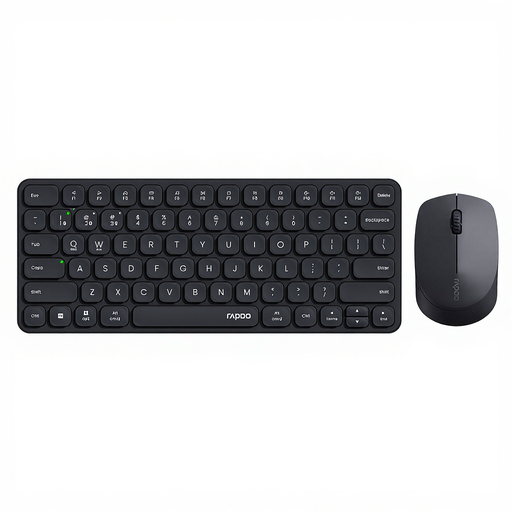 Image unavailable
This model may suit you if you switch between several computers and want a full-size keyboard and mouse.
The product description lists Bluetooth and a USB receiver for connecting to up to four devices. The description of the keys as quiet is a product claim, not a comparative measurement.
Check both the physical Enter, Shift and punctuation keys and your computer’s language settings. Seeing QWERTY on its own doesn’t tell you whether the physical layout matches the one you’re used to.
Adjust your workstation when you sit down and check that your posture feels relaxed. Arboportaal advises reassessing your workstation when you sit somewhere new; no particular keyboard guarantees that it will prevent discomfort.
According to R-Go Tools, the LED indicator described is controlled by R-Go Break software. Before buying, check whether you can and are allowed to use that software on the shared computer.
According to Arboportaal, when an employee works with a screen for more than 2 hours a day, the screen and keyboard must not be joined together. When using a laptop, it must be possible to use a separate screen or keyboard; this requirement doesn’t apply as a general purchasing rule to every scriptwriter.
Online consumer purchases generally come with a statutory 14-day cooling-off period after delivery, subject to exceptions explained by ACM ConsuWijzer. Your statutory guarantee is separate from any manufacturer’s guarantee: if a product doesn’t perform as you could reasonably expect under normal use, contact the retailer.