Choose what matters most at your shared desk: typing noise, space for your mouse or programmable commands. CHERRY describes certain STREAM models as quiet, BakkerElkhuizen links a compact layout with more room for your mouse, and Logitech and Keychron offer options for programmable or remappable keys. Then check the exact layout, connection and model variant; none of these options is automatically right for every workspace.
Who is this guide for?
Map-maker sitting next to a colleague
You type locations and notes while someone is working nearby. Typing noise may be a key consideration; CHERRY describes certain STREAM models as quiet, but that doesn’t guarantee a particular noise level at your desk.
Designer who uses the mouse frequently
You regularly switch between the map canvas and the keyboard. A compact model can free up space for your mouse, provided the missing or repositioned keys suit the way you work. BakkerElkhuizen describes this benefit for the UltraBoard 950.
Designer with recurring commands
You want to carry out repeated tasks using keys. Compare the programming options, layout and compatibility with your computer and software; Logitech and Keychron describe different customisation options for specific models.
Which features matter most?
Quiet, defined keystrokes
A good fit when: someone is working nearby and you mainly type locations, labels and notes. CHERRY describes the keystrokes on certain STREAM models as quiet.
Bear in mind: this description isn’t a noise measurement for your workspace. Also check whether you want a cable or a 2.4GHz receiver.
Compact layout
A good fit when: you often switch between the mouse and keyboard, and a separate number pad is less important.
Bear in mind: the number pad, arrow keys and editing keys may be missing or positioned differently; the UltraBoard 950 Wireless and the wired V2 are different versions.
Programmable controls
A good fit when: you regularly carry out the same actions and can assign them to keys in your design software.
Bear in mind: check software access and compatibility. Based on this information, the standard K4 Pro has not been shown to be quiet.
| What to consider |
What to check before buying |
Who should pay particular attention? |
| Typing noise |
Compare the keystrokes on the exact version and check whether it’s wired or uses a receiver. |
If I work next to someone and type lots of locations or notes, I want to consider the noise they’ll hear. Around 31% of consumers say quiet operation is their top reason for buying. |
| Space for the mouse |
Check the width and whether the layout has a separate number pad. |
If I move the mouse around the map a lot, I want to leave enough space without losing keys I need. Around 25% of consumers give space and mouse range top priority. |
| Design commands |
Check which keys can be customised and whether the software works on your computer and is allowed to be used. |
If I repeat the same tasks, I want to check whether keys can trigger those actions in my software. Around 25% of consumers prioritise shortcut keys over other considerations. |
| Connecting and switching |
Check the available USB ports, Bluetooth support and whether you really switch between devices. |
If I work at a shared desk with a particular computer, I want to know whether the keyboard can connect to it. Around 19% of consumers give connectivity or switching top priority. |
What should you consider when choosing?
-
Don’t take ‘quiet’ to mean a guaranteed noise level
Manufacturers’ descriptions of specific models or switches aren’t comparable noise measurements for your shared desk.
Compare the exact version and, if possible, try the keystrokes in the setup you plan to use.
-
Don’t buy a compact model without checking the layout
It may not have a separate number pad, and the navigation or editing keys may be positioned differently.
Check the layout against the map commands and keys you use most often.
If you often need separate number keys, a standalone number pad could become an extra item to carry.
-
Don’t assume a mechanical keyboard is quiet by default
Keychron describes its switches as replaceable and sells Silent K Pro switches separately; that doesn’t automatically make a standard K4 Pro quiet.
Check which switches are included with each version and whether the keyboard variant is compatible with them.
Silent switches may need to be bought separately; check that they’re compatible with the version you’ve chosen.
Which brands offer relevant keyboard options?
CHERRY
The STREAM range includes wired and wireless versions; according to CHERRY, the STREAM KEYBOARD ULTIMATE offers several connection channels.
- CHERRY describes the keystrokes on certain STREAM models as quiet.
- Check the connection and required desk space for each model; a manufacturer’s description doesn’t guarantee a particular noise level at your desk.
BakkerElkhuizen
The compact UltraBoard 950 Wireless and wired UltraBoard 950 V2 are options if you need to save space for your mouse.
- According to the manufacturer, not having a separate number pad can bring the mouse closer.
- The Bluetooth and wired USB-C versions differ; also check the position of the navigation and editing keys.
Logitech
The MX Keys S is an option if you’re looking for programmable keys.
- Logitech describes customisable functions through Options+.
- Check the exact layout and whether you can use the required software on your computer. This doesn’t establish that it’s quieter than other models.
Keychron
The K4 Pro is a mechanical option if you want to remap keys or use macros.
- Keychron describes hot-swappable options for certain K4 Pro versions.
- The standard version isn’t quiet by default; check the variant and compatibility of any Silent K Pro switches.
Joybuy keyboards for a shared desk
This Joybuy selection includes options for quieter typing, compact layouts that leave room for your mouse, programmable keys and switching between devices. Check that each model’s layout and connection suit your quest map software and computer.
 Image unavailable
Trust Ody II wireless keyboard and mouse set (Silent Keys, white)
An option to compare if you type alongside others and are looking for a wireless keyboard and mouse set.
The product description specifies a US/QWERTY layout, quiet keys and a single USB receiver.
View at Joybuy
 Image unavailable
AULA WIN60HE 60% wired keyboard
A compact option to consider if you’d like more room to move your mouse.
The title specifies a wired 60% layout. Check that it includes the keys you use for map navigation and entering numbers.
View at Joybuy
 Image unavailable
Royalaxe X68 65% wired keyboard (US layout)
A compact wired option to compare if desk space for your mouse is important.
The product name specifies a 65% layout, 68 keys and a US layout. Check that it suits the commands you use every day.
View at Joybuy
 Image unavailable
HP 725 wireless keyboard for multiple devices
An option to consider if you want programmable keys or the ability to switch between devices.
The product description specifies programmable keys, two Bluetooth connections and one 2.4GHz connection.
View at Joybuy
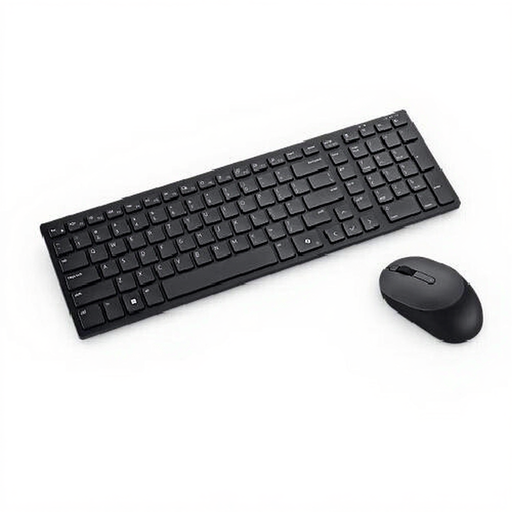 Image unavailable
Dell Pro Compact Silent KM555 keyboard and mouse set (Belgian AZERTY)
An option to compare if you’re looking for a quiet keyboard and mouse set with programmable keys.
The product description specifies a Belgian AZERTY layout, number pad and Bluetooth or RF connection. Check which connection suits your computer.
View at Joybuy
Frequently asked questions
Do I need a number pad for designing maps?
Only if you often enter numbers using the number pad as part of your workflow. Compact models may not have a separate number pad, and the navigation and editing keys may be in different positions. Check the layout against the keys you use in your design software.
What should I check before connecting a wireless keyboard to a shared computer?
Check whether the computer supports Bluetooth or has a free port for the required receiver, and whether you’re allowed to change settings on that computer. CHERRY specifies a 2.4GHz receiver for the STREAM KEYBOARD WIRELESS; the UltraBoard 950 Wireless is a Bluetooth model.
How should I set up my workspace if I’ll be working there for a long time?
Adjust the workspace to suit you again when you sit somewhere else, and change your posture. According to Arboportaal, employees who work at a screen for more than two hours a day should, among other things, use a screen and keyboard that aren’t attached to each other; this isn’t a general product requirement for every hobbyist.
What are my rights if I’m unhappy with a keyboard bought online or it’s faulty?
For an applicable online consumer purchase, you’ll generally have a 14-day cooling-off period after delivery, according to ACM ConsuWijzer. The legal guarantee covers what you can expect from the product under normal use; the seller is responsible for this. Check the seller and the terms of the specific purchase before ordering.


