Start with the space available and the fixed setup. A compact, wired keyboard may be a good fit if desk space is limited and you rarely use a separate number pad; choose a full-size model if you use one often. Wireless connectivity or the ability to switch between devices is most useful when volunteers actually work across different devices. Check the layout and connection type. Labels such as ‘quiet’ are manufacturers’ descriptions, not comparable sound measurements.
Who is this keyboard for?
Website editor at a small desk
You write web pages alongside other desk users and want to leave room for your mouse. Also consider whether you use a separate number pad often: the CHERRY STREAM KEYBOARD TKL leaves it out, while BakkerElkhuizen lists an integrated numeric keypad for the UltraBoard 950 Wireless.
Volunteer using the club’s dedicated computer
You want to get started without a complicated setup and may be looking for a familiar keyboard layout. Logitech describes the K120 as a USB keyboard with a number pad; Trust lists a USB-C cable with a USB-A converter for its wired Primo model.
Editor working across multiple devices
You switch between, for example, a desktop computer and your own device while working on the website. Check that the connection and keyboard layout suit all the devices you use. Logitech lists connections to up to three devices for the MX Keys S, while BakkerElkhuizen lists up to five for the UltraBoard 950 Wireless.
What should you look for when choosing?
Compact and wired
Choose this when: you mainly use one computer, want to keep desk space free and rarely use a separate number pad.
Bear in mind: a TKL model such as the CHERRY STREAM KEYBOARD TKL has no separate number pad. Check the connection type and layout too.
Full-size and wired
Choose this when: volunteers regularly enter numbers or always use the same club computer. Logitech lists a USB connection and number pad for the K120.
Bear in mind: a full-size keyboard takes up more space. Check that the available port and keyboard layout are suitable.
Wireless or for multiple devices
Choose this when: you really do switch between devices while working on the website. Logitech lists switching between up to three devices for the MX Keys S; BakkerElkhuizen lists connections to up to five devices for the UltraBoard 950 Wireless.
Bear in mind: check compatibility, layout and how to connect each device. Extra device features offer little benefit if you only use one dedicated computer.
| What to consider |
What should you look for? |
Who is this most important for? |
| Quiet typing |
Look at the key mechanism and, if possible, try out how the keys feel. ‘Quiet’ is not a comparable sound measurement across models. |
When I type alongside others, I want keystrokes to be as unobtrusive as possible; around 36% of consumers put quiet typing at the top of their list. |
| Room for a keyboard and mouse |
Measure the available space and decide whether you need a separate number pad. |
When I want to give my mouse enough room, a compact setup matters most to me; around 29% of consumers say desk space is their main concern. |
| Connecting and sharing |
Check the USB port, cable or converter, and the keyboard layout you need. |
When several volunteers use the same computer, I want a connection that works with it; around 21% of consumers prioritise easy connection. |
| Switching between devices |
Check compatibility and how many devices you want to connect. |
When I work on the website using different devices, I want to be able to switch between them; around 14% of consumers put this feature first. |
Things to consider before buying
-
Treating a quietness claim as a measured comparison
CHERRY and Trust describe some of their keyboards as quiet, but these manufacturers’ descriptions are not comparable sound measurements.
Compare the key mechanisms and, if possible, try out how the keys feel and sound in the room where you’ll use the keyboard.
-
Choosing a compact model without checking how often you use the number pad
The CHERRY STREAM KEYBOARD TKL has no separate number pad; a full-size keyboard includes one.
Before you buy, consider whether your club website tasks regularly involve entering numbers using a separate number pad.
-
Assuming spill-resistant means it can be washed in any way
Trust describes the Primo keyboard as having a spill-resistant design. That doesn’t mean it can be submerged or cleaned with any product.
Follow the care instructions for the exact model and only use cleaning products that are suitable for its surface.
Brands to consider
CHERRY
The wired STREAM KEYBOARD models offer a choice of full-size or TKL layouts for a dedicated workstation.
- CHERRY lists its own SX scissor technology for both STREAM models.
- The TKL model has no separate number pad. ‘Whisper-quiet’ is a manufacturer’s claim, not an independent comparison.
Logitech
The K120 is a wired option for a dedicated computer; the MX Keys S is designed for wireless use across multiple devices.
- Logitech lists USB connectivity and a number pad for the K120, and switching between up to three devices for the MX Keys S.
- Only choose extra device features if you’ll use them in your club setup. Check the connection type and layout you need before buying.
Trust
The wired Primo keyboard is an option if you’re looking for low-profile keys and a cable connection.
- Trust lists a USB-C cable with a USB-A converter and a spill-resistant design.
- Spill-resistant doesn’t mean it can be submerged or cleaned using any method. Follow the instructions for the model you choose.
BakkerElkhuizen
The UltraBoard 950 Wireless combines a compact design with wireless connections to multiple devices.
- BakkerElkhuizen lists connections to up to five devices and an integrated numeric keypad.
- Check that the connection and layout suit the devices you use to update the club website.
Keyboards at Joybuy
This selection includes compact and full-size keyboards, with wired and wireless options for working on a website at a shared desk.
 No image available
Trust Ody II wireless keyboard and mouse set
Worth considering if you want to work wirelessly at a shared desk and are looking for a keyboard and mouse set.
Trust lists quiet keys; the stated layout is US/QWERTY.
View at Joybuy
 No image available
RK ROYAL KLUDGE R98 Pro, Beige Switch
A wired option to consider if you also regularly enter numbers while working on the website.
The product name describes a mechanical keyboard with RGB lighting and a number pad; the variant is Beige Switch.
View at Joybuy
 No image available
Apple Magic Keyboard with Touch ID and Numeric Keypad
An option for entering numbers if your club computer is a Mac; check that it’s compatible with the computer you use.
The model name includes Touch ID and a numeric keypad.
View at Joybuy
 No image available
Redragon M68 Magnetic Switch Mechanical Gaming Keyboard
A compact, wired option to consider if you have limited desk space.
The product name lists 68 keys and a US layout; check that it suits the characters you use.
View at Joybuy
 No image available
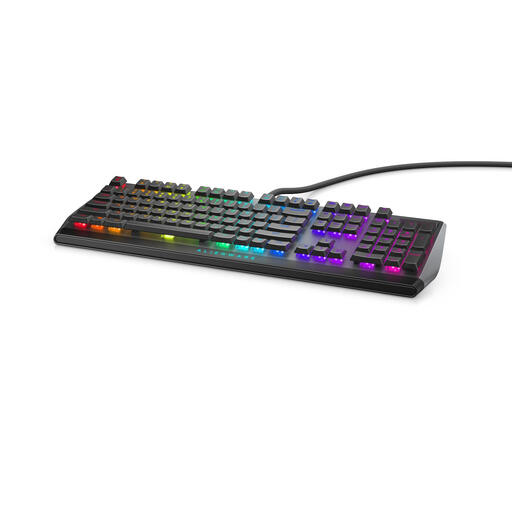
Alienware AW510K gaming keyboard
A wired option to consider if you’re looking for a USB keyboard for the club computer.
The product name lists a USB connection and black/grey colouring; check that the connection and keyboard layout suit your setup.
View at Joybuy
Frequently asked questions
Which keyboard layout should I check for website work?
Before buying, check the exact layout of the model you’re considering and try the characters you use often. BakkerElkhuizen says the UltraBoard 950 Wireless is available in several language layouts, so the model name alone won’t tell you which layout you’ll get.
How do you keep a shared keyboard clean?
Agree to clean frequently touched surfaces regularly. The Centers for Disease Control and Prevention recommends using cleaning products suitable for the surface in shared spaces. Also follow the care instructions for the specific keyboard.
What are my rights if a keyboard bought online isn’t suitable or breaks too soon?
For online consumer purchases, ACM ConsuWijzer says you’ll usually have a 14-day cooling-off period from delivery, although you should check for any exceptions before buying. This is separate from your statutory guarantee: if the keyboard doesn’t meet reasonable expectations when used normally, contact the seller.
Do I have to use a separate keyboard with a laptop in the Netherlands?
Not automatically for every volunteer. Arboportaal explains the rule for employees who work with a screen for more than 2 hours a day: the screen and keyboard must not be attached to each other, and laptop users must be able to use a separate screen or keyboard. Whether this applies to a particular club workstation depends on the circumstances.


