What should you look for?
Start with your main priority: noise, desk space, connection or a familiar layout. The percentages below reflect these different buying priorities.
| What to consider |
What to look for |
Who should pay particular attention? |
| Key noise |
Compare the key mechanism and try the feel of the keys if you can. Treat ‘quiet’ as a manufacturer claim unless it’s backed by comparable measurements. |
If I edit alongside colleagues, I want to type quietly without choosing a key feel I find uncomfortable. Around 33% of consumers prioritise quiet typing. |
| Desk space |
Check the layout and available keys on the specific model, and see how the keyboard and mouse fit together on your desk. |
If I work with my mouse and notes at the same time, I want to fit them all on a narrow desk. Around 25% of consumers prioritise desk space. |
| Connection |
Check which connections your computer supports and whether you’re allowed to use a USB receiver with a shared computer. |
If I work on a shared computer or use different devices, I want a connection that suits my setup. Around 25% of consumers prioritise a straightforward connection. |
| Keyboard layout |
Check the layout of the exact model and make sure the navigation and shortcut keys you use most are in familiar places. |
When editing carefully, I want to find punctuation and frequently used keys quickly. Around 17% of consumers make a familiar keyboard layout their top priority. |
Keyboards at Joybuy
These keyboard options are suited to quieter editing at a shared desk, with models for fixed, wireless and more compact setups.
 No image available
Trust Ody II, full-size US QWERTY
An option to compare if you want to work wirelessly and need a numeric keypad.
The product name lists a USB receiver and a spill-resistant design. This model has a US QWERTY layout and runs on batteries; the keyboard isn’t rechargeable. Trust describes the keys as quiet, but this isn’t based on comparative sound measurements.
View at Joybuy
 No image available
Trust Trezo Comfort keyboard and mouse set, US QWERTY
This set is worth comparing if you need both a keyboard and a mouse.
It includes a keyboard with a numeric keypad and integrated wrist rest, plus a mouse. It connects via a USB receiver and has a US QWERTY layout. Trust describes the keys as quiet; don’t compare that claim with measurements as if they were taken under the same conditions.
View at Joybuy
 No image available
Trust Vaiya, full-size US QWERTY
An option to compare if you want a full-size keyboard and need to switch between devices.
The product name lists scissor keys and a numeric keypad. This model has a US QWERTY layout and can connect via Bluetooth or a USB receiver.
View at Joybuy
 No image available
AJAZZ AK820 75% wired mechanical keyboard, US QWERTY
A compact wired option to compare if you want to free up desk space.
The product name lists a 75% layout, mechanical keys and a US QWERTY layout. Check that the available layout suits the keys you use when editing.
View at Joybuy
 No image available
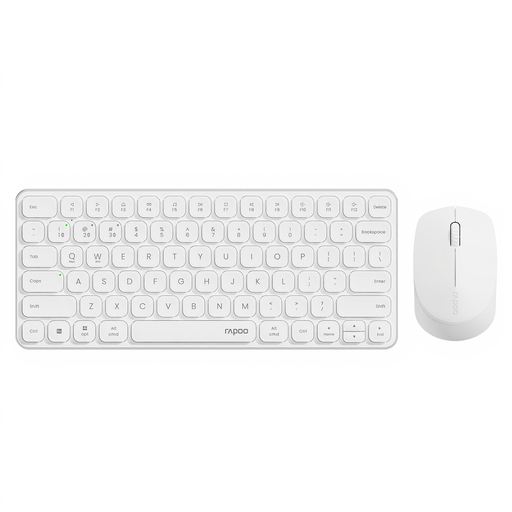
Rapoo 9010M keyboard and mouse set for multiple devices
This set is worth comparing if you need a keyboard and mouse and want to work wirelessly across devices.
The product name lists Bluetooth, a 2.4 GHz USB receiver, support for four devices and battery operation. Rapoo describes the keys as quiet; this isn’t based on comparative sound measurements.
View at Joybuy
Frequently asked questions
Should I buy a separate keyboard for editing on a laptop?
For employees who work with screens for more than 2 hours a day, Arboportaal states that the screen and keyboard must not be attached to each other. If you use a laptop in this situation, it must be possible to use a separate screen or keyboard. This is a conditional workplace rule, not a general requirement for every personal purchase.
How do I use a compact keyboard at a shared desk?
Check that you can reach the keys you need for editing, and assess the keyboard alongside the space for your mouse and screen. Arboportaal describes the strain associated with screen work; a compact keyboard or break indicator alone is no guarantee against discomfort.
Will a wireless keyboard work straight away with a shared computer?
That depends on the available connection and the rules for that computer. Trust lists a USB receiver for the Ody II; Logitech describes the Pebble Keys 2 K380s as allowing you to switch between devices. Check which connection the model you choose needs and whether you’re allowed to use it with the shared computer.
What are my rights if I’m unhappy with a keyboard I bought online or it’s faulty?
According to the Dutch Government, online purchases from a business often come with a 14-day cooling-off period. You’re also entitled to a product that works as it should; if there’s a fault, contact the seller to arrange a solution. The cooling-off period and a remedy for a faulty product are separate rights. Any additional retailer or manufacturer guarantee is separate from these.


