What should you consider when choosing?
Start with what you enter most often: numbers and codes, repeated actions, or mainly text with regular mouse use. Then check that the layout you want and any configuration software will work with your computer and catalogue application.
| What to consider |
What to look for |
Who it’s relevant to |
| Repeating steps between fields |
Check that key remapping works on your system, then test each configured action in your catalogue application. |
If I often move through the same fields, I want to be able to set up and check repeated actions. Around 36% of consumers prioritise fixed steps between fields. |
| Numbers, codes and field values |
Consider how often you enter numbers; test codes with leading zeroes and, if needed, set the field format or data validation in your application. |
If I enter lots of quantities or collection codes, I want to enter numbers quickly and store codes correctly. Around 29% of consumers put numbers and codes first. |
| Comfort during long data-entry sessions |
Compare the physical width and see whether the keyboard and mouse sit comfortably side by side. |
During longer data-entry sessions, I want to keep my mouse close, even if that makes a fixed number pad less important. Around 21% of consumers prioritise comfort during long data-entry sessions. |
| A tidy, portable setup |
Check the keyboard layout, whether the USB receiver fits your computer and what’s included with the version you choose. |
A tidy setup with fewer cables can be important in a shared workspace. Around 14% of consumers prioritise quietness and portability. |
Keyboards on Joybuy
This selection includes keyboards for programmable or repeated key actions, models with a number pad and a compact option.
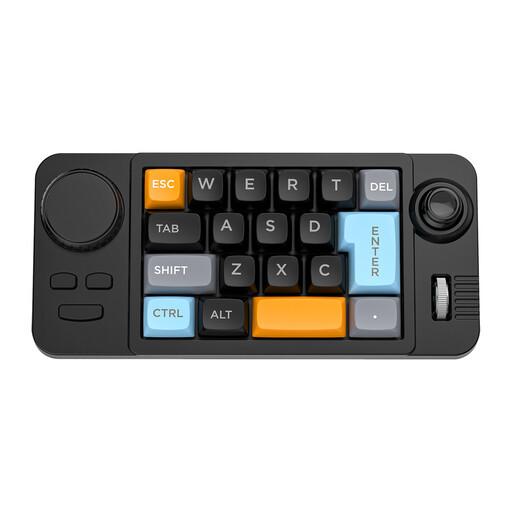 Image unavailable
NAXSIR 19-key wired gaming keyboard with joystick
A one-handed model to consider if you want to set up recurring key actions; it’s not a full keyboard for everyday text entry.
The product name lists 19 keys, a joystick, a rotary dial and programmable macros.
View on Joybuy
 Image unavailable
Wired QWERTY keyboard with number pad
An option to consider if you regularly enter quantities or codes for your seed collection and want a fixed number pad.
The product name lists a wired connection, a QWERTY layout and a number pad.
View on Joybuy
 Image unavailable
RK ROYAL KLUDGE R98 Pro wired mechanical keyboard, Phantom Color, Beige Switch
A model to consider if you want a number pad and are also interested in the mechanical design listed.
The product name lists a number pad, rotary dial, hot-swappable keys and PBT keycaps with an MDA profile.
View on Joybuy
 Image unavailable
RK ROYAL KLUDGE R65 wired gaming keyboard, 66 keys, Chartreuse Switch, Green sand
A compact option to consider if you want to explore repeated key actions; check that the configuration you want works with your software.
The product name lists a 60% layout, 66 keys, QMK/VIA and hot-swappable keys.
View on Joybuy
 Image unavailable
Apple Magic Keyboard with Touch ID and numeric keypad
An option to consider if you’re looking for a numeric keypad and the listed compatibility suits your computer.
The product name lists Touch ID and a numeric keypad. This version is listed for Mac use; check compatibility with your computer.
View on Joybuy
Frequently asked questions
Can a programmable keyboard create custom fields for my seed collection?
No. You create field types and settings in the catalogue application you use. Airtable Support explains how to create and edit fields, while Keychron describes how to customise key actions for the K10 Pro. Check separately whether your application supports the shortcuts you want.
How can I stop a collection code from losing its leading zeroes?
Set the code format to text in Excel before you enter or paste it. Microsoft Support warns that automatic conversion can remove leading zeroes; using a different keyboard won’t change the field format.
What do I need to set up macros on the Keychron K10 Pro?
According to Keychron, Launcher requires a wired connection and Chrome, Edge or Opera. Set up a key action and check the result in your catalogue software, so a repeated action doesn’t edit the wrong field.
What rules apply if I’m an employee cataloguing on a laptop for long periods?
According to the Dutch Arboportaal, if an employee spends more than two hours a day working at a screen, the screen and keyboard must not be attached to each other. For laptop work, it must be possible to use a separate screen or keyboard. This requirement applies to a workplace and isn’t a general purchasing requirement for every private collector.
What are my return and warranty rights when buying online in the Netherlands?
For qualifying distance sales to consumers, the Dutch government says you generally have 14 days to change your mind, although exceptions may apply. The Netherlands has no fixed statutory warranty period of two years: what you can expect from a product depends, among other things, on the product itself. Report any fault to the seller.


