
Someone who types at a quiet shared desk
You type for long periods with colleagues nearby and want a quiet, familiar feel under your fingers.


First, choose a key feel and noise level that suit a shared workspace. Then decide how much room you need for your mouse and whether you want a numeric keypad. A compact keyboard frees up more desk space, while a full-size layout keeps keys within easy reach. If you type for long periods, your workspace setup and how easily you can adapt to a different layout also matter.
You type for long periods with colleagues nearby and want a quiet, familiar feel under your fingers.
You often switch between your keyboard and mouse while modelling, and want to free up space without losing access to essential keys.
You want to try a different key layout during long work sessions and also pay attention to your overall workspace setup.
Start with key feel and noise levels in your shared workspace. Then consider the layout, your posture and only those extra features you can actually use on your work computer.
| What to consider | What should you check? | Who is this important for? |
|---|---|---|
| Noise and key feel | Compare the noise levels of the exact model and, for mechanical keyboards, check which switches it uses. The name of a switch type alone doesn’t tell you how quiet the keyboard is. | If I’m typing next to colleagues, I want a comfortable feel under my fingers that causes as little disruption as possible. That’s why around 33% of consumers prioritise quietness. |
| Space and layout | Check whether the arrow, navigation and punctuation keys are easy to reach, and whether you need a numeric keypad. | When I switch frequently between entering schemas and using the mouse, I want to free up desk space without losing access to the keys I use most. Around 27% of consumers prioritise space and a practical layout. |
| Hand position | Compare low-profile, compact or split layouts for fit and how easy they are to get used to. A keyboard doesn’t replace a suitable workspace setup or breaks from screen work. | During long typing sessions, I want to know whether a different key layout suits my posture and whether I can get used to it. Around 20% of consumers prioritise hand position. |
| Connectivity and shortcuts | Check which connections and configuration software your work computer allows, and whether you really need the available features. | If I switch between work devices or carry out repetitive tasks, I want a keyboard that works with my permitted work setup. Around 20% of consumers prioritise connectivity and shortcuts. |
Noise levels vary between models. At a shared desk, that difference can matter to your colleagues.
Check the exact switch variant and look for a review of that specific model. Don’t assume a keyboard is quiet based only on its brand or its mechanical design.
A narrower keyboard may mean that some keys are less easy to reach.
Before buying, think through your everyday tasks involving punctuation, arrow and navigation keys. Also decide whether you need a numeric keypad.
Repetitive movements and a static posture can affect you during screen work, whether or not you’re using a keyboard.
Consider your whole workspace and how you vary your tasks. Allow time to adjust if you try an unusual key layout.
The MX Keys S is a full-size, low-profile office keyboard; the MX Keys Mini is a more space-saving alternative.
The 975 is a full-size keyboard with multiple connection options; the 960 has split key zones and a separate numeric keypad.
The KC 6000 SLIM is a slim, wired keyboard with a full-size layout.
The K3 Max ISO is a compact mechanical option with customisable keys.
The Compact Break is a compact model with a break indicator.
These keyboards are suited to schema work at a shared desk, with options for a numeric keypad, a compact layout or connections to multiple devices.
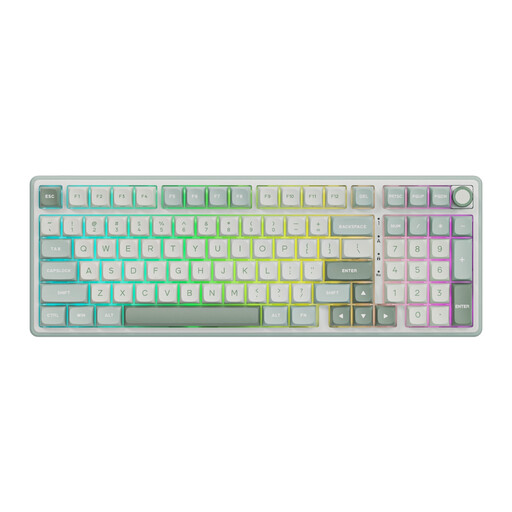 No image available
A good fit if you want mechanical keys and a numeric keypad for schema work.
The product description mentions beige linear switches and a dampened feel; this isn’t a comparative noise test.
The product name specifies hot-swappable keys.
 No image available
A good fit if you switch between devices and want a mouse included in the set.
The product information specifies connections to up to three devices via a USB receiver or Bluetooth.
The layout is US QWERTY; check that it suits the way you use punctuation.
 No image available
A good fit if you want a full-size layout and numeric keypad for office work.
The product title mentions quiet keys; check the noise level of the exact model if you share your workspace with colleagues.
The title specifies US QWERTY and the product information mentions a USB receiver. Check that you have a spare USB port and that the layout suits you.
 No image available
A good fit if you want a full-size layout and switch between multiple devices.
The product information specifies scissor keys and connections to up to four devices.
The layout is US QWERTY; check that it suits the way you work.
 No image available
A good fit if you want to free up space beside your keyboard; check that the layout keeps the keys you use most within easy reach.
The product name specifies a wired 75% layout with hot-swappable linear switches.
The product information mentions sound-dampening layers; this isn’t an independently measured noise level. The layout is US QWERTY.
According to Dutch guidance on working with screens, the screen must not be attached to the keyboard for employees who work at a screen for more than 2 hours a day. For laptop users, a separate screen or keyboard must therefore be available; this doesn’t mean you have to buy a particular model.
First check which connections your work computers allow. HP says the HP 975 can connect to two devices via Bluetooth and one via a 2.4GHz USB-A receiver; Keychron also specifies a wired connection for the K3 Max ISO. Which option works depends on your computer and workplace policies.
Follow the cleaning instructions for the exact model. HP specifies that the HP 960 can withstand 1000 wipes with household disinfectant wipes; don’t treat this as cleaning guidance for other models.
For a standard online consumer purchase, you’ll generally have a statutory 14-day cancellation period from delivery, subject to legal exceptions. If a product doesn’t perform as you could reasonably expect under normal use, the seller is responsible for providing an appropriate solution; this is separate from a manufacturer’s warranty.