What should you look for when choosing?
Start with the physical layout and the keys you need for navigation and shortcuts. Then compare the shape, typing noise and connectivity with your workstation.
| What to consider |
What should you check? |
Who should pay particular attention? |
| Headings and shortcuts |
Check the exact layout and test important key combinations in your word processor. Microsoft Support notes that the Word shortcuts it describes assume a US layout; Google Docs Editors Help warns that some shortcuts don’t work with every language or layout. |
If I edit lots of headings and subheadings, I want to find my usual keys and combinations quickly. Around 36% of consumers prioritise structure and text editing. |
| Comfort during long sessions |
Compare the shape and any wrist rest with your workstation; don’t assume it has a proven effect on reducing discomfort. |
For long writing sessions, I want a keyboard shape and workstation set-up that suit the way I type. Around 29% of consumers give long-term typing comfort top priority. |
| Typing noise |
Check the exact version and, where possible, judge the sound for yourself. A product description calling a keyboard ‘quiet’ isn’t a sound measurement comparing it with other models. |
If other people work or play in the same room, I want my typing to cause as little disturbance as possible. Around 21% of consumers choose with keeping the room peaceful in mind. |
| Portability and switching between devices |
Check the size, cable or wireless connection, and compatibility with your devices. According to Ergowerken, the R-Go Compact Break measures 285 × 139 × 9 mm and is wired; Logitech lists device switching as a feature of the MX Keys S. |
When I write in different places or switch between devices, I want the connection and layout to suit my needs. Around 14% of consumers prioritise portability or switching between devices. |
Keyboards on Joybuy
This selection includes keyboards for writing at a fixed workstation, as well as models described as suitable for use with multiple devices.
 No image available
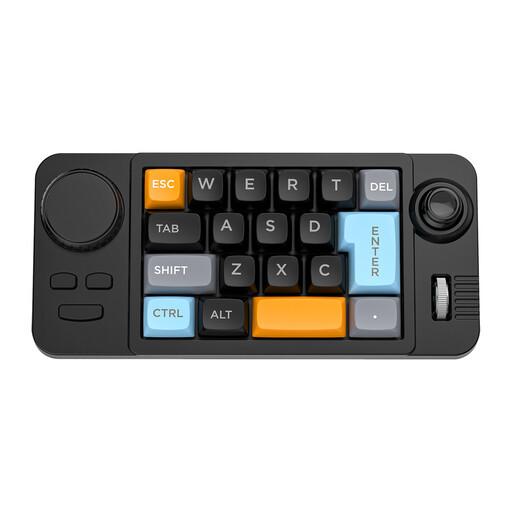
NAXSIR 19-key wired keyboard with programmable macros
Could be worth considering if you want to assign repeat tasks to programmable keys; you’ll still need to set up the chapter structure in your word processor.
The product name lists a wired connection, hot-swappable keys, a joystick, a rotary knob and RGB lighting.
View on Joybuy
 No image available
Wired QWERTY keyboard with numeric keypad
An option to compare if you’re looking for a conventional layout with a separate numeric keypad for your writing space.
The product name lists a wired plug-and-play connection and a full-size QWERTY layout.
View on Joybuy
 No image available
HP 725 Multi-Device Rechargeable Wireless Keyboard
Worth considering if you want to switch between several devices while writing.
The product name describes a wireless, rechargeable keyboard for multiple devices.
View on Joybuy
 No image available
Trust Vaiya wireless keyboard, full-size, US QWERTY
Could suit a writing space where you want to work wirelessly and need a full-size keyboard with a numeric keypad.
The product name lists a US QWERTY layout. Microsoft Support describes Word shortcuts based on a US layout; check the combinations in your app.
View on Joybuy
 No image available
Apple Magic Keyboard Universal, USB + Bluetooth, QWERTY Dutch, Black
An option to consider if a Dutch QWERTY layout matters for your writing.
The product name lists USB + Bluetooth and the QWERTY Dutch, Black version.
View on Joybuy
Frequently asked questions
Do I need special macro keys for numbered chapters and subheadings?
No, you create the document structure in your word processor. Word uses built-in heading styles and a multilevel list for numbered headings; Google Docs also offers heading styles. Programmable keys can help with repeat tasks, but they don’t replace these settings.
Why doesn’t a keyboard shortcut work the same way on every keyboard?
Shortcuts can depend on the app, language and keyboard layout. Microsoft Support bases the Word shortcuts it describes on a US layout, while Google Docs Editors Help notes that some combinations don’t work with every language or layout. So test the combinations you need.
What should I look for in a keyboard for my workstation?
Check that the connection works with your computer and that the keyboard fits on your desk. For employees who work with a screen for more than two hours a day, Arboportaal states that the screen and keyboard must not be attached to each other; this isn’t a general buying requirement for every home writer.
What are my rights when I buy a keyboard online?
For distance purchases from a business, you generally have a 14-day cooling-off period, according to the Dutch Government. If a product is faulty, contact the seller to arrange a solution; check the terms that apply to your purchase.


