What should you look for when choosing?
Start with the power source, then check the connection to your devices, the size and the keyboard layout.
Wireless with replaceable batteries
A good fit if: you don’t want to use a charging port while planning and can replace the batteries.
Bear in mind: you’ll need to keep spare batteries to hand. Logitech lists two AAA batteries for the Pebble Keys 2 K380s, with a battery life of 36 months under standard conditions.
Wireless and rechargeable
A good fit if: you can charge the keyboard in advance and want to switch between devices while planning routes.
Bear in mind: the battery will eventually need recharging. A USB receiver also requires a suitable spare port.
Wired via USB
A good fit if: you type at a dedicated computer workstation with an available USB-A port and don’t want to manage a keyboard battery or replaceable batteries.
Bear in mind: the cable limits where you can position the keyboard and uses a USB port. Check the layout of the version you choose, too.
| What to consider |
What should you check? |
Which consumers does this matter to? |
| Power source |
Check whether the model uses replaceable batteries, a rechargeable battery or a USB cable, and whether you have access to a charging option or port. |
If I have limited access to sockets, I don’t want to rely on frequent charging. Around 33% of consumers say power management is their main concern when buying. |
| Device connection |
Check Bluetooth support, available USB ports, operating system and the connection method for the exact version. |
If I edit route details on devices such as a computer and tablet, I want to know whether the keyboard works with both. Around 27% of consumers prioritise compatibility and switching between devices. |
| Size and portability |
Compare the size with the space available at your workstation and check whether you need a numeric keypad and separate cursor keys. |
At a small or changeable workstation, I want the keyboard to fit and be easy to carry. Around 20% of consumers focus mainly on portability and workspace. |
| Keyboard layout |
Check the layout of the exact version and whether it has the keys you use, such as a numeric keypad. |
If I mainly enter routes at a dedicated workstation, I want a familiar layout and the keys I’m used to. Around 20% of consumers put layout first. |
Keyboards at Joybuy
These keyboards are suited to planning routes on a computer, tablet or phone: rechargeable wireless models, a model with replaceable batteries and a wired option.
 No image available
NAXSIR foldable wireless Bluetooth keyboard
The foldable design is intended for a small or flexible workspace and use with a phone or tablet.
The product description mentions Bluetooth pairing with up to three devices, a rechargeable battery and up to 30 days’ use per charge. The stated charging time is 1–2 hours.
View at Joybuy
 No image available
HP 725 Multi-Device Rechargeable Wireless Keyboard
A rechargeable wireless model for anyone who wants to switch between route-planning devices and keep typing while the keyboard charges.
The product description lists support for up to three devices via two Bluetooth connections and one USB receiver connection. It states that three minutes of charging provides up to two months’ use; the battery will eventually need recharging.
View at Joybuy
 No image available
HP 450 Programmable Wireless Keyboard
This model could be a good fit if you type at a desk, want a numeric keypad and prefer replaceable batteries to a rechargeable one.
The product information lists AAA batteries, a USB-A receiver and a battery life of up to 20 months, depending on use. The receiver needs a spare USB-A port; the batteries will need replacing when they run out.
View at Joybuy
 No image available
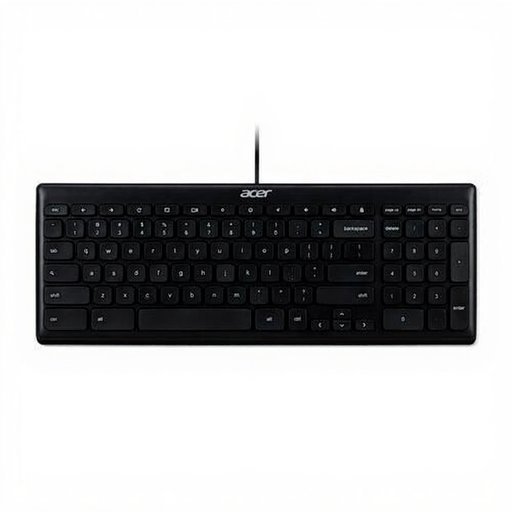
Acer GP.KBD11.00S Office Keyboard
A wired option for a dedicated workstation if you don’t want to manage a keyboard battery or separate batteries.
The product information lists a USB connection, a 1.8-metre cable, a numeric keypad and a QWERTY US International layout. You’ll need a spare USB port, and the cable limits where you can position the keyboard.
View at Joybuy
 No image available
Trust Vaiya Wireless Keyboard, QWERTY US
This wireless model could be a good fit if you switch between multiple devices and want a full-size keyboard with a numeric keypad.
The product description lists Bluetooth and a USB receiver, switching between up to four devices and USB-C charging. It states that the built-in battery provides up to six months’ use per charge; the receiver needs a spare USB port.
View at Joybuy
Frequently asked questions
Can you use a wireless keyboard with your tablet?
That depends on the tablet and the exact keyboard version. Logitech lists iPadOS and Android as compatible with the Pebble Keys 2 K380s; Trust lists these operating systems for the Lyra. Check your tablet’s compatibility and Bluetooth settings before ordering.
Can you type while a keyboard is charging?
Trust says that this is possible with the Trust Lyra. Don’t assume the same applies to other rechargeable keyboards; check the information for the exact model.
Where can you recycle used batteries or a discarded keyboard?
According to the Dutch government, used batteries shouldn’t go in the bin; you can return them to shops that sell batteries, among other places. A discarded electrical appliance can be taken to a collection point, such as your local council recycling centre. When a private individual buys a similar new appliance, the old-for-new take-back scheme also applies.
What warranty applies to a purchase in the Netherlands?
The Dutch government states that you’re entitled to a product that is fit for purpose, and that there is no fixed statutory warranty period in the Netherlands. If something goes wrong, contact the seller; the appropriate solution depends on the circumstances and on what you could reasonably expect from the product.
Are there product safety rules for wireless keyboards?
Yes. Dutch government information refers to the European Radio Equipment Directive for electrical devices with Bluetooth or a radio frequency module. The manufacturer is responsible for meeting the applicable requirements and providing the relevant documentation. Check the information for the exact version, as a general product description alone doesn’t prove that a particular item complies.


