First, choose a keyboard whose physical layout suits the characters you use for regular expressions, and check that it matches your computer’s input layout. Then compare a model described as quiet for office use with compact or customisable options. Manufacturers describe their own models, but those descriptions are not comparable sound measurements.
Who is this choice relevant to?
Typing alongside colleagues
If you practise patterns in a shared workspace, the sound of the keys may be a factor. Trust and CHERRY describe their own keyboards as having quiet or low-noise keystrokes; these descriptions are not comparative measurements.
Regex beginners who use lots of symbols
You’ll want to find characters such as backslashes and brackets, and check that the physical keys match the active input layout. Microsoft Learn explains the meaning of special characters in regular expressions, while Microsoft Support explains how to manage input layouts in Windows.
People with a small desk
You’ll want to leave room for your mouse and check whether a more compact layout still has the keys you use often. R-Go Tools describes the Compact Break as compact; check for yourself whether the layout suits your work.
What should you look for when buying?
| What to consider |
What should you check? |
Who should give this more weight? |
| Key noise |
Compare the key mechanism and the exact version; a description such as ‘quiet’ is not a comparative sound measurement. |
If I practise a lot while colleagues are working in the same room, I want to take the noise into account. Around 34% of consumers give quiet keystrokes their highest priority. |
| Regex symbols and input layout |
Check the physical version and test characters such as the backslash and brackets with the active input layout. |
If I often enter special characters while practising, I want to know where they are and what my computer registers. Around 33% of consumers prioritise symbol input and a suitable layout. |
| Desk space |
Check that the size and lack of a separate number pad suit your work and leave enough room for your mouse. |
If my desk has limited space, I want to leave enough room for my mouse without losing essential keys. Around 20% of consumers give space around the keyboard their highest priority. |
| Customisation and connectivity |
Check whether you’re allowed to run any required software on your work computer, and whether the connection and features suit your needs. |
If I want to configure key functions or switch between devices, I want to know what that involves and whether the layout will still suit me. Around 13% of consumers prioritise customisation or switching between devices. |
Common buying mistakes
-
Assuming ‘QWERTY’ guarantees that all symbols are in the right place
The physical layout and active input layout together determine which characters you enter. Windows lets you manage the software layout separately.
Check the exact keyboard version and test the characters you use often in your own operating system.
-
Assuming a mechanical keyboard is quiet without checking
Keychron lists hot-swappable switches for the K8 Pro ISO, but the standard version listed is not confirmed as a silent version.
Check which switches are fitted to the version you choose and assess the noise before using the keyboard in a shared space.
Changing the switches later means extra cost and work to set them up.
-
Choosing a full-size keyboard without checking the space for your mouse
A compact model may free up space beside the keyboard, but it may not have a separate number pad.
Compare the width of your available desk space with your need for a number pad and navigation keys.
Brands to compare
Trust
The Ody II is worth comparing if you’re looking for a low-profile model designed for office use.
- Trust describes the Ody II as having quiet keys and an adjustable typing angle.
- Its full-size design takes up desk space; check whether the offer is for the keyboard alone or a set with a mouse.
CHERRY
The wired STREAM KEYBOARD is an alternative with a low-profile design and SX scissor mechanism.
- CHERRY describes its keystrokes as very quiet.
- The manufacturer’s description does not show how its noise levels compare with other models; check the layout of the version on offer.
Logitech
The MX Keys S is worth considering if customisable features and switching between devices matter to you.
- Logitech lists Smart Actions via Logi Options+ for automating repetitive actions.
- The app is required for the automation described; also check the exact version and symbol layout.
R-Go Tools
The Compact Break is a compact option if space around your keyboard and mouse is important.
- R-Go describes the model as slim, with light keystrokes, and includes a break indicator.
- Check that the version and key layout suit you; product claims about health benefits are no guarantee of individual comfort.
Keychron
The K8 Pro ISO is worth considering when comparing mechanical keyboards with customisable features.
- Keychron lists QMK/Launcher and hot-swap support for the K8 Pro ISO.
- The ISO layouts listed are not explicitly identified as Dutch; the standard switches are not confirmed as quiet.
Joybuy products
These keyboards are worth considering for practising regex in a shared workspace, with options described as quiet, compact models and keyboards with customisable features. Check that the physical layout of each model suits your input settings.
 No image available
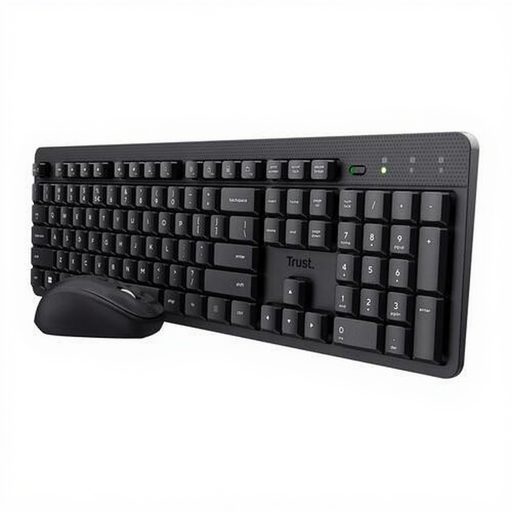
Trust Ody II wireless keyboard and mouse set, US QWERTY
Worth comparing if you’re looking for a low-profile model for typing alongside colleagues; Trust describes its keys as quiet.
The set has an adjustable typing angle and uses one USB receiver for the keyboard and mouse. The layout is US QWERTY.
View at Joybuy
 No image available
Trust Vaiya wireless keyboard, full size, US QWERTY
A low-profile model to consider if you switch between several devices and want quiet keystrokes; Trust describes its keys as quiet.
The product information lists scissor keys, a number pad and US QWERTY. You can connect up to four devices using the USB receiver and Bluetooth.
View at Joybuy
 No image available
Corsair K55 CORE TKL, US ANSI QWERTY
A compact wired option if you want to leave room for your mouse; the product information lists quiet membrane keys.
The TKL layout has no number pad. It connects via USB and has a physical US ANSI QWERTY layout.
View at Joybuy
 No image available
MageGee TS91 wired keyboard, 60%, US QWERTY
A compact option if you have limited desk space and a 60% layout suits the way you work.
This version has 61 keys, a wired connection and US QWERTY. The product information describes a membrane design with a mechanical feel.
View at Joybuy
 No image available
AJAZZ AK820 wired mechanical keyboard, 75%, US QWERTY
A compact mechanical option if you’re looking for a wired model with interchangeable switches.
The product information lists a 75% layout, US QWERTY and hot-swappable linear switches. The noise-reducing pads mentioned do not confirm that the version you choose will be quiet enough for a shared workspace.
View at Joybuy
Frequently asked questions
Do I need to buy a special keyboard layout for regular expressions?
Not necessarily. Check that you can enter the characters you need for your exercises using the physical layout you’ve chosen, and that it matches the active input layout. Microsoft Support explains how to check or change the input layout in Windows.
What can I do if the characters I enter don’t match the keys?
Check which keyboard or input layout is active in Windows under Time & language. Changing the software setting does not change the characters printed on the physical keys.
Is a separate keyboard a legal requirement in a shared office?
Not simply because the workspace is shared. According to Arboportaal, for an employee who works at a screen for more than 2 hours a day, the screen and keyboard must not be attached to each other. If you use a laptop, it must be possible to use a separate screen or keyboard; this is not a requirement for every keyboard purchase.
What if a keyboard I bought online is faulty or doesn’t suit me?
If a product develops a fault that you would not have expected with normal use, the seller is responsible for providing a solution free of charge under the statutory guarantee, according to ACM ConsuWijzer. For distance purchases, the Dutch government says that in many cases you have a 14-day cooling-off period; check the terms that apply to your purchase.


