
Record comparer
Views two records side by side and wants navigation and shortcut keys within easy reach. Microsoft Support explains how to arrange windows in Windows using the Windows key and arrow keys.


Start by choosing a physical layout that makes the navigation and shortcut keys in your catalogue software comfortable to use. A full-size keyboard suits frequent number entry; a more compact model can leave more room for your mouse, while with a split model you can adjust the position of each half, although you may need time to get used to the layout. In Windows, you can arrange windows side by side using the Windows key and arrow keys, as Microsoft Support explains. You don’t need a special type of keyboard to do this.
Views two records side by side and wants navigation and shortcut keys within easy reach. Microsoft Support explains how to arrange windows in Windows using the Windows key and arrow keys.
Regularly enters numerical fields and is weighing up a built-in number pad against a more compact keyboard, possibly with a separate number pad.
Types for extended periods and wants to be able to adjust the position of the keyboard, hands and mouse at their workstation.
| What to consider | What to look for | Who is this important for? |
|---|---|---|
| Layout and navigation | Check the physical keyboard layout for your region, dedicated arrow keys and the shortcut keys in your catalogue software. | When comparing two records, I want to reach the arrow and shortcut keys without having to search for them. Around 33% of consumers give navigation between records top priority. |
| Number entry and desk space | Consider how often you enter numerical fields and how much room you have for your keyboard and mouse. | When entering lots of measurements, I want a number pad in a fixed position; if I use one less often, a separate number pad could work alongside a compact keyboard. Around 27% of consumers prioritise number entry. |
| Working position and mouse space | Consider how the keyboard and mouse sit together on your desk; don’t assume that a particular setup will prevent discomfort. | During longer typing sessions, I want to be able to adjust the position of my hands, keyboard and mouse at my workstation. Around 20% of consumers give this positioning top priority. |
| Connections and devices | Check the available ports, your operating system and whether you’re allowed to use the software for any key remapping. | If I choose a keyboard with a different connection or key settings, I want to know in advance whether it will work with my computer. Around 20% of consumers prioritise connection and device compatibility. |
The Keychron ISO collection reviewed lists several regional layouts; the CHERRY KC 6000 SLIM is also available in different product variants.
Check the exact regional variant and key legends of the model on offer.
R-Go lists a separate number pad as a possible addition to the Compact Break.
Based on how much numerical data you enter, decide whether a compact keyboard with a separate number pad or a full-size model is better suited to your work.
A keyboard’s support for key remapping doesn’t automatically mean your catalogue software will use the configured key combination.
Check the shortcuts in your own software before letting programmability determine your choice.
The KC 6000 SLIM is a full-size wired keyboard for anyone looking for a conventional layout and USB-A connection.
The Compact Break and Split Break are designed for different positioning needs: a more compact keyboard or two halves that can be positioned separately.
The K10 Pro ISO is a full-size mechanical keyboard for anyone interested in key remapping.
Wave Keys is a wireless option with a wave-shaped layout and device connectivity; the ERGO K860 for Business is another model with a split keyboard layout.
This selection includes compact models that leave room beside the keyboard for navigation, and full-size keyboards for anyone looking for a number pad.
 No image available
The compact layout could suit you if you want to leave room for your mouse while comparing records.
The product information lists arrow keys and tri-mode connectivity. This variant has a US QWERTY layout; check that it suits your preferences.
 No image available
This compact model could suit you if you want to keep the arrow keys and need room beside the keyboard.
The product name lists a 75% layout and tri-mode connectivity: wired, Bluetooth and 2.4 GHz. This variant has a US QWERTY layout.
 No image available
A full-size model with a number pad could suit you if you enter figures frequently.
The product name lists a black, wired QWERTY model. A full-size keyboard may take up more desk space than a compact one.
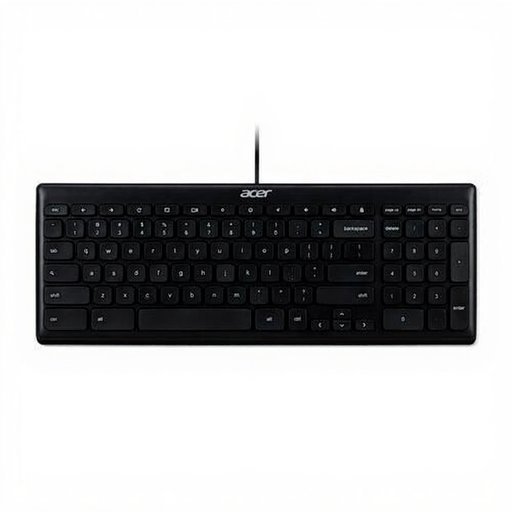 No image available
This model could suit you if you’re looking for a USB keyboard and the US International layout works for you.
The product name lists a black, wired USB model. Check the key layout before ordering.
 No image available
This model could suit you if you’re looking for a numeric keypad for a compatible Mac.
The product name lists Touch ID, a numeric keypad, white keys and compatibility with Mac models featuring Apple Silicon.
No, not just to arrange windows side by side: Microsoft Support explains how to do this in Windows using the Windows key and arrow keys. However, check that your computer and catalogue software support the controls you want to use.
Consider the position of your keyboard and mouse together, and check that the connection is compatible with your computer. For employees who work with a screen for more than two hours a day, Arboportaal states that the screen and keyboard must not be attached to each other; this isn’t a general legal purchasing requirement for every private collector.
For an online consumer purchase, you generally have a statutory cooling-off period of up to 14 days after delivery, according to ACM ConsuWijzer. Check the applicable returns policy and any exceptions before buying.
In addition to any manufacturer’s warranty, you have a statutory right to a product that meets the expectations you were entitled to have, as ACM ConsuWijzer explains. This doesn’t mean that every keyboard has a fixed statutory warranty period of exactly two years.
Keychron Launcher is used for key remapping on the Keychron K10 Pro reviewed here. If the software doesn’t recognise the keyboard, Keychron recommends, among other things, using a wired connection; also check that you can use the required software on your computer.