What should you look for when choosing?
First assess the light around your screen and keys, then consider liquid protection and the layout. This helps you avoid confusing a keyboard feature with a solution to a different problem, such as screen glare.
| What to consider |
What to look for |
Who will find this important? |
| Readability in daylight |
Check the key legends and finish in similar daylight. Address screen glare separately by adjusting your setup or using blinds. |
If I regularly look at the keys while typing up recipes, I want to be able to distinguish the letters without confusing screen reflections with the finish of the keys. Around 36% of consumers say readability is their top priority. |
| Splashes and cleaning |
Compare the protection offered by the exact model and follow its cleaning instructions. |
When I enter recipes near the kitchen, I want to know what protection the keyboard really offers and how I can clean it. Around 29% of consumers give liquid protection top priority. |
| Space and entering figures |
Consider the layout for recipe names as well as quantities, and check how much space is available for the keyboard and mouse. |
If I often enter quantities but also need room for my mouse, I weigh up a number pad against a more compact layout. Around 21% of consumers prioritise layout and typing comfort. |
| Connection and devices |
Check that your device supports the required USB port or Bluetooth, and that the keyboard layout is suitable. |
If I switch between a computer and tablet, I want to know whether one keyboard can connect to both devices. Around 14% of consumers give switching between devices top priority. |
Keyboards at Joybuy
This selection at Joybuy includes wired and wireless keyboards, from full-size to compact models. Alongside the window, pay particular attention to the layout, connection and position of your screen.
 No image available
Wired keyboard with number pad, QWERTY
A wired option if you’d like a number pad for entering quantities.
Full-size, QWERTY layout, black and plug and play.
View at Joybuy
 No image available
Trust Ody II wireless keyboard, QWERTY US
A good fit if you’re looking for a full-size wireless keyboard with a number pad.
The name describes it as spill-resistant, but the product instructions warn against exposure to liquids; don’t treat it as washable. The title mentions quiet keys and a USB receiver.
View at Joybuy
 No image available
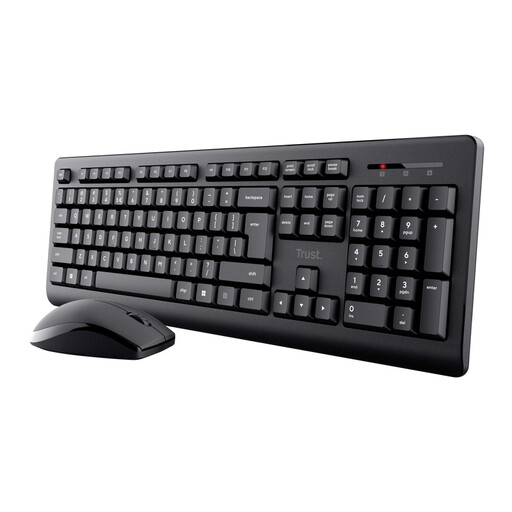
Trust Primo wireless keyboard and mouse, QWERTY US
A keyboard and mouse set for anyone looking for a full-size keyboard for a dedicated workspace.
The title mentions quiet keys and splash resistance. The safety instructions warn that splash-resistant doesn’t mean waterproof and advise against exposure to water or liquids.
View at Joybuy
 No image available
AJAZZ AK820 75% wired mechanical keyboard, US QWERTY
A compact layout to consider if desk space is limited and you’re looking for a wired model.
The product name lists 83 keys, replaceable linear switches, white backlighting and a grey-and-white colourway.
View at Joybuy
 No image available
Voxis B033 foldable Bluetooth keyboard with touchpad
A compact option to consider for typing on a computer, tablet or smartphone.
The product name describes a tri-fold design and a touchpad. The product description warns against direct sunlight.
View at Joybuy
Frequently asked questions
Will backlit keys solve distracting daylight next to a window?
Not if the main issue is screen glare. Arboportaal’s official workplace advice recommends changing the screen’s position in relation to the window or using suitable blinds to deal with reflections. Assess backlighting and the readability of the key legends separately.
Can you wash a spill-resistant keyboard?
Don’t assume so: spill-resistant doesn’t automatically mean washable. Logitech’s test for the K250 is limited to up to 60 ml of spilled liquid, and it warns against immersing the keyboard; CHERRY lists the KC 1068 as IP68 and describes it as having a casing. Follow the instructions for the exact model.
How do you connect the keyboard to your device?
Check which port or wireless connection your device supports. Logitech says the K120 connects via USB; the Pebble Keys 2 K380s uses Bluetooth and, according to Logitech, supports Windows, macOS, iPadOS, iOS and Android.
Are there workplace rules for a separate keyboard next to a window?
For a personal recipe index, the employment rule mentioned doesn’t create a general requirement to buy a particular keyboard. Arboportaal says that for employees who work with display screen equipment for more than two hours a day, the screen and keyboard must not be attached to each other. This is a conditional rule, not a universal product requirement for every reader.
Do you have a cooling-off period for an online purchase?
For many online purchases from a business by a consumer, a 14-day cooling-off period applies; the Dutch Government lists some exceptions. Check the relevant sales and returns terms, and keep your statutory rights separate from any voluntary returns policy.


