
Recipe editor working alongside colleagues
You write and edit a lot of text while other people work nearby. A quiet keystroke and useful navigation keys may matter to you; CHERRY and Trust describe specific models as quiet.


Start with what matters most at your desk: quiet typing alongside colleagues, room for your mouse, a numeric keypad, easy cleaning or switching between devices. Then decide whether you want a wired or wireless model, and check the layout and connection. Terms such as ‘quiet’ and ‘spill-resistant’ are not comparable sound measurements, nor do they mean you can clean a keyboard with any product you like.
You write and edit a lot of text while other people work nearby. A quiet keystroke and useful navigation keys may matter to you; CHERRY and Trust describe specific models as quiet.
You want to leave room for your mouse and decide whether you need a separate numeric keypad for entering quantities. CHERRY says the STREAM KEYBOARD TKL does not have a numeric keypad.
You use the keyboard with different devices or need to clean it regularly. The connection and cleaning instructions for the exact model are important; Logitech says the MX Keys S can switch between up to three devices.
First decide which work requirement matters most. Then check that the layout and connection of the model you choose suit your computer and the way you work.
| What to consider | What should you check? | Who is this most relevant to? |
|---|---|---|
| Quiet typing | Check the keys on the exact model and consider whether you find the keystroke comfortable; ‘quiet’ is not a standardised measurement for comparing keyboards. | If I edit recipes alongside colleagues, I want my typing to cause as little distraction as possible. Around 33% of consumers make quiet typing their top priority. |
| Space and number entry | Consider whether you often use a separate numeric keypad and which navigation keys you want to keep. | If my desk is cramped, I want to leave room for my mouse without losing keys I need for entering quantities. Around 27% of consumers prioritise space and layout. |
| Cleaning | Follow the instructions for the exact model and the cleaning product you want to use. | If several people use the same keyboard, I want to know which cleaning method is suitable for both the workspace and the model. Around 20% of consumers make cleaning their main consideration. |
| Connection and devices | Check the available ports, operating system and whether the model uses a cable, receiver or another type of connection. | If I switch between computers, I want the keyboard to connect to the devices I actually use. Around 20% of consumers prioritise connection and switching between devices. |
Trust describes the Primo as spill-resistant, while CHERRY lists specific protection for the separate KC 1068 model. These features are not necessarily interchangeable.
Check the cleaning instructions for the exact model and the product you want to use. Don’t assume it is suitable for intensive cleaning just because it has one type of protection.
According to CHERRY, the CHERRY STREAM KEYBOARD TKL saves space because it has no numeric keypad. That may be inconvenient if you often enter quantities.
Choose a compact model if mouse space matters more; consider a full-size keyboard if you regularly need a numeric keypad.
A wireless model may need a specific receiver or a compatible connection. The available ports and operating system can also make a difference.
Before buying, check the connection, available ports and layout of the model you have chosen.
The STREAM KEYBOARD TKL is a compact wired option without a numeric keypad; the KC 1068 is designed for a different cleaning requirement.
The Ody II is a wireless model with a receiver; the Primo is a wired, full-size keyboard with low-profile keys.
The MX Keys S is aimed at users looking for backlighting, customisable functions or the ability to switch between devices.
The Compact Break is a compact wired option for anyone who wants to save space and does not need a numeric keypad.
This selection includes compact keyboards and full-size models, including options for using multiple devices. Compare the keys you need, the connection and the layout with your workspace.
 No image available
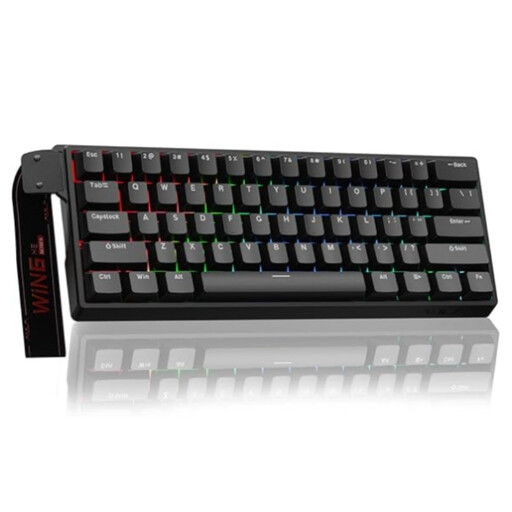
The product title specifies a 60% layout; check that it includes the keys and functions you use for recipes and navigation.
The title lists a wired connection, Hall Effect magnetic switches and adjustable actuation from 0.01 mm.
 No image available
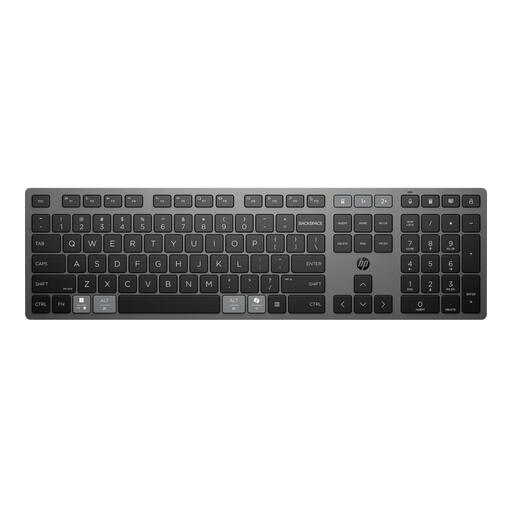
A full-size layout and the ability to switch between devices may suit you if you need both a numeric keypad and multi-device use.
The product description lists Bluetooth, a USB receiver, a rechargeable battery and the ability to switch between up to three devices.
 No image available
This model may suit you if you want a full-size keyboard with a numeric keypad and the US QWERTY layout works for the way you type.
The product information lists a USB receiver, Bluetooth and scissor keys. Trust describes the keys as quiet; this is not a comparative sound measurement.
 No image available
The product description lists a compact layout with 82 keys, arrow keys and function keys; check whether it has everything you need for entering recipes.
The listed connections are Bluetooth, 2.4 GHz and USB-C. The product description lists compatibility with Windows and macOS.
 No image available
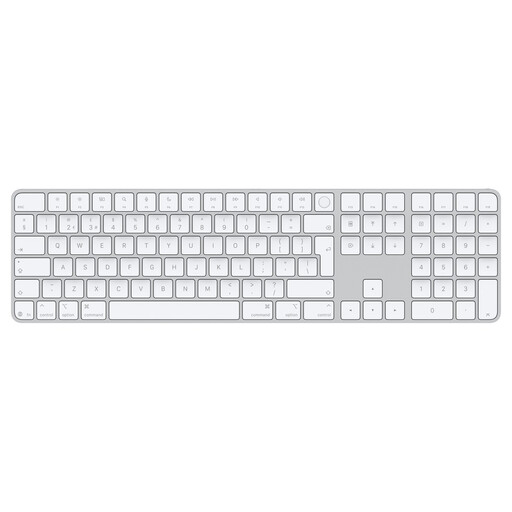
This model is listed for Mac models with Apple silicon and has a numeric keypad for entering numbers.
The product information lists Touch ID, a Dutch layout, white keys and Bluetooth. Check that your Mac model is included in the stated compatibility.
Not in every situation. According to Arboportaal, when you work with a screen for more than two hours a day, the screen and keyboard must not be attached to each other; when using a laptop, it must be possible to use a separate screen or keyboard. Whether this requirement applies depends on the actual working and usage situation.
Follow the instructions for the exact model and do not apply liquid directly unless the manufacturer says you can. For the Rugged Lite, Logitech recommends a lint-free cloth dampened with water and warns against applying liquid directly to the keyboard. This model-specific guidance does not automatically apply to other models.
Check the computer’s ports and operating system. Trust says the Ody II uses a USB receiver, while CHERRY says the KC 1068 model described requires Windows and USB-A. Other models may have different requirements.
According to the Dutch government, when you buy from a business at a distance, you are often entitled to a 14-day cooling-off period; check the terms and exceptions for your specific purchase. Your rights if a product is faulty are separate from any additional manufacturer’s warranty.