
Editor with a small desk
You keep recipes or notes next to your computer and want to leave room for your mouse. A model without a separate number pad may be worth considering.


Start by considering how much desk space you have and how often you enter quantities in one go. A compact layout leaves more room, while a separate number pad can be useful for entering sequences of numbers. Then compare the connection, key layout and typing sound of the exact model. A description such as ‘quiet’ is a manufacturer’s claim, not a comparable sound measurement.
You keep recipes or notes next to your computer and want to leave room for your mouse. A model without a separate number pad may be worth considering.
You type while someone else is sitting nearby. Where possible, listen to the typing sound yourself, and don’t treat a manufacturer’s description of a keyboard as quiet as a sound measurement.
While collecting or editing recipes, you might switch between a laptop and a tablet, for example. Check the connections and compatibility with your devices.
First, measure the space available and decide how often you enter sequences of numbers. Then check which connection and key layout suit your computer, tablet and workspace.
| Factor to consider | What should you check? | Who is this most relevant to? |
|---|---|---|
| Desk space | Measure the available space and check the dimensions and key layout of the model. | If I need to fit recipes, my screen and my mouse on a small desk, I want to know how much space the keyboard takes up. Around 36% of consumers put free desk space first. |
| Typing sound | Read the description of the exact model and, where possible, assess its sound in your own workspace. | When I type in a shared room, I want to take the sound of the keys into account without treating a claim that they’re quiet as a test result. Around 29% of consumers prioritise quiet typing. |
| Connection and switching between devices | Check Bluetooth support, the ports required, operating systems and power supply for the model you’re considering. | If I work on a laptop and tablet in turn, I need to check how the keyboard connects to each device. Around 21% of consumers prioritise connectivity and switching between devices. |
| Typing and entering quantities | Decide how often you enter sequences of numbers and check whether the layout has a separate number pad. | If I often enter several quantities in a row while editing, a separate number pad may suit the way I work better; I’ll also consider the extra space it takes up. Around 14% of consumers prioritise entering numbers or typing comfort. |
A TKL layout leaves out the separate number pad. This can free up space for your mouse, but it changes how you enter numbers.
Before choosing a layout, compare the space available with how often you type quantities one after another.
CHERRY, Logitech and Trust use sound descriptions for their own models. This doesn’t establish which keyboard will sound quietest in your room.
Where possible, assess the typing sound yourself, and don’t choose the connection and layout based only on a claim that a keyboard is quiet.
A Trust Ody II offer for a keyboard sold on its own is not the same as an offer for a keyboard and mouse set.
Before buying, check the model name, version and what’s included in the box.
A set may include a mouse you don’t need.
The STREAM KEYBOARD TKL is a wired option for a permanent workspace where mouse space matters.
The Pebble Keys 2 K380s is designed for compact, wireless use across devices; the MX Keys Mini is a separate compact range.
The compact Lyra is designed for switching between devices; the Ody II is a separate wireless keyboard with a number pad.
The E9010M is a compact wireless option to compare if you want both Bluetooth and a USB receiver.
This selection includes compact keyboards for a permanent or portable workspace, as well as models for use with specific tablets. Check the layout and compatibility of each version.
 No image available
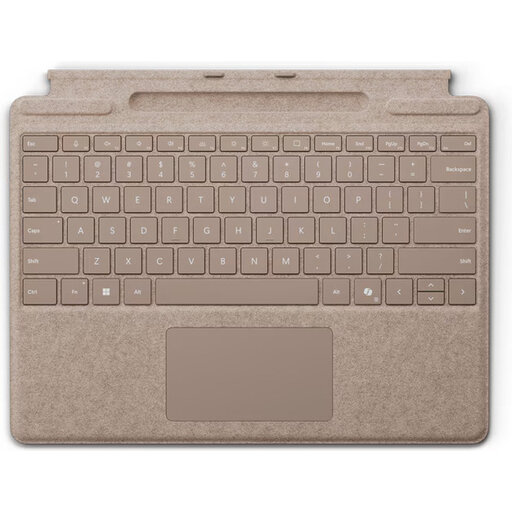
Before choosing this version, check that your tablet is one of the Surface Pro models 8–11 listed.
QWERTY layout; Dune colour variant.
 No image available
A wired option to compare if you’re looking for a compact layout for a permanent workspace.
75% layout; Hall Effect; TTC Magnetic HE switches; hot-swappable; wired connection.
 No image available
Consider this version if you’re looking for a wired keyboard with a stated 94-key layout.
94 keys; wired; phone holder and removable wrist rest.
 No image available
Consider this version for typing on the iPad Pro 13-inch (M4) specified. Check that your tablet exactly matches the compatible version.
Version for iPad Pro 13-inch (M4).
 No image available
A wired TKL model to consider if you’re looking for a compact layout for a permanent workspace. Check that BE AZERTY suits your keyboard layout.
Mechanical; TKL; wired; BE AZERTY; MLX Red; Black.
Place the keyboard directly in front of you, and consider its position alongside your mouse and the height of your workspace. The Occupational Safety and Health Administration recommends keeping your shoulders relaxed and your wrists in line with your forearms. This is workplace guidance, not a guarantee against discomfort.
Check which connection each device supports and follow the instructions for the exact model. Logitech lists iPadOS and Android, among other systems, for the Pebble Keys 2 K380s; Trust lists Bluetooth and tablet use, among other features, for the Lyra. A model with only a USB receiver needs a compatible port.
Check whether the version you choose uses replaceable batteries or a rechargeable battery. Trust says the Lyra has a rechargeable battery; Rapoo specifies two AAA batteries for the E9010M. Don’t assume another version uses the same power source.
For a typical online purchase from a business, you generally have a 14-day cooling-off period. You’re also entitled to a product that works properly, and you can contact the seller if there’s a fault. According to the Dutch government, there isn’t a fixed two-year statutory warranty period for every product in the Netherlands.
According to the Dutch government, you can return an old electrical appliance in various ways, including when buying a similar new appliance. Used batteries should not go in the rubbish bin; take them to a suitable collection point.