If you find the physical keys hard to read while typing, choose a model with large, high-contrast lettering. If the text on your screen is what you struggle to read, adjust the text size or screen magnification first. Also check that the layout and connection are compatible with your computer, and consider your whole workstation if you write for long periods.
Who is this buying guide for?
Writers who find keys hard to read
You look at the keys while typing and mainly need larger, high-contrast lettering. Compare colour combinations and check whether frequently used keys are in familiar positions. Koninklijke Visio also describes keyboard stickers as a way to customise key labels.
Writers who enlarge manuscript text
Your keyboard may already meet your needs, but you want to enlarge the text and controls on screen so you can read chapters and references. Microsoft Support explains how to make text and apps larger, while Koninklijke Visio offers tips on adjusting text in Word.
Writers who work for long periods
You type and edit for extended periods, so you want a suitable layout and workstation as well as good readability. Arboportaal explains that screen work can involve repetitive hand movements and maintaining a position for long periods.
What should you look for when choosing?
First decide whether you want to read the physical keys, the text on screen or both more easily. Then choose a suitable layout and connection.
| What to consider |
What to look for when buying |
Who is this important for? |
| Key readability |
Check the lettering on the actual model, the colour contrast and the layout; backlighting is not the same as larger lettering. |
If I look at the keys while typing, I want lettering I can easily distinguish; around 36% of consumers say key readability is their top priority. |
| On-screen text |
Decide whether you want to enlarge text in the operating system, your writing software or both. |
When I find chapters and references hard to read on screen, I first want to know which magnification setting is right for me; around 29% of consumers say on-screen text is their top priority. |
| Comfort during long sessions |
Check that the layout and reach of the keys suit the way you work, and assess your workstation too. |
During long writing and editing sessions, I want a typing experience that suits me and a well-organised workstation; around 21% of consumers say typing comfort is their top priority. |
| Layout and connection |
Compare the exact model with your computer, preferred language layout and available USB or Bluetooth connection. |
When I enter names, dates and references, I want to find keys and punctuation in familiar positions; around 14% of consumers say layout and connection are their top priority. |
Common buying mistakes
-
Confusing backlit keys with large lettering
Backlighting can illuminate the keys, but it doesn’t mean the lettering is large. Logitech lists backlighting for the MX Keys S, but the model is not described as a large-print keyboard in the product information consulted.
Check the lettering on the exact model if you find the keys themselves hard to read.
-
Buying a keyboard when the text is only too small on screen
Larger lettering on the keys won’t change the size of your manuscript or source material on screen. Windows has separate settings for text size and display scaling, and in Word you can adjust the font size of editable text.
Adjust the text size or screen display first, then decide whether the lettering on the physical keys also needs to be easier to read.
-
Ordering an old or different model without checking the layout
Models can differ in their operating system versions and key layouts. Clevy describes the Contrast Keyboard 2 as a product range that is no longer supported; according to the manufacturer, the Contrast Keyboard 3 has a 67-key layout.
Check the full model name, which computer the model is designed for and whether it includes the keys you use most often.
Brands to compare
Clevy
Worth considering if you’re looking for large, high-contrast lettering and want to compare wired and wireless connections.
- Clevy describes the Contrast Keyboard 3 as having large characters, USB and Bluetooth connectivity, and 67 keys.
- The manufacturer describes a distinctive layout with vertically aligned keys. Check that it includes the keys you use for text editing and that their positions feel familiar.
Optelec
An option to compare if you’re looking for high-contrast keys and use Windows, particularly if ZoomText or Fusion features are relevant to you.
- Optelec lists a numeric keypad, a USB connection and programmable shortcut keys for ZoomText and Fusion.
- Check that the features are compatible with your software and version of Windows.
LogicKeyboard
Large Print models are worth considering if you’re looking for larger lettering and want to choose a keyboard version to suit Windows or Mac.
- The manufacturer describes separate NERO models for Windows and ALBA models for Mac.
- Features of one model do not necessarily apply to another. Check the layout and language version you’ve chosen.
Logitech
The MX Keys S is worth comparing if you can read standard lettering and are looking for a conventional backlit keyboard.
- Logitech lists adjustable backlighting and the ability to switch between up to three devices.
- The model information provided does not describe large-print lettering, so backlighting alone does not make this a large-print keyboard.
Keyboards at Joybuy
This Joybuy selection includes standard keyboards with different layouts and connection options. Check the lettering on the exact model: backlighting and the number of keys alone don’t tell you how easy the characters will be for you to read.
 No image available
RK ROYAL KLUDGE R98 Pro Wired Mechanical Keyboard
The wired model with a numeric keypad may suit you if you use those keys to enter names and dates.
Wired mechanical keyboard with a numeric keypad. The product name lists RGB lighting and PBT keycaps.
View at Joybuy
 No image available
RK ROYAL KLUDGE R65 Wired Gaming Keyboard, 66 keys
This wired model has a compact layout; check that the number and positioning of the keys suit your writing needs.
The product name lists 66 keys, RGB lighting and PBT keycaps.
View at Joybuy
 No image available
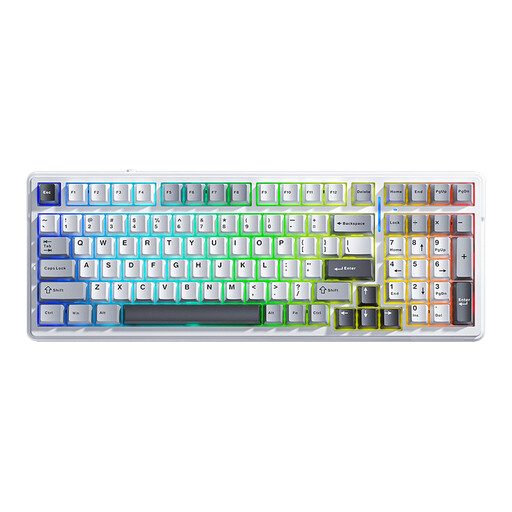
AULA F99 Wireless Mechanical Keyboard
This model may suit you if you want a numeric keypad and several connection options; check that the US layout works for you.
The product name lists 99 keys, a US QWERTY layout, and wired, Bluetooth and 2.4 GHz connections.
View at Joybuy
 No image available
AJAZZ AK820 75% Wired Mechanical Keyboard
This compact, wired US model may suit you if you’re looking for that layout; check the positions of the keys and punctuation before buying.
The product name lists 83 keys, a US QWERTY layout, white backlighting and PBT keycaps.
View at Joybuy
 No image available
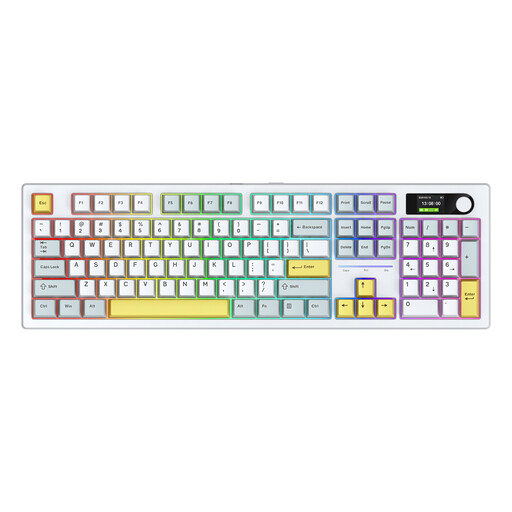
Siukie ACH105 Mechanical Keyboard, 104 keys
With 104 keys and several connection types, this model may suit you if you need those features; check the layout and connection are right for your computer.
The product name lists RGB lighting and three connection modes.
View at Joybuy
Frequently asked questions
Will a large-print keyboard also make my manuscript larger?
No. The larger characters are on the physical keys. Microsoft Support explains that Windows has separate settings for making text and apps larger; in Word, you can also adjust the font size of editable document text.
What should you consider if you write on a laptop for long periods?
Check the keyboard’s connection and layout, and assess the readability and setup of your entire workstation. Arboportaal explains that for employees who work at a screen for more than two hours a day, the screen and keyboard must not be attached to each other; this is not a general buying requirement for someone writing at home.
What rights do you have regarding returns and guarantees when buying online in the Netherlands?
For a standard online consumer purchase, you generally have a statutory 14-day cooling-off period after delivery, subject to legal exceptions; ACM ConsuWijzer explains this period. The statutory guarantee is separate from a commercial guarantee: the Netherlands Authority for Consumers and Markets explains that a product must meet the expectations you can reasonably have of it under normal use.
Do private writers have to buy a particular keyboard under Dutch workplace health and safety rules?
No. The rules described for screen work apply to employers and employees and do not require private writers to choose a specific keyboard. If you’re an employee who works on a laptop for long periods, the requirements for that workstation are relevant.


