Start by choosing a keyboard layout that suits writing quiz questions and answers, then consider the key feel and connection options for your workspace. You could choose a compact model that leaves room for your mouse, or a full-size keyboard with a number pad. Bear in mind that descriptions such as ‘quiet’ aren’t based on comparable sound measurements.
Which keyboard is right for you?
Quiz writer working alongside colleagues
You type lots of questions and answers in a shared workspace and want a quiet typing experience. Trust and CHERRY describe the keys on their own models as quiet, but this isn’t a sound measurement that lets you compare models directly.
Writing and editing for long periods
You spend extended periods working on questions, answers and feedback, and consider the feel of the keys, your posture and the distance to your mouse. Arboportaal recommends varying your posture and taking micro-breaks when working with a screen.
Quiz writer who enters lots of numbers
You regularly enter question numbers, scores or other figures, and want to weigh up whether a separate number pad matters more than extra desk space.
What should you consider when choosing?
First decide whether you need a number pad, then check which key feel and connection options suit your shared workspace.
| What to consider |
What to look for when buying |
Who is this important for? |
| Typing noise |
Compare the feel of the keys and, if possible, try out the sound in a similar office environment. Manufacturers’ descriptions aren’t based on a shared sound measurement. |
If I type lots of questions and answers alongside colleagues, I want to avoid my typing becoming a distraction. Around 36% of consumers say typing noise is their top priority. |
| Typing comfort |
Consider how the keys feel and how far the keyboard is from your mouse; compact models generally don’t have a separate number pad. |
When writing for long periods, I pay attention to how the keyboard feels and how I can set up my workspace. Around 29% of consumers prioritise typing comfort and the position of their hands and mouse. |
| Keyboard layout |
Check the language layout and whether you need a separate number pad for entering sequences of figures. |
When I enter quiz questions, punctuation and scores, I want the keys to be where I expect them. Around 21% of consumers say keyboard layout and number entry are their top priorities. |
| Connection |
Check that your work computer supports the required USB connection or pairing method, and that you’re allowed to use any required software on that computer. |
When I connect a keyboard to my work computer or switch between devices, I want the connection to suit my workspace. Around 14% of consumers prioritise connection options and use with multiple devices. |
Common mistakes when choosing
-
Assuming ‘quiet’ means the same thing as a comparable sound test
Trust and CHERRY use sound-related descriptions for their own models, but these don’t provide a shared measurement basis for comparing their noise levels.
Compare how the keys feel and, where possible, try the keyboard in a similar office environment.
-
Choosing a compact keyboard without considering number entry
A compact model such as the BakkerElkhuizen S-board 840 doesn’t have a separate number pad. That can be inconvenient if you enter lots of number sequences or scores.
Think about how often you type numbers and whether the convenience of a number pad is worth the desk space it takes up.
If you later find you need a separate number pad, you’ll need to make room for an extra item on your desk.
Brands worth comparing
The features mentioned apply to the product lines described; comments about one model don’t represent a general assessment of the brand.
Trust
Trust describes the Ody II as a wireless keyboard for use in shared spaces.
- Trust highlights quiet, low-profile keys and a stowable USB receiver.
- This description isn’t a measured comparison of sound levels. Check the receiver, layout and battery requirements of the version you choose.
CHERRY
CHERRY says the STREAM KEYBOARD is designed for office work, with a low profile and SX scissor mechanism.
- CHERRY lists office and multimedia keys, and describes the typing action as ‘whisper-quiet’.
- This sound description is a manufacturer’s claim, not a measured comparison; the cable limits where you can position it.
BakkerElkhuizen
The S-board 840 is a compact, wired option without a separate number pad.
- Its more compact layout may suit you if you want to position your mouse closer to the keyboard.
- If you enter numbers frequently, consider whether you can manage without a number pad. Also check that the language layout is right for you.
Logitech
Logitech offers various models with different features: the MX Keys S and Signature K650 aren’t interchangeable versions of the same keyboard.
- Logitech says the MX Keys S can switch between up to three devices. The Signature K650 has a full-size layout and shortcut keys.
- The MX Keys S switching features don’t automatically apply to the K650. Check the layout for each model, and whether you can use any required software on your work computer.
Keyboards at Joybuy
This selection includes compact and full-size layouts, with keyboards for typing and options featuring a number pad.
 No image available
Corsair K55 CORE TKL gaming keyboard, US QWERTY
The TKL layout may suit you if you want to keep some space beside the keyboard; bear in mind that it doesn’t have a number pad.
The product name specifies a US QWERTY layout. Check that it matches the key positions you’re used to.
View at Joybuy
 No image available
Wired QWERTY keyboard with number pad
A full-size layout with a number pad suits anyone who regularly enters numbers while creating quizzes.
The product name specifies a wired, plug-and-play model with a full-size layout.
View at Joybuy
 No image available
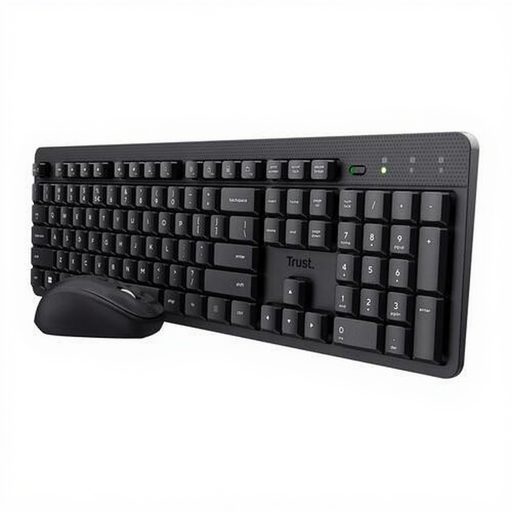
Trust Ody II wireless keyboard and mouse set
This set may suit you if you’re looking for a mouse as well as a keyboard for a shared workspace.
The product name specifies a keyboard and mouse set. Check that the stated US QWERTY layout suits you and that you have a USB port available for the receiver.
View at Joybuy
 No image available
Trust Vaiya wireless keyboard, full-size, US QWERTY
A full-size keyboard with a number pad may suit you if you enter lots of numbers and want a wireless model.
The product name specifies scissor switches and a US QWERTY layout. Check that this layout suits the way you work.
View at Joybuy
 No image available
Apple Magic Keyboard with Touch ID and number pad
This version may suit you if you write quizzes on a Mac model with Apple Silicon and regularly enter numbers.
The product name specifies a Dutch version with white keys. Check that the layout suits the way you work.
View at Joybuy
Frequently asked questions
Should you use a separate keyboard with a laptop?
According to Arboportaal, for employees who work with a screen for more than 2 hours a day, the screen and keyboard must not be attached to each other. If you work on a laptop, it must be possible to use a separate screen or keyboard. Whether this requirement applies to your work depends on your circumstances.
Can an ergonomic keyboard prevent discomfort on its own?
Don’t assume that a keyboard alone can prevent discomfort. Arboportaal also recommends varying your posture while working with a screen, looking away regularly and taking micro-breaks.
Which connection should you check before buying?
Check that your computer supports the connection or pairing method used by the keyboard you’ve chosen. If it comes with a USB receiver, make sure you have a suitable port available. If you work across multiple devices, also check which pairing methods are supported and whether you’re allowed to use any setup software on your work computer.
What cooling-off period and product rights apply to an online purchase?
For distance purchases from a business, a 14-day cooling-off period often applies, according to the Dutch Government. You’re also entitled to a product that works properly; in the Netherlands, there’s no single fixed statutory warranty period for every product. Check the seller’s terms for any delivery or return costs.
What wireless keyboard requirements should you check?
The Dutch Authority for Digital Infrastructure states that radio equipment must meet the applicable European requirements and that electrical and electronic equipment must have the correct CE marking. Check the marking on the specific device; a product description alone doesn’t establish that a particular item complies.


