
Coder who navigates a lot
Writes code while referring to local documentation, and wants symbols, arrow keys and function keys close at hand.


Start with a keyboard layout that lets you find symbols and navigation keys quickly, then compare the key legends with your computer’s software layout. For everyday typing without an internet connection, a basic wired connection may be enough. Customising keys is another matter: check in advance whether the configuration method for your model and system works offline. For long typing sessions or a shared workspace, adjustable split halves or a low-profile key mechanism may be worth considering, but a keyboard alone cannot guarantee a particular posture or noise level.
Writes code while referring to local documentation, and wants symbols, arrow keys and function keys close at hand.
Considers hand position and workspace during long typing sessions, and wants to assess whether an adjustable layout might suit them.
Looks for a suitable key feel and takes noise and the preferred connection into account, without treating a manufacturer’s claim of quietness as a measured result.
First, compare the layout and the keys you use when programming. Then decide whether you want to customise any extra keys: everyday typing and configuring functions are not the same thing.
| What to consider | What to look for | Who is it important for? |
|---|---|---|
| Layout and navigation | Compare the key legends with your software layout; also check the arrow keys, function row and navigation keys. | If I want to find symbols and documentation keys quickly while programming, I compare the physical layout with my computer settings. Around 33% of consumers give layout and navigation their highest priority. |
| Posture | Check whether both keyboard halves fit on your desk and whether there is still room for your mouse and wrist rest. | During long typing sessions, I want to be able to assess how my hands and arms are positioned at my workstation, without expecting a keyboard on its own to prevent discomfort. Around 27% of consumers put posture at the top of their list. |
| Key sound and feel | Check the key mechanism on the exact version and, if possible, try the feel for yourself. | In a shared workspace, I want to take the sound and feel of the keys into account. Around 20% of consumers give these factors their highest priority. |
| Connection and configuration | Check which connection you need and whether your preferred configuration method works on your system when you’re offline. | If I work offline, I want to distinguish everyday typing from setting up extra functions in advance. Around 20% of consumers give connection and configuration priority. |
Keyboards with different country layouts can have different key legends. When programming, this can change where you find symbols on the physical keyboard.
Compare the product image and exact country variant with the layout you’re used to, and check your computer’s software settings too.
Keychron describes Launcher as a web app. Logitech links Smart Actions for the MX Keys S to Logi Options+. This does not confirm that you can set up these features on your computer without an internet connection.
Check the setup method for the exact model and system before making offline remapping a deciding factor in your purchase.
The Kinesis Freestyle2 lets you position the halves apart, but the setup of your entire workstation and taking breaks from screen work still matter.
Check whether the layout suits your workstation, and break up screen work with other tasks or a rest. Don’t assume an ergonomic shape will deliver a particular health outcome for you.
The K8 Pro ISO is a compact mechanical keyboard to consider if you want to keep a function row and be able to remap keys.
The Freestyle2 is an option if you want to adjust the distance and position of the two keyboard halves.
The wired STREAM KEYBOARD is worth considering if you’re looking at a low-profile keyboard with a scissor mechanism.
The K120 and MX Keys S are different product ranges: the former is for basic wired typing, while the latter offers wireless control and additional software features.
This selection includes wired keyboards in compact and full-size layouts. For the model you’re considering, check the physical key layout and make sure it has the keys you need for coding and documentation.
 No image available
Suited to anyone looking for a compact wired setup; according to the product information, it does not have a number pad.
The product name lists TKL, QWERTY and PC/PS5.
 No image available
Worth a look if you’re after a compact wired setup; according to the product information, this TKL model has no number pad.
The product name lists US QWERTY. Compare the key legends with your computer’s software layout.
 No image available
The 60% layout is designed for those considering an ultra-compact keyboard; check whether the navigation keys suit the way you work.
The product name lists Hall Effect magnetic switches, Rapid Trigger, an 8K polling rate, 0.01mm adjustable actuation and RGB.
 No image available
A compact wired option to compare if you want to keep the arrow keys and function keys; check the key positions on the exact version.
The product name lists 68 keys, a US layout and Gateron HE magnetic switches.
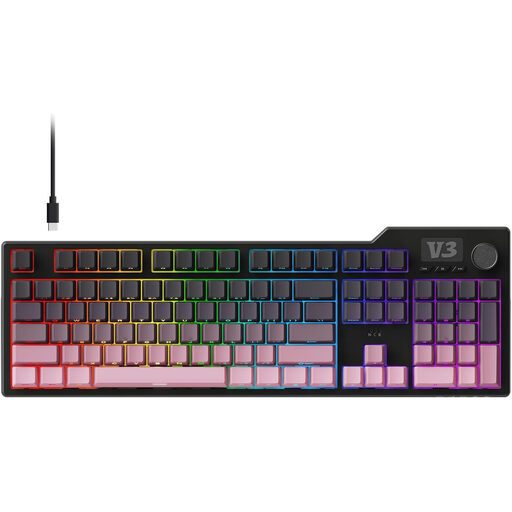 No image available
A full-size layout may suit you if you want more room; compare the keys and connection with what you need for your computer.
The product name lists a full-size gasket mechanical keyboard.
First, choose a physical layout with symbols you recognise and check that it matches your computer’s software layout. Then see whether it has arrow keys, function keys and navigation keys: according to Keychron, the Keychron K8 Pro ISO is an 80% TKL model, while Logitech describes the K120 as a full-size keyboard.
Don’t assume configuration works offline without checking. Keychron describes Launcher as a web app, and Logitech links Smart Actions to Logi Options+; check with the manufacturer whether your exact model and system support the configuration you want without an internet connection. Basic USB typing with the K120 is a different matter from setting up extra functions.
Adjust your keyboard and wrist rest to suit your workstation, and take regular breaks from screen work. Arboportaal, part of the Ministry of Social Affairs and Employment, explains that an unfavourable static working posture can put strain on muscles. Dutch government information for employees also recommends alternating screen work with other tasks or a break. No particular keyboard guarantees that you will avoid discomfort.
ACM ConsuWijzer explains that online purchases generally come with a statutory cooling-off period that ends 14 days after delivery. This is separate from your statutory rights if a product breaks sooner than you could reasonably expect with normal use: according to the ACM, the seller must put this right. Check the terms and instructions that apply to your purchase.
The European Radio Equipment Directive provides the framework for placing radio equipment on the EU market. According to the European Commission, CE marking is not a separate EU approval; it is a declaration by the manufacturer that the applicable requirements have been met. Check the information and marking on the exact wireless version: these general rules do not confirm the conformity of an individual product.