Who is this keyboard for?

Programmer who uses lots of shortcuts

Wants to use programming characters, navigation keys and, where relevant, custom functions quickly. That makes the physical layout and the options for remapping keys important. Keychron describes a web app for remapping keys on the V1.

Setting up a reliable offline workstation

Wants to type without first establishing a wireless connection, so looks for a wired connection and keys that work straight away. CHERRY describes the KC 1000 as Plug & Play via USB; Kinesis also offers a wired version of the Freestyle2.

Long-session typist who wants adjustability

Wants to adjust the position of both keyboard halves at their workstation, without assuming that a particular keyboard will prevent discomfort. Kinesis describes the Freestyle2’s positionable halves.

What should you look for when choosing?

What to consider What to look for Who is this important for?
Layout and programming characters Check the physical key layout, the characters printed on the keys and your computer’s input language. Also check that it has the arrow and function keys you need. If I use a lot of code and documentation, I want to find characters and shortcuts in familiar places. Around 31% of consumers rank the right key layout as their top priority.
Offline input and features A wired connection means you don’t have to pair the keyboard wirelessly first. Keychron describes Launcher as a web app, while Logitech’s Smart Actions are in Logi Options+, so set up the features you want in advance and test them on your work computer. If I want to keep working without internet access, I don’t want to depend on a new wireless connection or settings that I have to change on the spot. Around 25% of consumers put ready-to-use input first.
Hand position during long typing sessions You can position the halves of the Kinesis Freestyle2. Check whether the required risers are included with that version and whether your workspace has room for the setup. If I have long typing sessions, I want to be able to adjust the distance between my hands. Around 19% of consumers prioritise an adjustable hand position.
Number pad A full-size keyboard such as the CHERRY KC 1000 has a separate number pad. The Freestyle2 PC version we looked at doesn’t; you enter numbers using the Fn keys instead. If I often enter competition numbers or scores, I want a separate number pad within easy reach. Around 13% of consumers make this their main buying requirement.
Key noise CHERRY describes the KC 1000’s keys as whisper-quiet. This is the manufacturer’s description, so check the exact model and switch type if noise is a deciding factor for you. If I work in a shared space, I want to avoid disturbing others with keyboard noise. Around 12% of consumers prioritise quiet typing.

Things to consider before buying

  • Offline documentation doesn’t mean programmable features will automatically work offline

    Keychron describes Launcher as a web app, and Logitech Smart Actions as a feature in Logi Options+. A wired connection on its own tells you nothing about whether these setup tools are available or whether custom features will work without internet access.

    Set up any essential features in advance on the computer you’ll be using, and test whether they remain available while you work offline.

  • Not every QWERTY version has the same physical layout

    The keyboards we looked at are available in different layouts and country variants. The position or keycap markings for programming characters may therefore differ from what you expect.

    Check the full version name and an image of the actual keys. Also check which input language is set on your computer.

  • A barebone mechanical keyboard may not come fully assembled

    Keychron states that the barebone version of the V1 is supplied without switches or keycaps.

    For the exact version, check whether it’s described as ‘fully assembled’ or ‘barebone’, and which parts are included.

Relevant brands to consider

CHERRY

A relevant choice for a straightforward, full-size wired workstation. CHERRY describes the KC 1000 as having a number pad and USB-A; the KC 200 MX is a separate mechanical office range with different switch options.

  • CHERRY describes the KC 1000 as Plug & Play via USB and its keys as whisper-quiet.
  • Check that the connection and country variant are right for you. The full-size layout takes up space, and the KC 200 MX’s mechanical features don’t automatically apply to the KC 1000.

Kinesis

A relevant choice if you want to adjust your hand position. The Freestyle2 is available in several versions, including a wired PC model.

  • Kinesis describes the Freestyle2’s keyboard halves as positionable, with optional risers available.
  • The Dutch PC version we looked at has an ANSI US International layout and no separate number pad. Check which accessories are included with your version; an adjustable setup doesn’t guarantee an individual ergonomic benefit.

Keychron

A relevant choice if you’re looking for a compact, customisable mechanical keyboard. Keychron describes the wired V1 as a 75% model with QMK and a web app for remapping keys.

  • According to Keychron, the V1 combines a compact layout with options for remapping keys.
  • The specification we looked at is ANSI and doesn’t have a separate number pad. The barebone version is supplied without switches or keycaps; check whether custom features will remain available offline on your particular keyboard.

Logitech

A relevant choice if you want to switch between devices. Logitech describes the MX Keys S as a wireless work keyboard that can switch between up to three devices.

  • Logitech lists backlighting and customisable features.
  • Smart Actions are set up through Logi Options+. Test in advance whether the settings you want will be available on your offline work computer, and check the layout of the exact version.

Joybuy products for this task

This selection includes mechanical keyboards in different layouts. Compare each model’s physical key layout and wired usability, and consider whether you need a separate number pad.

AULA F75 MAX 75% mechanical keyboard with US QWERTY layout and Reaper Switch

AULA F75 MAX, 75%, US QWERTY, Reaper Switch

An option to compare if you’re looking for a compact keyboard that can also be used wired.

75% layout with US QWERTY. The title lists wired, Bluetooth and 2.4GHz connection modes.

View at Joybuy
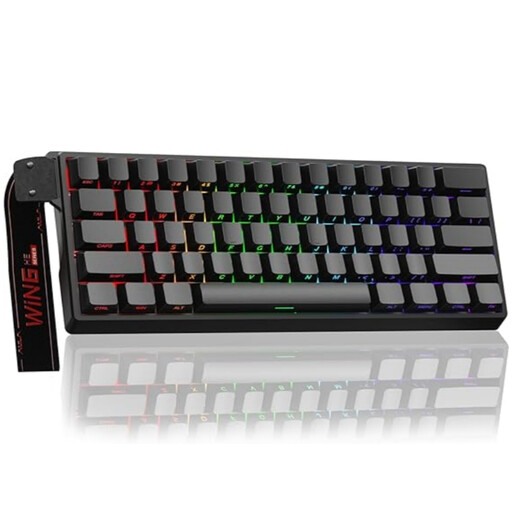
AULA WIN60HE 60% wired mechanical keyboard with magnetic switches

AULA WIN60HE, 60%, wired

A compact option to compare if you want to type using a wired connection and keep your desk space to a minimum.

60% layout with magnetic switches. The title lists adjustable actuation and Rapid Trigger.

View at Joybuy

Ticktype EVO75 75% mechanical keyboard with US layout and Creamy Rye switches

Ticktype EVO75, 75%, US layout, Creamy Rye switches

An option to compare if you’re looking for a compact layout and customisable switches.

The specifications list ANSI US, USB-C, hot-swappable switches and VIA compatibility. The title lists three connection modes.

View at Joybuy

REDRAGON mechanical keyboard with 94 keys, phone stand and wrist rest

REDRAGON mechanical keyboard, 94 keys

A model to compare if you’re looking for a wired connection and a wrist rest.

The title lists 94 keys, a phone stand and a wrist rest. The product description lists a wired connection and replaceable switches.

View at Joybuy

Redragon M68 mechanical keyboard with magnetic switches and US layout

Redragon M68, 68 keys, US layout

A compact option to compare if you’re looking for a US layout and a detachable USB-C cable.

The product information lists 68 keys, magnetic switches and a detachable USB-C cable. The title lists Rapid Trigger.

View at Joybuy

Frequently asked questions

Will my saved programming documents automatically work offline because my keyboard is wired?

No. A wired connection relates to how the keyboard connects, not how documents are saved. Check that your documentation is available locally, and set up and test any key customisations you want in advance. Keychron describes Launcher as a web app; Logitech uses Logi Options+ for Smart Actions.

Which connection and keyboard layout should I check?

Check both your computer’s port and the physical layout of the exact version. CHERRY specifies USB-A for the KC 1000; the Kinesis Freestyle2 PC version we looked at is wired and has a QWERTY ANSI US International layout. The markings on a key don’t determine which input language is set on your computer.

Will a split keyboard prevent discomfort during long programming sessions?

A split keyboard can’t guarantee that discomfort will be prevented. You can position the halves of the Freestyle2; Arboportaal also recommends varying tasks, taking short breaks and adjusting your workstation when working with screens.

What do the cooling-off period and statutory guarantee mean when buying online in the Netherlands?

According to ACM ConsuWijzer, online purchases generally come with a statutory cooling-off period of up to 14 days after delivery, with some exceptions. The seller must also put things right if, under normal use, a product doesn’t meet what you could reasonably expect. This doesn’t mean that every keyboard comes with a fixed guarantee of exactly two years.

Does a Dutch employer have to provide a separate keyboard for extended laptop use?

Arboportaal states that for employees who work with screens for more than 2 hours a day, the screen and keyboard must not be attached to each other. When using a laptop in this situation, it must be possible to use a separate screen or keyboard. This is a conditional workplace standard, not a buying requirement for private consumers.
