What should you look for?
First, compare the physical layout with the keys you use in your editor and terminal. Then decide whether you need programmable actions, and consider ergonomics and sound in relation to your workspace.
| Key consideration |
What to check before buying |
Who is it most important for? |
| Layout for coding and navigation |
Check the physical layout and key legends of the exact model. Test whether your own shortcuts are easy to reach. |
If I want direct access to arrow and function keys while programming and testing, this is my top priority. Around 33% of consumers prioritise direct access to coding and navigation keys. |
| Ergonomics during long sessions |
Consider whether the keyboard and mouse suit the way you work. For a split model, also check how adjustable it is and allow time to get used to it. |
During long work sessions, I want to be able to adjust the distance and position of my keyboard and mouse to suit my workspace. Around 27% of consumers prioritise an adjustable working position. |
| Typing noise in a shared workspace |
Check the switch type and, if possible, try the complete keyboard in a similar environment. A quiet switch does not mean the whole keyboard is silent. |
If I work alongside other people, I want to know how much noise the model I choose makes. Around 20% of consumers prioritise quieter typing in a shared workspace. |
| Programmability and switching between devices |
Check which keys and actions can be customised, what software is required and how the keyboard connects to your computers. |
If I want to customise repeated keystrokes or switch between computers, these features are key. Around 20% of consumers prioritise programmability or device switching. |
Keyboards at Joybuy
These keyboards suit a range of programming and testing set-ups, from compact layouts to models with a numeric keypad.
 No image available
GXTrust Thado wired TKL keyboard, QWERTY, black
The TKL layout may suit you if you’re looking for a compact keyboard without a separate numeric keypad.
Wired via USB; QWERTY layout; for PC and PS5; the product description states that it registers up to 10 simultaneous keystrokes.
View at Joybuy
 No image available
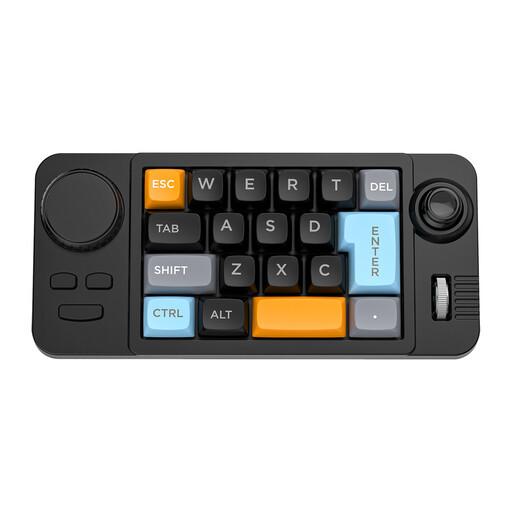
NAXSIR wired 19-key keyboard with hot-swappable keys
A wired option to consider if you’re looking for the listed replaceable keys and programmable macros.
The product name mentions a joystick and a rotary knob. Check the exact layout and version in the product information before ordering.
View at Joybuy
 No image available
Wired QWERTY keyboard with numeric keypad
This model may suit you if you enter numbers as part of your work and want to keep a full-size keyboard.
QWERTY layout; numeric keypad; wired plug-and-play connection.
View at Joybuy
 No image available
RK ROYAL KLUDGE R98 Pro, wired, Beige Switch
An option to consider if you want a numeric keypad alongside customisable keys or macros.
Wired mechanical keyboard; numeric keypad; hot-swappable; the product information lists key remapping and macros via an online driver.
View at Joybuy
 No image available
RK ROYAL KLUDGE R65, wired 60%, 66 keys
This compact model may suit you if you want to save desk space and customise keystrokes.
Wired mechanical keyboard; 60% layout with 66 keys; QMK/VIA; hot-swappable switches. The title specifies Chartreuse Switch.
View at Joybuy
Frequently asked questions
Can a keyboard run my automated tests?
A programmable key can trigger keystrokes or macros, but it doesn’t replace test code or checking the results. Whether a macro works with your test command depends on your development environment and configuration.
How should I set up a split keyboard?
Kinesis recommends that new Freestyle2 users start with the two halves close together, then gradually move them apart or angle them. Adjust the set-up to suit your workspace; the keyboard is not a treatment for discomfort.
How can I check whether a keyboard is hot-swappable?
Check that hot-swap support applies to the exact version, and follow the instructions for that model. The model name alone, such as AK820, doesn’t confirm which switches or variant details apply to a particular listing.
What are my rights when buying online in the Netherlands?
For distance purchases, the Dutch government says you generally have a 14-day cooling-off period in many cases; whether it applies depends on the purchase. The Dutch government also states that the seller must provide a solution if there’s a problem with the product.
Do I have to use a separate keyboard with a laptop?
For employees, Arboportaal says that if you work at a screen for more than two hours a day, the screen and keyboard must not be attached to each other. In that case, laptop users must be able to use a separate screen or keyboard. This is not a general buying requirement for every private consumer.


