
Frequent product-code entry
You enter lots of numbers and want to do so without constantly switching input methods. A keyboard with a numeric keypad could be a good fit.


Choose a keyboard based on how many product codes you enter and how much desk space you have. A dedicated numeric keypad is ready to use, while a compact model can free up space beside your mouse. A keyboard cannot check for duplicate entries; review records in your catalogue software and don’t delete anything until you’ve confirmed whether it represents a separate item. Microsoft Support explains the difference in Excel between highlighting duplicate values and permanently deleting them.
You enter lots of numbers and want to do so without constantly switching input methods. A keyboard with a numeric keypad could be a good fit.
You want to compare records and check whether two rows represent two separate trains. Microsoft Support explains how to highlight or remove duplicate values in Excel; the check itself takes place in your catalogue software.
You want a compact workspace and are choosing between an integrated numeric function and a separate keypad that you can move around.
| What to consider | What should you check? | Who is this important for? |
|---|---|---|
| Entering lots of numbers | Check whether the model has a separate numeric keypad or only offers a numeric function via NumLock. Check the physical layout too. | If you enter lots of product codes while cataloguing, you’ll want to type numbers directly. Around 36% of consumers prioritise this. |
| Checking duplicate entries | Check whether your software can highlight or filter records. Keep a copy before deleting data, and make sure separate items remain identifiable. | If you want to check whether two rows are a data-entry error or represent two trains in your collection, you’ll want to compare records carefully. Around 29% of consumers make this their priority. |
| Workspace and mouse position | Compare the keyboard’s width with your desk setup and the space where you want to use your mouse. | If space is limited, you may want to keep your mouse closer to the keyboard, even if that means going without a separate numeric keypad. Around 21% of consumers prioritise space and positioning. |
| Layout and connection | Check the physical key layout of the exact model and make sure its connection or supplied adapter works with your computer. | If your existing setup is the deciding factor, you won’t want to choose a layout or connection that doesn’t work with your computer. Around 14% of consumers prioritise compatibility. |
Two identical rows could be a data-entry error, but they could also represent two separate items. Microsoft Support distinguishes between highlighting duplicate values and permanently deleting them.
Compare the records first, make sure separate items are clearly identified, and keep a copy before deleting data.
Microsoft Support warns that Excel can automatically remove leading zeroes. As a result, a product code may be saved differently from how you intended after it’s entered or imported.
If necessary, treat code columns as text and check the saved value before searching for duplicate entries.
A changed code could mean extra work to put things right or lead to an incorrect comparison of records.
According to BakkerElkhuizen, the UltraBoard 950 V2 has a numeric field accessible via NumLock, but no traditional separate numeric keypad.
Compare the physical layout with how often you enter numbers. Choose an integrated NumLock solution only if it suits the way you work.
Trust describes the Keyboard 23880 as a wired keyboard; the Primo name is also used for a wireless keyboard and mouse set. These are different models.
Compare the full model name and package contents, and check the connection on the version you want to buy.
UltraBoard models offer different ways to combine a compact keyboard with numeric input.
The Primo Keyboard 23880 is a wired keyboard option with low-profile keys.
The STREAM KEYBOARD is a low-profile wired option for office use.
The MX Keys S is an option if you’re looking for a wireless keyboard with backlighting and programmable keys.
These keyboards are designed for manual entry of model and product numbers; checking for duplicate entries remains a job for your catalogue software.
 Image unavailable
For manual entry; check for duplicate entries in catalogue software, not on the keyboard itself.
68 keys, compact design and US layout.
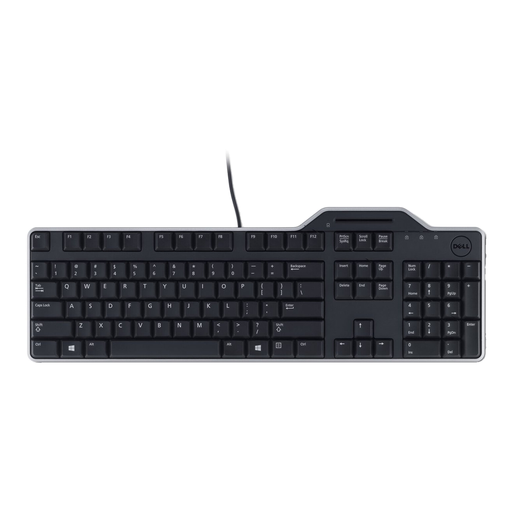 Image unavailable
If you enter lots of product codes, check that the layout suits the way you work. Review duplicate entries in your catalogue software.
Model KB813; AZERTY layout.
 Image unavailable
For manual catalogue entry; check records with possible duplicate entries separately in your software.
75% layout, 83 keys and US layout.
 Image unavailable
If you enter lots of product codes, a numeric keypad could be an important consideration. Check duplicate records in catalogue software.
Dutch version; according to the product name, for Mac models with Apple silicon.
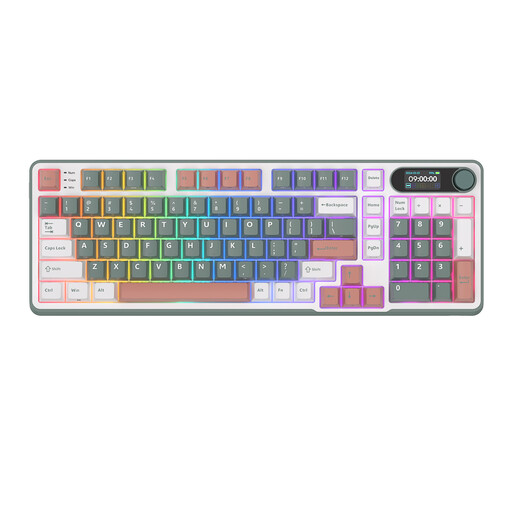 Image unavailable
For manual entry with several connection options; check that the layout suits the way you enter numbers. The keyboard doesn’t detect duplicate records.
96% layout, 98 keys and Bluetooth/2.4G/USB-C.
No, the keyboard itself can’t perform that check. In Excel, you can highlight duplicate values first to review them; the remove function permanently deletes data. Check that two rows don’t represent two separate items and make a copy before deleting anything, as Microsoft Support advises.
If necessary, treat product codes as text in Excel and check the saved value. Microsoft Support warns that Excel may otherwise remove leading zeroes automatically.
Check that the connection and any adapter supplied with the model you choose work with your computer. Follow the manufacturer’s cleaning instructions and unplug the keyboard before cleaning it.
For a consumer purchase covered by Dutch law, you’re entitled to a product that meets the terms of the agreement; there is no fixed statutory guarantee period. According to the Dutch Government, distance purchases usually come with a 14-day cooling-off period, although exceptions apply.
The rules for screen-based work by employees and employers don’t automatically apply to someone cataloguing a collection privately. Arboportaal explains that, for employees who work with screens for more than two hours a day, the screen and keyboard must not be attached to one another under the conditions described.