What should you look for when buying?
Start with the connection and a suitable practice set-up, then compare the playing range and storage space. Choose accompaniment only if it suits the way you want to practise.
| What to consider |
What should you check? |
Who should consider this? |
| Quiet practice |
Check the headphone output on the exact version and make sure your headphones are compatible. Also agree on suitable practice times. |
If I practise while my housemates are at home, I want to listen through headphones and agree clearly on when I’ll play. Around 36% of consumers make quiet practice their top priority. |
| Practising in time |
Check whether the model has a metronome or accompaniment, and whether you can switch it off while playing by yourself. |
If I want to practise changing chords in time, I’m looking for rhythmic support without an automatic part taking the place of my own playing. Around 29% of consumers prioritise timing and accompaniment. |
| Putting it away after playing |
Measure the space available for playing and storage, then compare it with the dimensions of the exact model. |
If I need to put the keyboard away after every session, its dimensions and how easy it is to move matter to me. Around 21% of consumers make storage their top priority. |
| Keys and playing range |
Try your own chord shapes on the model and check that the notes you need fall within its range. Touch sensitivity doesn’t automatically mean the keys are weighted. |
I want the keyboard to suit my chord shapes and the key feel I’m looking for. Around 14% of consumers prioritise responsiveness and playing range. |
Joybuy products
Below are Joybuy products suited to practising on a keyboard without a computer. For each version, check the connections, features and included accessories you need.
 No image available
MLS-931 digital piano, 61 keys
Could suit you if you’re looking for an instrument with a headphone socket for practising on your own.
The product title lists 61 keys, a weighted keyboard and a headphone socket. Check that the key feel and connection suit the way you plan to use it.
View at Joybuy
 No image available
Electronic keyboard, 61 keys
Could suit you if you want to use a metronome while practising chord changes.
The product title lists 61 keys, a metronome, speakers, a recording function, a music stand and a MIDI controller function. Check which connection you need for headphones.
View at Joybuy
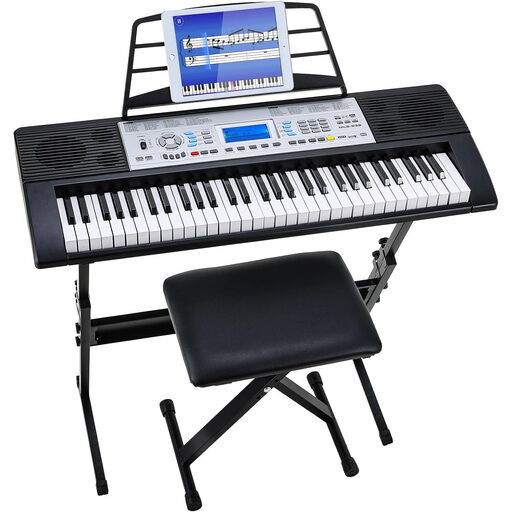 No image available
Keyboard set, 61 keys, stand and stool
Could suit you if you’re looking for a set with a stand and stool for a dedicated practice space.
The product title lists 61 keys, 500 sounds, three learning levels, two speakers and an LCD screen. Check the dimensions of the set and the connections you need.
View at Joybuy
Frequently asked questions
Can I practise with headphones on at any time?
Wearing headphones doesn’t automatically mean you can ignore the household’s arrangements about noise. Agree on practice times with your housemates. The Dutch Government advises people to try agreeing on arrangements with each other first when dealing with noise from neighbours, and notes that local rules, such as municipal by-laws (APV), may also be relevant.
What do I need to connect to hear chords from a MIDI controller?
According to Novation, Launchkey has no built-in sounds. Connect the controller to suitable software or an external sound source and choose an audio output there. If you’re using a standalone keyboard, check its built-in sounds and headphone socket instead.
How can I practise chord changes without automatic accompaniment?
Use a metronome if you want to practise in time, and practise the changes without an automatic chord part as well. Yamaha lists a metronome for the PSR-E383, and Roland for the E-X10; check how to switch off the accompaniment on each model.
What extra features and accessories should I check?
Check whether you need headphones, a compatible connection, a power supply, a stand and a seat, and what’s included with the specific version. Casio describes the headphones for the CT-S300 as separately available. Information about what’s included with a version from another country doesn’t automatically apply to a Dutch offer.
What are my rights when buying a keyboard online?
According to ACM ConsuWijzer, ordinary online consumer purchases generally come with a statutory cooling-off period of up to 14 days after delivery, although legal exceptions may apply. Check the seller’s information, and remember that a voluntary returns policy is different from the statutory cooling-off period.


