What should you look for when choosing?
Start with the keys and size that suit the way you work with photos. Then check whether the connection and any configuration software are allowed on the shared computer.
| What to consider |
What should you check? |
Who should pay particular attention? |
| Typing noise |
If possible, try the keys in a similar environment. Assess the keyboard separately from any mouse clicks. |
If I work alongside other people, I want to type without distracting them unnecessarily. That’s why around 33% of consumers put noise top of their list. |
| Photo keys and keyboard shortcuts |
Check the shortcuts for your own photo software. Test custom actions only if you’re allowed to install the necessary software on the computer. |
If I select lots of images, I want to use keys that suit my photo workflow. Around 27% of consumers put their photo workflow first. |
| Size and numeric keypad |
Work out how often you enter numbers and whether a compact keyboard will fit alongside your mouse on the available desk space. |
If I rarely enter numbers, I’d rather leave room for my mouse than use a numeric keypad. Around 20% of consumers make desk space their top priority. |
| Connection |
Check the available USB ports, Bluetooth support and the rules on receivers or configuration software for the shared computer. |
If I use a shared or managed computer, the connection needs to work within the workplace policy. Around 20% of consumers make connectivity their main requirement. |
Keyboards at Joybuy
This selection includes compact and full-size keyboards for working with photos at a shared desk, with wired and wireless options. Above all, check that the keyboard layout and connection suit your computer.
 No image available
Trust Ody II Wireless Keyboard and Mouse Set, White
A good fit if you want to work wirelessly and need a numeric keypad for entering numbers.
The product information lists quiet keys, a full-size keyboard and a USB receiver. Trust describes the keys as quiet; this is not an independent sound measurement. Check that you can connect the receiver to the shared computer.
Joybuy
 No image available
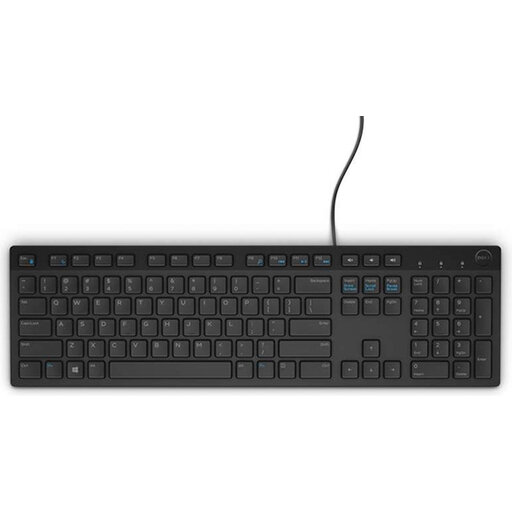
DELL KB216 USB Keyboard, Belgian AZERTY, Black
A good fit if you’re looking for a wired connection and a full-size keyboard with a numeric keypad.
The product information lists USB, chiclet keys and multimedia functions. The Belgian AZERTY layout may not suit you if you need a different layout, and the cable will remain on the desk.
Joybuy
 No image available
HP 450 Programmable Wireless Keyboard
A good fit if you want to assign recurring actions to keys and can use the necessary software on the computer.
The product information lists more than 20 programmable keys, a USB receiver and HP Accessory Center for setting up keyboard shortcuts. Check that you’re allowed to install it on the shared computer.
Joybuy
 No image available
AJAZZ AK820 MAX Wireless Mechanical Keyboard, German QWERTZ, 75%
A good fit if you want to save desk space and are looking for a compact wireless keyboard.
The product information lists a 75% mechanical keyboard with tri-mode connectivity. Check that the German QWERTZ layout suits your preferences and computer.
Joybuy
 No image available
AJAZZ AK820 MAX Magnetic Axis Wired Keyboard, 82 Keys
A good fit if you’re looking for a compact keyboard with a wired connection.
The product information lists a 75% size with 82 keys, a Type-C cable connection and a volume knob. The cable will remain on the desk.
Joybuy
Frequently asked questions
Do I need a programmable keyboard for selecting photos?
No, not necessarily: Adobe documents its own keyboard shortcuts for Lightroom Classic. Check the shortcuts for the software you use; programmable keys are an extra option only if you can set up the actions you want on your computer.
How do I connect a compatible Logitech keyboard via Bluetooth?
According to Logitech’s setup instructions, if necessary, hold down the Easy-Switch key for three seconds, then complete pairing in your computer’s Bluetooth settings. Check that these instructions apply to your keyboard variant.
Who can help if a keyboard bought in the Netherlands develops a fault during normal use?
If a product is faulty, contact the seller. According to the Dutch Government, there is no fixed statutory warranty period in the Netherlands; a manufacturer’s warranty is in addition to your statutory rights.
Is a separate keyboard a legal requirement when using a laptop at a shared desk?
Not for everyone who works at a shared desk. The Arboportaal states that for employees who work at a screen for more than 2 hours a day, the screen and keyboard must not be attached to each other. When using a laptop, it must therefore be possible to use a separate screen or keyboard; whether this applies depends on the working situation and length of use.


