
Anyone who enters figures often
If you regularly update expense entries, a built-in or separate number pad—and the space it takes up—could be key factors. RTINGS.com describes a number pad as useful for spreadsheets and data entry.


If you enter figures often, a full-size keyboard with a number pad is practical. If having more desk space matters most, a compact model without a number pad may be a better fit. A separate number pad can offer a compromise, provided your computer and available connections are compatible. Also compare the typing noise, connection options and exact layout with the needs of your shared workspace.
If you regularly update expense entries, a built-in or separate number pad—and the space it takes up—could be key factors. RTINGS.com describes a number pad as useful for spreadsheets and data entry.
If someone is working or relaxing nearby, you’ll want to consider how noisy the keys are. Trust and CHERRY describe specific models as quiet, but these manufacturers’ claims aren’t based on comparable noise measurements.
If you have little room next to your mouse and don’t need a number pad all the time, a TKL model could save space. RTINGS.com describes smaller keyboards as more space-efficient; TKL models don’t have a built-in number pad.
First decide what matters most to you: entering figures, keeping a shared workspace quiet, switching between devices or having more room for your mouse.
| What to consider | What should you check? | Who is this important for? |
|---|---|---|
| Entering figures | Consider how often you enter long strings of figures and whether the keyboard has a built-in number pad. Also think about where you could place a separate number pad. | If I regularly enter figures in a household budget spreadsheet, I want to be able to type them straight in without constantly switching between sections of the keyboard. Around 36% of consumers rank number entry as their top priority. |
| Typing noise | Check which type of keys the specific model has and, if possible, try it out for yourself. A manufacturer’s claim that a keyboard is ‘quiet’ doesn’t mean it’s silent. | When someone is working or relaxing next to me, I want to type without causing unnecessary disturbance. Around 29% of consumers give low typing noise top priority. |
| Connecting devices | Count the devices you actually use and check the connection options supported by each model, along with any USB ports or software required. | If I want to use the same keyboard with several devices, I want to know how to switch between them and which connections are needed. Around 21% of consumers prioritise switching between devices. |
| Desk space | Measure the space available for your keyboard and mouse. Also decide where a separate number pad will go when you’re entering expenses and when you’re not. | With little room next to my mouse, I’d rather have a more compact keyboard and use a separate number pad only when needed. Around 14% of consumers give free desk space top priority. |
A TKL keyboard doesn’t have a built-in number pad. That can be inconvenient if you often need to enter long strings of figures later on.
Decide in advance how often you use a number pad and whether a separate one will fit on your desk.
A separate number pad is an extra device that you’ll need to connect and find space for.
A different keyboard layout or connection could affect how well the keyboard works with your computer. The included accessories may also vary between versions.
Check the product page for the full model name, layout, connection options and box contents.
The Dutch government explains that the Netherlands has no fixed statutory warranty period. What you can reasonably expect from a product also affects your rights.
Consider any additional warranty separately from your statutory rights. If a product is faulty, contact the seller.
Logitech offers full-size keyboards such as the MX Keys S and Signature K650, with different features on each model.
The wired STREAM family includes a full-size version and a more compact TKL version; the STREAM KEYBOARD ULTIMATE is a separate model.
The TK-150 is a full-size wired keyboard. The Xalas is a separate USB number pad, which Trust says is designed for compatible Windows laptops.
According to Rapoo, the E9500M is a wireless keyboard that lets you switch between connected devices.
This selection focuses on full-size keyboards with a number pad for entering household expenses. The models vary in features such as connection options and keyboard layout.
 No image available
The built-in number pad is useful if you regularly enter figures. Check whether a wired connection works for your shared workspace.
The product name identifies this as a wired mechanical keyboard with Beige switches. The product description says these switches are linear and quiet.
 No image available
If you enter figures and switch between several devices, the number pad and device-switching feature may be useful.
The product information lists a number pad and the ability to switch between up to three devices. The layout is US QWERTY, so check that it suits the way you work.
 No image available
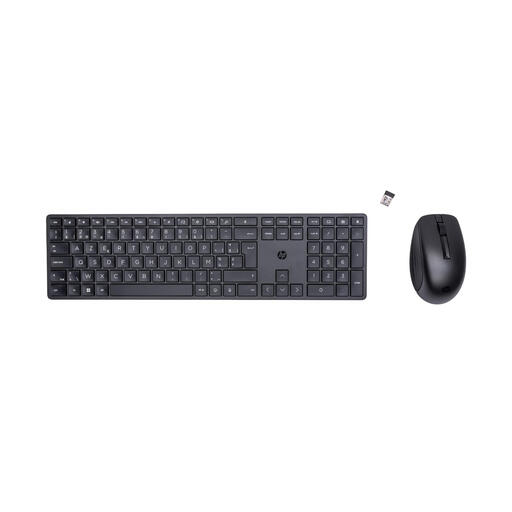
A full-size keyboard with a number pad could suit you if you regularly enter figures. Check the wireless connection and layout before choosing.
The product information lists a wireless RF connection and a Belgian AZERTY layout. This is a keyboard and mouse combo.
 No image available
The number pad is handy if you regularly enter figures. The product information describes the keys as quiet, making them suitable for shared use.
The product information lists a wireless USB receiver, a US QWERTY layout and a spill-resistant keyboard. Spill-resistant doesn’t mean waterproof.
 No image available
This full-size keyboard could be a good fit if you enter figures and want to use the same keyboard with several devices.
The product information lists a USB receiver, three Bluetooth channels and connections for up to four devices. It also mentions scissor-style keys and a rechargeable battery. The layout is US QWERTY.
No, a number pad isn’t essential for everyone. It can be useful if you enter lots of figures in succession; for occasional entries, a compact keyboard without a built-in number pad may be a better fit. A separate number pad is another option if your computer and connections are compatible.
Check which ports or wireless connections are available, as well as the exact keyboard layout. Trust lists a USB-C cable and a USB-C-to-A adapter in the box for the TK-150, and a USB connection for the Xalas. For wireless models, it’s also worth checking how they’re powered. Don’t assume that ‘spill-resistant’ means ‘waterproof’.
The Netherlands has no fixed statutory two-year warranty period. The Dutch government explains that you’re entitled to a product that works as it should, and that the seller is your point of contact if it doesn’t. For many online purchases from a business, you have a 14-day cooling-off period, according to the Dutch government. Check which terms apply to your purchase.
No, the rules described by Arboportaal apply to employees and display screen work. If the desk is also used as an employee’s workstation, assess that working situation separately. Arboportaal says that when someone works with a screen for more than two hours a day, among other things, the screen and keyboard must not be attached to each other.