For short music worksheets, you can start by entering notes using your computer keyboard; MuseScore Studio supports this method without a MIDI keyboard too. Choose a MIDI controller if you prefer entering notes using piano keys, or a standalone keyboard if you also want to play without a computer. Base your choice on the range of keys you need, the space available on your desk and how you want to listen to the audio. For the exact version, check that it has the required CE marking.
Who are these options for?
Music teacher entering notation
You create short musical examples or exercises for worksheets and want to know whether piano keys could complement your existing workflow. MuseScore Studio also supports note entry using a computer keyboard or a MIDI keyboard.
Creator at a shared desk
You want to enter notes using piano keys, but need to leave room for computer work and think about how you’ll listen to the audio. A controller’s dimensions can help you compare it with the space available on your desk.
Teacher who also plays examples
You want to play examples on the instrument as well as create worksheets, without relying on a computer. Yamaha Netherlands lists 61 keys for the Yamaha PSR-E383, while Casio Netherlands says the Casio CT-S300 has built-in speakers.
What should you consider when choosing?
Start with the biggest constraint in your working day: how you enter notes, how you listen, the space available or the range of the keyboard.
| What to consider |
What to look for when buying |
Who is this important for? |
| Entering notes for worksheets |
Try a representative worksheet in your own notation software and see whether entering notes with a MIDI keyboard would complement your workflow. |
If I mainly write short exercises, I want to know whether piano keys add anything to the way I already enter notes. Around 36% of consumers say note entry is their top priority. |
| Listening without disturbing colleagues |
Decide whether you want to listen through your computer or the instrument, then check the audio output and connections you’ll need. |
If I want to check my examples in the office, I want to know in advance how I can listen to playback without having to use the office speakers. For around 29% of consumers, being able to listen quietly comes first. |
| Desk space |
Measure the available width and depth, then compare them with the dimensions of the exact model. |
When I use worksheet materials on the desk as well as my computer, I want to leave enough clear space. Around 21% of consumers name desk space as their main consideration. |
| Key range for your examples |
Compare the lowest and highest notes in your own exercises with the keyboard, and consider whether changing octaves would work for you. |
If my examples need a wider range straight away, I want to be able to play the notes I need on the keyboard. Key range is the top priority for around 14% of consumers. |
Common mistakes when choosing
-
Assuming a MIDI controller is a standalone keyboard that makes sound
A MIDI controller can send notes to computer software without producing sound itself. Akai describes the MPK Mini MK3 as a controller that sends MIDI messages to software on a computer.
Decide in advance whether you want to get the sound from your computer or play without one too. MuseScore Studio has separate settings for MIDI input and audio output.
Depending on the workflow you choose, you may also need suitable software and an appropriate audio output.
-
Looking only at the number of keys
The models reviewed range from 25 slim keys to 49 full-size keys; a standalone keyboard may offer a different range. A higher key count alone doesn’t tell you whether the instrument will suit your desk or exercises.
Measure the available space and compare the range with a few of your own examples before choosing a size.
-
Confusing USB-MIDI with a way to listen privately
A MIDI connection for entering notes doesn’t confirm how the exact version outputs sound or whether it allows you to listen privately.
Check your computer’s audio output and, for a standalone keyboard, the connections on the exact version.
Brands to consider
Arturia
The MiniLab 3 is a compact USB-MIDI controller for note entry and software control when desk space is limited.
- Arturia lists 25 slim, velocity-sensitive keys and dimensions of 355 × 220 × 50 mm.
- Its immediate key range is limited; compare the dimensions with your workspace and the notes in your exercises.
Novation
The Launchkey Mini 37 MK4 is a compact controller option for anyone looking for 37 piano-style keys.
- Novation lists 37 mini keys and controls for DAW software.
- Extra buttons won’t necessarily work with every notation app; check that your chosen software supports the functions you want.
M-Audio
The Keystation 49 MK3 is a USB-MIDI controller with a larger keyboard for use with a computer.
- M-Audio lists 49 full-size, velocity-sensitive keys and USB power.
- Check that you have enough workspace for a larger keyboard.
Yamaha
The PSR-E383 is a standalone keyboard for anyone who wants to play examples without notation software.
- Yamaha Netherlands lists 61 keys and USB audio/MIDI.
- For the exact version, check how you can listen privately and which connections are available.
Casio
The CT-S300 is a standalone keyboard to compare with MIDI controllers and other instruments.
- Casio Netherlands lists built-in speakers, a USB-to-host connection and dimensions of 930 × 256 × 73 mm.
- The connection alone doesn’t confirm how this version works with your notation software; check for the exact model.
Joybuy products
This selection features standalone 61-key keyboards for anyone who wants to play examples as well as create worksheets. For the exact version, check that it has the required CE marking and the connections you need. The Netherlands Food and Consumer Product Safety Authority states that CE marking is compulsory for electrical products.
 No image available
MLS-931 digital piano, 61 keys
A good option if you’re looking for a standalone keyboard with piano keys to play examples alongside your worksheets.
The product title lists 61 keys, USB-MIDI and a headphone socket.
View at Joybuy
 No image available
Electronic keyboard, 61 keys
An option to consider if you’re looking for a 61-key keyboard to play on independently alongside your music worksheet work.
The product title mentions a MIDI controller; check the connections and compatibility with your notation software.
View at Joybuy
 No image available
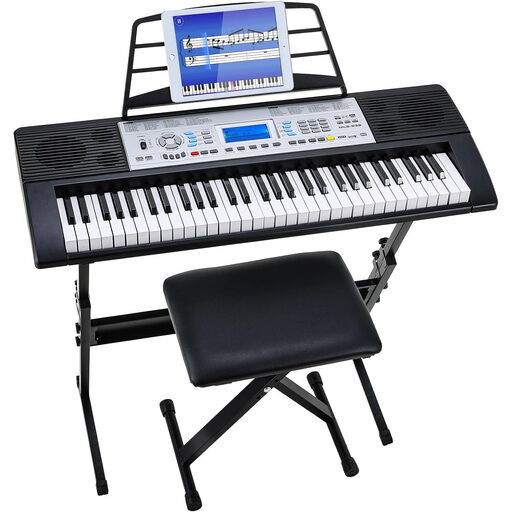
Digital keyboard set, 61 keys, stand, stool and music rest
A good option if you want to play on a standalone keyboard as well as create worksheets.
The product title lists 61 keys, USB-MIDI, 300 sounds and 300 rhythms, plus a stand, stool and music rest.
View at Joybuy
 No image available
Digital keyboard set, 61 keys, stand and stool
An option to consider if you want to play examples on a standalone keyboard alongside your worksheet work.
The product title lists 61 keys, 500 sounds, dual speakers, a stand and a stool.
View at Joybuy
Frequently asked questions
Do I need a MIDI keyboard to create printable music worksheets?
No, you can also enter notes using your computer keyboard. MuseScore Studio supports this input method and can export a score as a PDF; try this workflow before choosing additional hardware.
Can a MIDI controller make sound without a computer?
It depends on the model; don’t assume that a MIDI controller makes sound on its own. For example, Akai says that the MPK Mini MK3 sends MIDI messages to computer software and doesn’t produce sound itself. Check the specifications for the exact model.
What should I check if my keyboard isn’t entering notes?
Check the connection and select the intended MIDI input device in your notation software. MuseScore Studio provides separate audio and MIDI settings for this; also refer to the manufacturer’s model-specific instructions.
How can I listen privately in a shared office?
Check which audio outputs are supported by your computer or the exact keyboard version, and whether you can connect headphones to one of them. A USB-MIDI connection for entering notes doesn’t, by itself, confirm which listening connections are available.
Which product safety rule applies to a keyboard sold in the Netherlands?
The Netherlands Food and Consumer Product Safety Authority states that CE marking is compulsory for electrical products. Check the CE marking and accompanying product information for the exact version on offer; a general rule doesn’t confirm that a specific model complies.


