First, choose a keyboard layout that works with the characters and shortcuts you need on your computer. Visual Studio Code notes that shortcuts follow the active layout. Then choose a size and connection that suit your workspace: compact keyboards omit the number pad, full-size models include one, while split keyboards offer a different key layout. None of these keyboard designs, on its own, proves that a museum website is accessible; the W3C guideline for keyboard operation applies to web content.
Who is this choice relevant to?
People who type lots of code and copy
If you switch between collection descriptions, code and a local preview, it helps to have a layout where characters and editor shortcuts are where you expect them to be. Visual Studio Code notes that shortcuts follow the active keyboard layout.
People who spend a lot of the day typing
If you type for long periods, you’ll want to position your keyboard, mouse and hands comfortably in your workspace. Workplace requirements depend on the working environment; Arboportaal explains the rules for working with display screens.
People working at a shared desk
If you share a workspace, consider the room around your keyboard, typing noise and how it connects to your computer. CHERRY describes its TKL model as quiet to type on; this is the manufacturer’s description, not an independent noise measurement.
What should you look for when choosing?
Compact and wired
A good fit if: you rarely use the number pad and want to save space at a fixed workstation.
Consider: a TKL keyboard omits the number pad; also check that the cable and available layout suit your needs.
Full-size keyboard
A good fit if: you often enter collection numbers or other figures and use the number pad.
Consider: a full-size keyboard takes up more desk space. The wired Logitech K120 is a straightforward option; Logitech says the MX Keys S can switch between up to three devices.
Split keyboard
A good fit if: you’d like to try a different hand position when typing for long periods.
Consider: a different layout may take some getting used to. The Logitech ERGO K860 has a fixed split design, while the R-Go Split Break consists of two movable halves. Neither, on its own, proves that physical complaints will be prevented.
The percentages show the relative first priority when choosing a keyboard for building and locally checking a museum collection website.
| Consideration |
What should you check? |
Who might find this especially important? |
| Layout and shortcuts |
Compare the physical and active system layouts; test punctuation and the editor shortcuts you use. |
When I switch between code, collection descriptions and previews, I want characters and shortcuts to be where I expect them. Around 33% of consumers give layout and shortcuts top priority. |
| Workspace comfort |
Consider the position of your keyboard and mouse together; try out the hand position if possible. |
During long typing sessions, I want to position my hands and mouse comfortably, without assuming that a keyboard will prevent physical complaints. Around 25% of consumers put workspace comfort first. |
| Quiet operation and desk space |
Check whether you need the number pad; if possible, assess the noise for yourself. |
At a shared workstation, I want to leave enough room and take typing noise into account. For around 25% of consumers, quiet operation and desk space are the top priorities. |
| Connectivity and ease of use |
Check the available ports, your preferred connection type and whether any configuration software is supported on your computer. |
When I connect a keyboard, I want to know whether it works with my computer; easy switching can also matter if I use several devices. Around 17% of consumers give connectivity and ease of use top priority. |
Common mistakes when choosing
-
Assuming the layout shown on the packaging guarantees all shortcuts
Visual Studio Code shortcuts follow the active keyboard layout. So the name of the physical layout alone won’t tell you where every character and shortcut will appear on your computer.
Check the physical and active layouts, and try the shortcuts you use for code and previews.
-
Choosing a compact keyboard without considering the number pad
The CHERRY STREAM KEYBOARD TKL has no number pad; the Logitech K120 does.
Think about how often you enter figures before choosing a compact or full-size model.
If you miss having a number pad, entering figures could take extra steps or you may need a separate number pad.
-
Seeing a split keyboard as a substitute for setting up your whole workspace
Arboportaal covers the setup of a display-screen workstation separately from the choice of keyboard. A different keyboard, on its own, is no proof that physical complaints will be prevented.
Assess the whole setup and try out the positioning; don’t treat claims about reducing discomfort as a guarantee.
Brands to compare
CHERRY
The STREAM KEYBOARD TKL is a wired, more compact model without a number pad; the full-size STREAM KEYBOARD retains one.
- CHERRY specifies an SX scissor mechanism for the TKL model and describes it as quiet to type on.
- The manufacturer’s description is not an independent noise comparison. Check the available key layout and bear in mind that there’s no number pad.
Logitech
The K120 is a wired option; the MX Keys S is a full-size wireless keyboard with configurable functions; the ERGO K860 has a fixed split design.
- Logitech specifies USB plug-and-play and a number pad for the K120, and switching between up to three devices for the MX Keys S.
- Check the connection for each model and whether the software features you want work on your system. These product descriptions don’t prove that one model will be more comfortable for everyone.
R-Go Tools
The R-Go Split Break is designed for people looking for two keyboard halves that can be positioned separately.
- R-Go Tools describes two movable halves and a break indicator controlled by Break software.
- The indicator’s operation also depends on the software; the manufacturer’s description doesn’t prove that physical complaints will be prevented.
Microsoft
The Microsoft Ergonomic Keyboard is a wired keyboard with a split design, for use with a compatible computer.
- Microsoft Support identifies this model as a USB keyboard.
- Before buying, check the current model and the key layout you need.
Joybuy products for coding and previewing
These keyboards offer different options for layout, number pad and connectivity. Check the physical layout and connection type against your own computer and everyday typing needs.
 No image available
Wired keyboard with number pad, QWERTY, black
An option if you’re looking for a full-size keyboard with number input.
QWERTY layout, number pad, full-size and plug-and-play.
View at Joybuy
 No image available
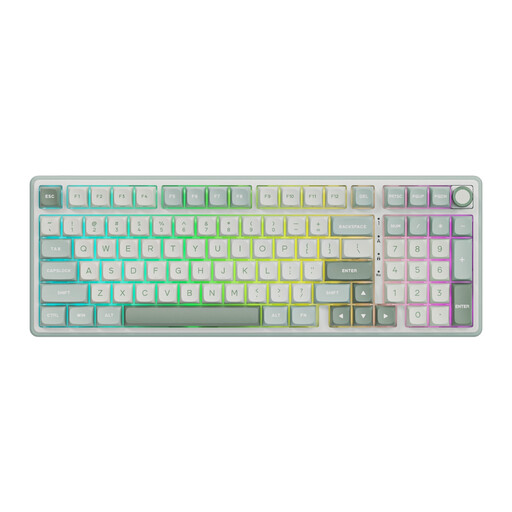
RK ROYAL KLUDGE R98 Pro, Beige Switch
A wired option if you’re looking for a mechanical keyboard with a number pad.
Mechanical, wired, with number pad and Hot-Swappable Sky Cyan version with Beige Switch.
View at Joybuy
 No image available
AULA F75 MAX 75%, US QWERTY, Reaper Switch
A compact option if you want to compare different connection types and don’t need a number pad.
75% size; wired, Bluetooth or 2.4G. The product name specifies a US QWERTY layout; check how it works with your active system layout for characters and shortcuts.
View at Joybuy
 No image available
AJAZZ AK980 V2, 98% QWERTY, Starry Night Gray
An option if you’re looking for a number pad and several connection types in one keyboard.
98% layout, QWERTY, wired, Bluetooth or 2.4G; the product name specifies a 10000mAh battery and Gift Switch V2.
View at Joybuy
 No image available
REDRAGON wired mechanical keyboard, 94 keys
An option if you’re looking for a wired keyboard with mechanical keys and a wrist rest.
94 keys, metal casing, detachable wrist rest and phone stand.
View at Joybuy
Frequently asked questions
Do you need to buy a specialist programming keyboard for a local preview?
No. A specialist programming model is not a proven requirement for viewing a local preview. Visual Studio Code describes customisable shortcuts that are linked to the active keyboard layout, so check the layout and shortcuts on your own computer.
How can you check a museum collection website using only a keyboard?
Use the keyboard interface to work through the interactive features in the local preview and check that you can operate them. W3C Success Criterion 2.1.1 describes keyboard operation for web content, with an exception for functions that inherently require a movement path. This is a requirement for web content, not a certification for the keyboard.
Which setting should you check after connecting your keyboard?
Check that the active system layout matches the physical layout, then test your most-used editor shortcuts. Visual Studio Code notes that the shortcuts shown follow the current layout and can be customised.
Are there Dutch workplace rules that make a separate keyboard relevant?
For employees who work with a display screen for more than two hours a day, Arboportaal states that the screen and keyboard must not be attached to each other. When using a laptop, you must be able to use a separate screen or keyboard. Whether this applies to you depends on your working situation.
What applies in the Netherlands if a keyboard is faulty after an online purchase?
A faulty product and the cooling-off period for an online distance purchase are two separate matters. According to the Dutch government, in many cases you have a 14-day cooling-off period when buying remotely from a business, subject to exceptions. If a product is faulty, you’re entitled to a product that works properly, and the seller is your point of contact for a solution. The Dutch government also states that the Netherlands has no fixed, general statutory guarantee period for products.


