Who is this relevant to?

Multilingual data-entry user

Enters names and notes using characters from several languages, and wants the physical keys to match the selected input layout. Microsoft Support explains how to manage keyboard layouts in Windows, while Apple Support covers input sources and accented characters on Mac.

Quantity cataloguer

Regularly enters numbers as well as text, and weighs up an integrated numeric keypad against a separate one or a more compact keyboard. Keychron and R-Go Tools describe examples of full-size and compact layouts.

Long-session computer user

Works at a screen for extended periods and considers more than just the keyboard, including the distance to the mouse and the overall workspace setup. TNO’s Display Screen Work factsheet discusses keyboard width in relation to mouse use.

What should you look for?

What to consider What should you check? Who is this most important for?
Multilingual characters Check the physical layout of the version you’re considering, then test the characters you need using your computer’s input settings. If I enter names with accents or characters from different languages, I want to know which keys and input source will work for me. Around 36% of this buyer group put multilingual characters first.
Numbers alongside text Consider how often you enter numbers and compare an integrated numeric keypad with a separate one or a compact model. If I regularly enter quantities, codes or dates, I want to decide whether a numeric keypad needs to be within easy reach. Around 29% of consumers make number entry their top priority.
Workspace for long sessions Look at the keyboard’s width and consider the mouse position as part of your overall workspace setup. For long data-entry sessions, I want to position my keyboard and mouse so that the whole workspace works well for me. Around 21% of this buyer group prioritise their workspace and extended typing.
Switching between devices Check which connections the model offers and whether its settings and connections suit your computers. If I catalogue on several computers, I want to switch between devices without unnecessary hassle. Around 14% of consumers prioritise switching between devices.

How to avoid common buying mistakes

  • Assuming the key labels determine which characters you enter

    The physical keyboard layout and the active software input setting are separate. Windows and macOS each offer options for input layouts or input sources.

    Compare the layout of the version you want to buy, then test the characters in your catalogue in the application you use to enter them.

  • Choosing a compact keyboard without considering your number entry

    A compact model doesn’t always have an integrated numeric keypad. A separate keypad can be positioned independently, but you’ll need to buy it separately.

    Check how many catalogue fields require numbers, then choose between an integrated or separate numeric keypad.

  • Assuming an ergonomic product claim guarantees you won’t experience discomfort

    As well as keyboard width, TNO’s Display Screen Work factsheet covers mouse use and other factors relating to your workspace. A keyboard alone can’t tell you how the complete setup will work for you.

    Consider the position of your keyboard and mouse alongside the rest of your workspace, and make sure you vary your work.

  • Not checking the exact version

    A model name can cover several physical layouts or switch variants.

    Before buying, check the layout and variant of the version you’re considering to make sure they suit your input needs and preferences.

Brands to compare

Logitech

The MX Keys S is worth comparing if you’re looking for a low-profile wireless work keyboard with device switching and customisable actions.

  • Logitech says you can switch between up to three devices and set up Smart Actions using Logi Options+.
  • The manufacturer claims that the stable keys reduce noise; this isn’t an independent noise measurement. Also check the physical layout of the version you’re considering.

Keychron

The V6 Max is a full-size mechanical keyboard worth comparing if you’re looking for customisable keys and a numeric keypad.

  • Keychron specifies a full-size ANSI layout, hot-swappable switches and key remapping via Keychron Launcher for the V6 Max.
  • You’ll need to choose a switch variant; the product specifications can’t tell you which type will feel comfortable for everyone to type on.

R-Go Tools

The Compact Break is a compact option worth comparing if you want a narrower keyboard and the option to position a separate numeric keypad.

  • R-Go Tools offers, among other options, a wired QWERTY-US version and describes a separate Numpad Break.
  • The break indicator works with R-Go Break software. Claims about ergonomic benefits come from the manufacturer and don’t guarantee a personal result.

CHERRY

The KW 9100 SLIM is a low-profile keyboard worth comparing if you want to use Bluetooth or a wireless USB receiver.

  • CHERRY lists Bluetooth and a wireless USB receiver for this model.
  • Check the language version available: the connection method and physical keyboard layout are separate features.

Keyboards at Joybuy

This selection includes full-size keyboards with numeric keypads and more compact models for multilingual input, number entry and different desk layouts.

Trust Vaiya wireless full-size keyboard, QWERTY US, black

Trust Vaiya wireless keyboard, full-size, QWERTY US, black

An option if you want an integrated numeric keypad and the ability to switch between devices.

The product information lists scissor keys, a USB receiver and Bluetooth, plus connection to up to four devices.

View at Joybuy

Ajazz AK820 Pro, 75%, QWERTY US, grey

Ajazz AK820 Pro, 75%, QWERTY US, grey

A compact option to compare if you want to use less desk space for your keyboard.

The product information lists an 82-key layout and hot-swappable switches. It can connect via cable, Bluetooth or 2.4 GHz.

View at Joybuy
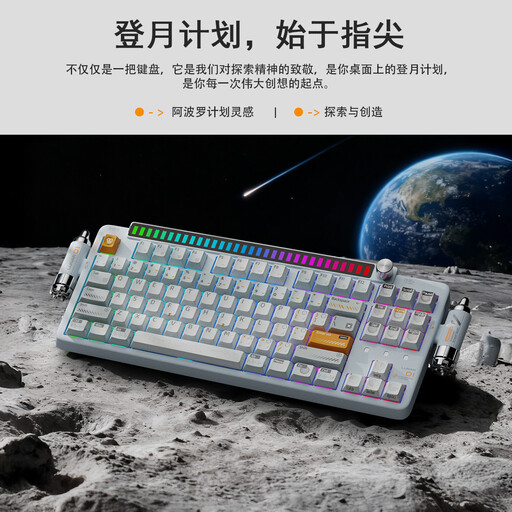
KEYSME Lunar 01, 80%, QWERTY US, white

KEYSME Lunar 01, 80%, QWERTY US, white

A compact option to compare if you’re looking for a programmable knob and several connection options.

The product information lists an 80% layout, hot-swappable switches and a programmable knob. It can connect via Bluetooth, a wireless receiver or a cable.

View at Joybuy
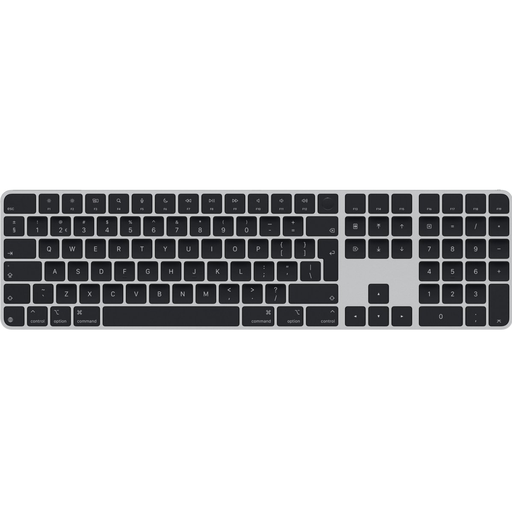
Apple Magic Keyboard Universal, USB and Bluetooth, QWERTY Dutch, black

Apple Magic Keyboard Universal, USB and Bluetooth, QWERTY Dutch, black

An option to compare if you want a Dutch QWERTY layout and an integrated numeric keypad.

The product information lists Bluetooth, a rechargeable battery and a numeric keypad.

View at Joybuy
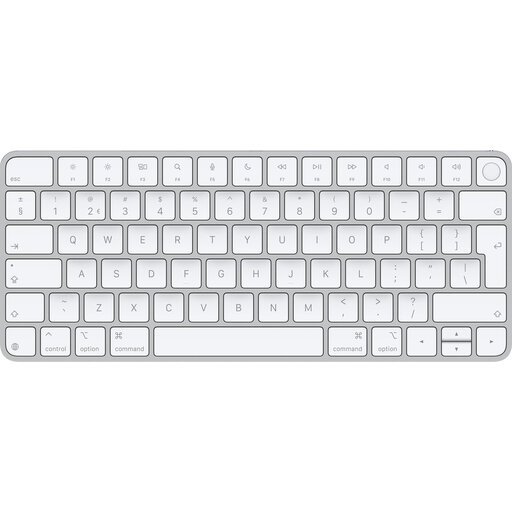
Apple Magic Keyboard with Touch ID for Mac models with Apple Silicon, Dutch

Apple Magic Keyboard with Touch ID for Mac models with Apple Silicon, Dutch

A compact option to compare if you’re looking for a Dutch keyboard for a compatible Mac.

The product information lists a tenkeyless version without an integrated numeric keypad, Bluetooth and Touch ID. This version is designed for Mac models with Apple Silicon; the description specifies macOS 11.4 or later.

View at Joybuy

Frequently asked questions

Do you need a special physical keyboard to enter names with accented characters?

Not necessarily. Microsoft Support explains how to add or change keyboard layouts in Windows, while Apple Support covers input sources and the accent menu on Mac. Test the characters used in your catalogue in the application you use to enter them.

When is a numeric keypad useful for a seed catalogue?

A numeric keypad is worth considering if you regularly enter quantities, codes or other numbers. Choose between an integrated keypad, a separate numeric keypad and a compact layout based on the fields you use.

Is a compact keyboard automatically better for long typing sessions?

Not necessarily. A narrower keyboard can leave room to position the mouse closer, but your whole workspace still matters. TNO’s Display Screen Work factsheet discusses keyboard width alongside mouse use and other factors relating to screen-based work.

Should an employee who catalogues on a laptop for long periods be able to use a separate keyboard?

According to Arboportaal, for employees who work at a screen for more than 2 hours a day, the screen and keyboard must not be attached to each other. When using a laptop, it must therefore be possible to use a separate screen or keyboard. This is a conditional workplace requirement, not a general rule for every private buyer.

What statutory guarantee and cancellation period apply to a purchase by a consumer in the Netherlands?

The Dutch Government says there is no fixed statutory guarantee period in the Netherlands: the product must be of satisfactory quality, taking factors such as use and reasonable expectations into account. For distance purchases from a seller, a 14-day cancellation period applies in many cases. Check the relevant exceptions and the information provided by the seller.
