What should you look for?
First, check that the physical layout suits the languages you write in and the shortcuts you use most often. Then assess the guide’s keyboard accessibility separately, before comparing size, positioning and connection options.
| What to consider |
What to look for when buying |
Who is this important for? |
| Layout and multilingual input |
Check the exact language variant and try commonly used accents, punctuation and CMS shortcuts with your computer’s input layout. |
If I write lots of text in different languages, I want the key labels and characters I type to suit the way I work. Around 36% of consumers give physical layout and multilingual input top priority. |
| Testing the guide without a mouse |
Check that the keys you need for navigation are available, and test the actual pages and forms separately. |
When I check accessibility, I need to be able to navigate the published guide using the keyboard; a customised keyboard is no substitute for that test. Around 29% of consumers give keyboard testing top priority. |
| Typing posture and workspace |
Compare the keyboard and mouse width and positioning with your desk; allow time to adjust if you choose a split layout. |
If I type for long periods, I want to be able to adjust the position of my hands and mouse to suit my workspace, without expecting a keyboard to prevent symptoms on its own. Around 21% of consumers give typing posture and workstation setup top priority. |
| Connectivity and workflow |
Check that the connection suits your devices and that any configuration software will work on your work computer. |
If I switch between devices or want to set up custom editor actions, I want to know in advance which connection and software I’ll need. Around 14% of consumers give switching between devices or custom editor actions top priority. |
Keyboards at Joybuy
This selection includes compact keyboards listed with a US layout and a full-size keyboard with Belgian AZERTY. Before buying, check that the physical key labels suit the languages you write in and your usual input layout.
 No image available
AULA F75, US QWERTY
The compact 75% layout may suit you if you’re looking for a smaller keyboard and a US layout works for your input needs.
75% layout, US QWERTY and three connection modes, according to the product title.
View at Joybuy
 No image available
Redragon M68, US layout
The compact 68-key layout is an option if you want to save space and the US layout suits the way you work.
68 keys and US layout, according to the product title.
View at Joybuy
 No image available
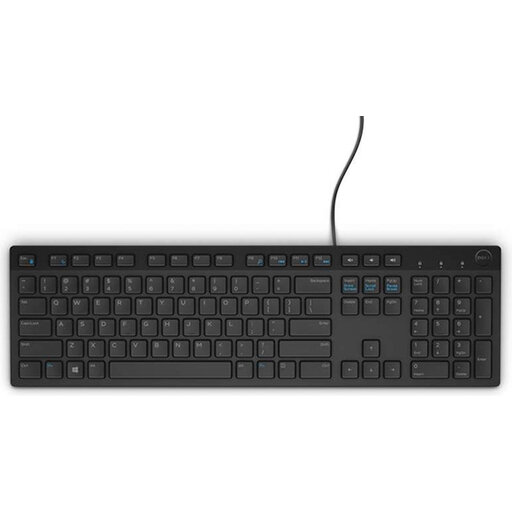
DELL KB216, Belgian AZERTY
This model may suit you if you’re looking for a full-size keyboard with a numeric keypad and a wired USB connection, provided Belgian AZERTY is the layout you need.
Full-size layout with numeric keypad, USB connection and Belgian AZERTY.
View at Joybuy
 No image available
AJAZZ AK820 MAX, US QWERTY
According to the product information, the compact layout retains arrow keys and a function row; check that the US QWERTY layout suits your input needs.
75% layout, US QWERTY and Bluetooth, 2.4 GHz or wired USB-C connection.
View at Joybuy
 No image available
AJAZZ AK820 V2, wired HE magnetic
The compact layout described retains a function row, arrow keys and navigation cluster; check the exact key variant if the layout is important for your work.
Wired version and 75% layout, according to the product title; the product information lists 81 keys.
View at Joybuy
Frequently asked questions
Do I need a separate keyboard for every language in my location guide?
Not necessarily. Windows lets you add and switch between input layouts, while on a Mac you can set up input sources for other languages. Do check that the physical key labels and chosen layout work for the characters you need.
How can I check whether the published guide can be used with a keyboard?
Test the actual features without using a mouse. Success Criterion 2.1.1 of the W3C Web Accessibility Initiative’s WCAG concerns operating content through a keyboard interface; buying a particular keyboard does not demonstrate compliance.
What should I do about passages in other languages for screen readers?
Make sure the language of passages in other languages can be determined programmatically where the relevant WCAG criterion requires it. This is a property of the published content, not of the language shown on the keyboard keys.
Does a Dutch location guide have to be digitally accessible by law?
That depends on the provider and the service. DigiToegankelijk describes the obligations for websites and apps run by public authorities that fall under the Besluit digitale toegankelijkheid overheid. Business.gov.nl’s information about the European Accessibility Act includes e-commerce services, among others; the description ‘location guide’ alone does not establish that this category applies.
Do I have to use a separate keyboard if I create the guide on a work laptop?
Not every buyer does. Arboportaal describes workstation requirements for employees who work at a screen for more than 2 hours a day: in those cases, the screen and keyboard must not be attached to each other. Check whether these working arrangements apply to you.
What can I do if the keyboard develops a fault?
For a consumer purchase in the Netherlands, statutory conformity applies: you’re entitled to expect a product that works properly, and if there’s a fault, repair or replacement may be appropriate. Any additional manufacturer’s warranty is separate; different rules may apply to business purchases.


