What should you look for?
Compact keyboard
Choose this if: you mainly enter text and want to keep your mouse close to the keyboard.
Consider: whether you need a separate number pad; the S-board 840 doesn’t have one.
Full-size keyboard
Choose this if: you enter numbers regularly and have enough room for both your keyboard and mouse.
Consider: a full-size model takes up more width; also check the connection and operating system version.
Split keyboard
Choose this if: your hand position is a priority when you type for long periods.
Consider: how much desk space you’ll need and whether the halves are adjustable; not every split model has a number pad.
When you’re indexing with the source and data-entry field side by side, navigation, hand position, number entry and connectivity each play a different part.
| What to consider |
What should you check? |
Who is this important for? |
| Layout and navigation |
Check the QWERTY variant, how easy it is to reach the arrow and navigation keys, and the shortcuts available in your indexing software. Microsoft Support describes window snapping in Windows; it isn’t a special keyboard feature. |
When I have the source and data-entry field side by side, I want to move the cursor and selection easily. Around 36% of consumers put navigation first. |
| Hand position |
Compare the available space and the shape of the keyboard. For an adjustable model, check that you can position the halves as you prefer. |
When I do a lot of data entry, I want to assess which shape and workstation set-up suit my hand position, without treating a product claim as a guarantee. Around 29% of consumers prioritise hand position. |
| Number pad and mouse space |
Consider how many numbers you enter and whether a built-in, integrated or separate numeric keypad would suit your work. |
If I often enter dates or case numbers, I want to type numbers directly while keeping enough room for my mouse. Around 21% of consumers prioritise number entry. |
| Connection and key noise |
Check that your computer has the required connection. Treat descriptions such as ‘quiet’ as manufacturer claims, not measured noise levels. |
At a shared workstation, I want a suitable connection and to take the sound of the keys into account. Around 14% of consumers prioritise connectivity or key noise. |
Keyboards at Joybuy
This selection mainly includes keyboards with a number pad and compact keyboards with navigation keys for work where the source and data-entry field are side by side.
 No image available
Wired QWERTY keyboard with numeric keypad
An option to consider if you’re looking for a full-size keyboard with a number pad and separate navigation keys.
QWERTY layout, numeric keypad, arrow keys and navigation keys; the description lists a wired plug-and-play connection.
Joybuy
 No image available
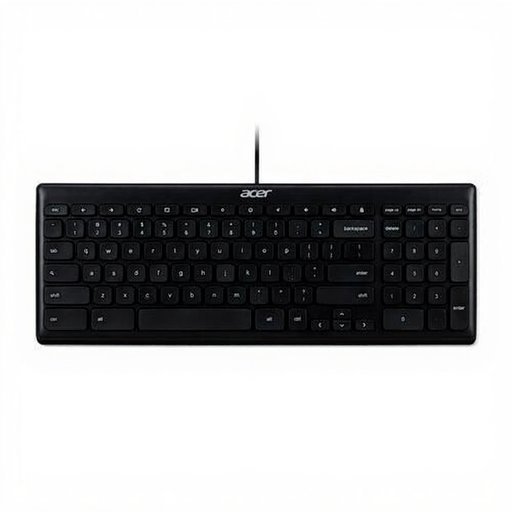
Acer GP.KBD11.00S Office Keyboard, QWERTY US International
Worth comparing if you’re looking for a wired office keyboard with a number pad.
QWERTY US International layout, numeric keypad, USB connection and a 1.8 m cable.
Joybuy
 No image available
AJAZZ AK820 75% wired mechanical keyboard, QWERTY US, grey and white
A compact layout to consider if you want to keep your navigation keys and free up desk space.
The description lists arrow keys, a function row and a navigation cluster. The title mentions PBT keycaps and an adjustable stand; check that the QWERTY US layout suits your typing.
Joybuy
 No image available
AJAZZ AK820 Pro 75% tri-mode keyboard, QWERTY US, purple Flying Fish switches
A compact option to compare if you want to use navigation keys while entering data and are considering different connection types.
The title lists QWERTY US and connection via cable, Bluetooth or 2.4 GHz. Check that the layout and connection options suit your computer and workstation.
Joybuy
 No image available
Apple Magic Keyboard with Touch ID and numeric keypad, Dutch layout
An option if you want to enter numbers and navigate documents on a keyboard with a Dutch layout.
The description lists a numeric keypad, document navigation and arrow keys, and Bluetooth. According to the title, this version is designed for Mac models with Apple silicon; check compatibility before buying.
Joybuy
Frequently asked questions
Do I need a special keyboard to have two windows side by side?
No. Microsoft Support explains that in Windows 10 and 11 you can snap windows using your mouse or the Windows logo key and arrow keys. Check separately which shortcuts your indexing software supports.
How do I choose between a built-in and a separate number pad?
Base your choice on how many numbers you actually enter and how much space you need beside your keyboard. A full-size model keeps the number pad close to hand; with a compact model, you can position a separate keypad wherever you like. First, check whether you need a separate number pad for your data-entry work.
Can an ergonomic keyboard replace breaks?
No. Arboportaal also recommends that employees alternate screen-based work with other tasks or take a break. A keyboard’s shape doesn’t replace this variation.
When should I be able to use a separate keyboard for screen-based work?
According to Arboportaal, for employees who spend more than two hours a day doing screen-based work, the screen and keyboard must not be attached to one another. When using a laptop, it must be possible to use a separate screen or keyboard. These workplace rules aren’t automatically a buying requirement for every personal or volunteer indexer.
Can I simply add names from meeting minutes to a public online index?
Not automatically. The Dutch Data Protection Authority states that organisations need a good reason to process personal data. Before publishing, check whether the organisation is allowed to process the data for this purpose and who can view the index; choosing a keyboard doesn’t give you permission to publish data.


