
Marker with limited desk space
Wants to keep space beside the keyboard for a mouse, screen and assignments. So assess your entire workstation setup, not just the keyboard’s width.


Start by considering how much space the keyboard, mouse and marking materials will take up together. Then decide which navigation and number keys you need. A compact wireless model gives you more flexibility when positioning it, while a wired tenkeyless model keeps the main typing area but requires a cable. Whichever version you choose, check the physical key layout and connection type. This guide is based on specifications and workplace guidance, not on a measured comparison of typing comfort.
Wants to keep space beside the keyboard for a mouse, screen and assignments. So assess your entire workstation setup, not just the keyboard’s width.
Switches between text, fields and documents while marking work, and wants to check that familiar keys and the physical layout are retained.
May use more than one computer and wants a connection type and switching method that work with those devices.
First, measure the space available for both your keyboard and mouse. Then decide whether a dedicated number row, integrated number input or a particular connection type matters most for the way you mark work.
| What to consider | What to look for | Who should consider this? |
|---|---|---|
| Space for your keyboard and mouse | Measure the available width, including room for your mouse, and compare it with the dimensions of the exact version. | If you want to fit your mouse and marking materials beside the keyboard, consider the whole setup; around 33% of consumers prioritise space for their keyboard and mouse. |
| Familiar key layout | Check the physical layout, including the Enter key, punctuation and navigation keys. | If you edit a lot of text while marking work, you’ll want to keep keys in familiar positions; around 27% of consumers prioritise key layout. |
| Connection to your work computer | Check which connections are available and whether Bluetooth or software is permitted on your work computer. | If you use a desktop computer or switch between compatible devices, choosing the right connection is crucial; around 20% of consumers focus on the connection and switching between devices. |
| Entering numbers | Consider how often you enter scores consecutively and whether an integrated number pad would work for you. | If you enter lots of numbers, a dedicated or integrated solution may be useful. If you only do so occasionally, you may prefer to save space; around 20% of consumers focus on how numbers are entered. |
A narrower keyboard only makes a difference if you can make good use of the extra space for your mouse and marking materials.
Measure the whole desk setup before choosing a size.
A tenkeyless model may retain the main typing area, while compact models differ in how you enter numbers and use the navigation keys.
Check the physical key layout, paying particular attention to the keys you use often when marking work.
According to Logitech, the Logitech Pebble Keys 2 K380s uses AAA batteries. R-Go Tools says the pause LED on the R-Go Compact Break is controlled by software.
Check that Bluetooth and any required software are permitted on your work computer for the version you choose. If the model uses batteries, remember to factor in battery maintenance.
The Pebble Keys 2 K380s is a compact Bluetooth model for switching between compatible devices.
The STREAM KEYBOARD TKL is a wired option for a fixed workstation if you want to keep the main typing area.
The UltraBoard 950 Wireless combines a compact design with integrated number input.
The Compact Break is a compact option if you want a reminder to take breaks while working at your computer.
These models are for anyone looking for a compact layout when marking work digitally at a small desk. The selection includes wired options and a tenkeyless model.
 No image available
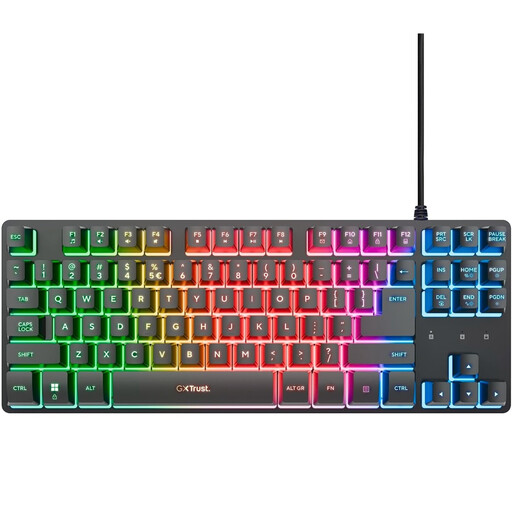
A wired tenkeyless option for a fixed workstation if you want to keep space free for your mouse.
The product name specifies a QWERTY layout and compatibility with PC and PS5. There is no separate numeric keypad.
 No image available
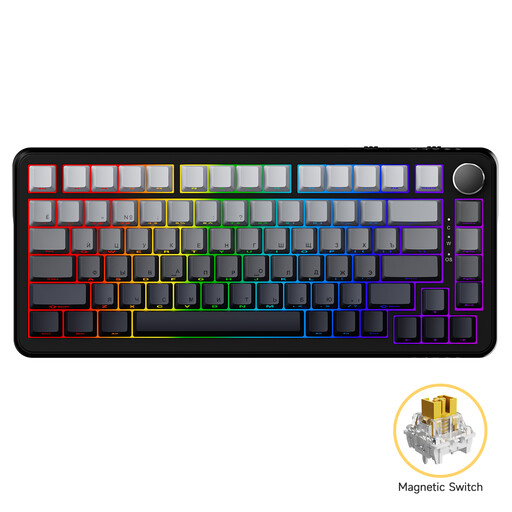
A compact wired option if you’re looking for a smaller layout and want to check the physical keys beforehand.
The product name specifies Magnetic Axis and an 82-key layout.
 No image available
A tenkeyless model to consider if you’re looking for a more compact layout. Check beforehand that the US key layout suits you.
The product name specifies the Tenkeyless version and a US layout.
 No image available
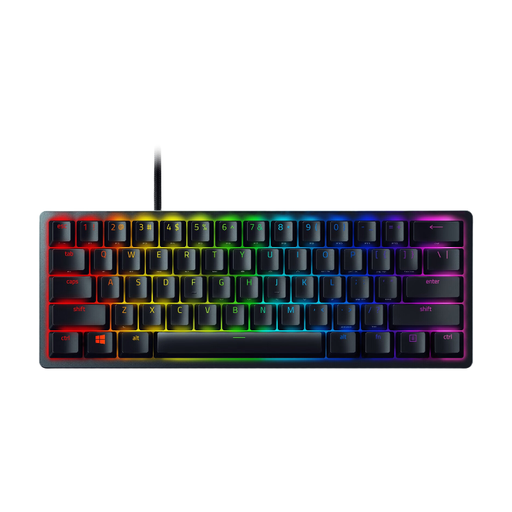
A mini version for anyone who wants to use as little desk space as possible for their keyboard. Check that the layout suits your work.
The product name specifies Purple Switch and a US QWERTY layout.
 No image available
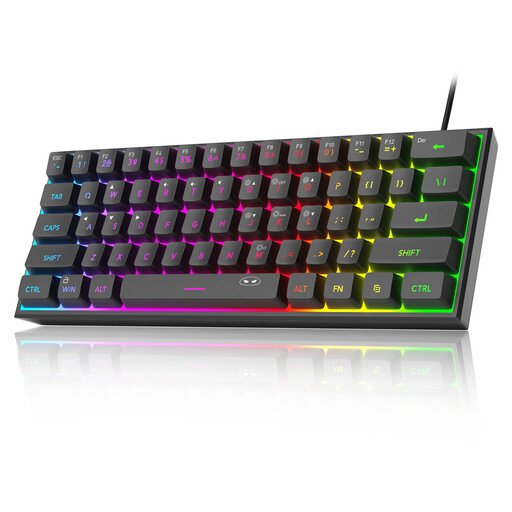
A compact wired option for a fixed workstation where space for your mouse matters.
The product name specifies a 60% layout with 61 keys and US QWERTY.
For employees who work at a screen for more than two hours a day, the Arboportaal says that the screen and keyboard must not be attached to each other. If you use a laptop, you must therefore be able to use a separate screen or keyboard. This is not a general requirement for every buyer or every marking session.
No. First check that your computer supports the required connection and that your organisation allows pairing or additional software. Logitech specifies Bluetooth for the Pebble Keys 2 K380s; R-Go Tools says the pause LED on the Compact Break is controlled by software.
Take breaks from screen work and readjust your entire workstation when you move to a different location. The Arboportaal stresses that a well-adjusted workstation and enough movement go hand in hand with managing workload and taking rest breaks; changing your keyboard alone will not address these factors.
For online consumer purchases, the Dutch government says that in many cases you have a 14-day cooling-off period; check whether this applies to your purchase. This is separate from your rights if a product is faulty: there is no fixed statutory guarantee period in the Netherlands, and the seller is your point of contact for a solution.
The Dutch Authority for Digital Infrastructure outlines European requirements for radio equipment and the CE marking for equipment that meets the applicable requirements. Check the conformity information for the exact version you’re considering.