What should you look for when choosing?
Start by weighing up how much you use your mouse against how much number entry you do. Then compare typing noise, connectivity and the layout you need on the shared computer.
The percentages below are for consumers choosing a keyboard for mapping at a shared desk; each row describes a different main reason for buying.
| What to consider |
What to look for when buying |
Who should consider this? |
| Room for your mouse |
Check the keyboard’s width and whether the navigation and function keys you use will remain easy to reach. |
If you often switch between your mouse and keyboard, you’ll want to keep your mouse close to the keyboard. Around 33% of consumers say room for their mouse is their main reason for buying. |
| Typing noise |
Check the mechanism and the description of the exact model; if possible, try the keys in a similar setting. |
If you work close to colleagues, quieter keys may be a factor, although a product description is no substitute for a like-for-like noise measurement. Around 27% of consumers give low typing noise the highest priority. |
| Number entry |
Consider how many numbers you enter and whether you need a separate number pad or can use a number layer. |
If you regularly enter numbers, direct access to a number pad may be important, even if it takes up more space. Around 20% of consumers say number entry is their top priority. |
| Hand position |
Check whether a split model will fit on your desk and whether its connectivity and keyboard layout are compatible with your computer. |
If you want to position the two halves separately, a split model gives you that flexibility, but it also needs space and may take some getting used to. Around 20% of consumers prioritise an adjustable hand position. |
Joybuy products
This selection includes compact keyboards with layouts ranging from 60% to 75%. For each model, check in particular that the keyboard layout and connection are compatible with your computer.
 Image unavailable
AULA WIN60HE 60% wired gaming keyboard
The compact 60% layout may suit you if you want to leave desk space free for your mouse.
The product name mentions Hall effect magnetic switches and a wired connection.
Joybuy
 Image unavailable
Redragon M68 with magnetic switches, US layout
The compact layout can leave more room on your desk for mouse movement.
The product name lists 68 keys and a US layout; check that this layout suits the way you work.
Joybuy
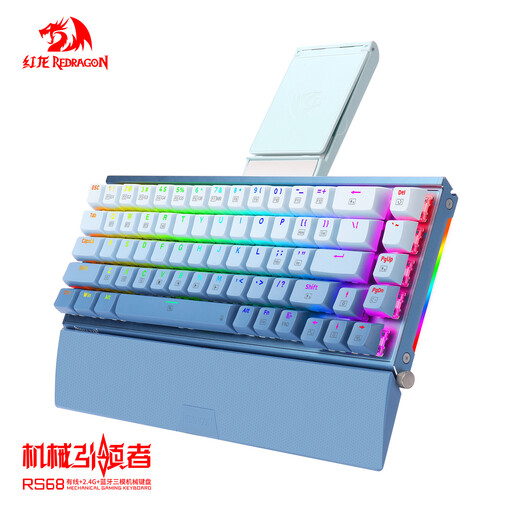 Image unavailable
RS68 mechanical keyboard, 65% layout
The product description lists a compact layout for desk use.
The description mentions wired and wireless connection options, as well as a detachable wrist rest. Check which connection applies to the exact model.
Joybuy
 Image unavailable
AJAZZ AK820 MAX, 75%, German QWERTZ layout
The product description presents the 75% layout as a space-saving option for desk use.
The tri-mode connection described includes Bluetooth, 2.4 GHz and USB-C. The product name specifies a German QWERTZ layout.
Joybuy
 Image unavailable
AJAZZ AK820 75% wired, US QWERTY
The 75% layout may suit you if you’re looking for a more compact keyboard for desk use.
The product name specifies a wired connection, hot-swappable linear switches and a US QWERTY layout. It also lists compatibility with PC, Windows and Mac.
Joybuy
Frequently asked questions
Does a keyboard for QGIS need special mapping keys?
No. According to the QGIS documentation, shortcuts can be customised. Check that the keys you need are easy to reach on your computer; other mapping software may work differently.
How should I set up a shared workstation each time?
The Arboportaal advises setting up your workstation again whenever you sit somewhere different. Keep a relaxed posture, position your mouse within easy reach, and vary your posture and tasks. This is workstation guidance, not evidence that a particular keyboard has a therapeutic effect.
Can I simply connect a wireless keyboard to a shared computer?
First check which wireless connection the exact model supports and whether pairing with that computer is possible and permitted. According to the manufacturer, the UltraBoard 950 Wireless uses Bluetooth; the UltraBoard 950 V2 is wired and uses USB-C.
What rights do I have when buying a keyboard online in the Netherlands?
For many consumer purchases made at a distance, you have a 14-day cooling-off period, according to the Dutch government. It also states that statutory guarantees entitle you to a product that works as it should, and that there is no fixed statutory guarantee period. This does not necessarily apply to a purchase made by an employer.
Is a separate keyboard a legal requirement for screen work?
For employees who work at a screen for more than 2 hours a day, the Arboportaal describes a workplace requirement that the screen and keyboard must not be attached to one another. When using a laptop, a separate screen or keyboard must therefore be available. This does not mean that every individual buyer has to choose a particular model.


