Start by choosing a keyboard that suits the way you work on maps. A compact model can leave more room for your mouse, while a numeric keypad can be useful if you enter a lot of numbers. Also check that your mapping software and operating system support the shortcuts you want, and consider the layout, connection and your overall workstation. A shape described as ergonomic is not, on its own, a guarantee against discomfort.
Who is this guide for?
Map editor who uses the mouse a lot
If you often switch between typing and pointing while editing, check that you have enough room on your desk for the mouse and that your whole workstation suits the way you work. TNO and Arboportaal highlight the importance of mouse use and workstation set-up when working with screens.
Map-maker who repeats the same tasks
If you often carry out the same edits, check which keyboard shortcuts your mapping software supports and whether you can customise them. The QGIS documentation describes configurable shortcuts; Logitech describes Smart Actions for the MX Keys S via Logi Options+.
Map data entry
If you regularly process strings of numbers or table data, weigh up the convenience of a built-in numeric keypad against the extra desk width it takes up. The amount of data entry you need depends on the mapping task.
What should you look for?
Start with your main task: frequent mouse use, repeated edits or entering numbers. Then check which layout and connection suit the job.
| What to consider |
What to look for |
Who should pay particular attention? |
| Posture and mouse space |
Check the space beside the keyboard and assess your whole desk set-up; a shape described as ergonomic does not prove that it reduces discomfort. |
If you often switch between the mouse and keyboard while editing maps, having space beside the keyboard may matter more to you. Around 29% of consumers prioritise posture and mouse space. |
| Keyboard shortcuts |
Check that your mapping software supports the combinations you want and that the keyboard layout and any accompanying software are suitable. |
If you repeat the same map edits, first check which shortcuts you can actually use. Around 23% of consumers prioritise shortcuts for recurring tasks. |
| Entering numbers |
Check whether the model has a built-in numeric keypad and whether its wider layout fits on your desk. |
If your mapping task involves entering a lot of numbers in succession, direct access to a numeric keypad may be worth the extra desk width. Around 18% of consumers put number entry first. |
| Key noise |
Manufacturers may describe keys as quiet, but this is not an independent, comparable measurement of noise levels. |
If you work in a shared home space, typing noise may influence your choice. Around 18% of consumers prioritise a quiet workspace. |
| Connections and devices |
Check that the model offers the Bluetooth, USB receiver or wired connection you need and is compatible with the devices you use. |
If you regularly switch between devices while working on maps, check which connection options you need. Around 12% of consumers prioritise switching between devices. |
Pitfalls to avoid
-
Choosing a compact model without considering how much number entry you do
A more compact keyboard can leave room beside the mouse, but CHERRY says the KW 9200 MINI does not have a built-in numeric keypad.
Before choosing a compact or full-size model, count how often you enter numbers in succession for your mapping task.
If you later find you need a numeric keypad, buying one separately may be an additional expense.
-
Assuming ‘ergonomic’ means you won’t experience discomfort
When working with screens, mouse use, breaks from repetitive tasks and workstation set-up also matter. The shape of a keyboard alone does not address these factors.
Assess your whole desk and how you use it, then choose a shape that suits your set-up.
-
Assuming every version with the same model name is identical
Versions may differ in layout, connection or included accessories, and those differences may matter for your mapping work.
Before buying, check the full model name, physical layout, connection and what’s included in the box.
A version that doesn’t suit your needs may have to be exchanged.
Brands to consider
Logitech
The MX Keys S is a wireless option worth considering if you’re looking for configurable actions or the ability to switch between devices.
- Logitech describes Smart Actions via Logi Options+ and switching between up to three devices.
- Check the layout of the specific version and whether you can configure the map edits you want; this is not an independent performance test.
CHERRY
The KW 9200 MINI is a compact option without a built-in numeric keypad, designed for a set-up where space beside the mouse matters.
- CHERRY lists Bluetooth, 2.4 GHz and a wired connection for this model.
- If you enter a lot of numbers, bear in mind that it has no built-in numeric keypad. Also check the layout available.
R-Go Tools
R-Go describes the Compact Break as a compact model with an LED break indicator that works with its own software.
- The break indicator is a stated product feature.
- This feature does not prove that the model prevents individual discomfort. Check the version, layout and software compatibility.
Trust
Trust describes the Primo and Ody II as, respectively, a full-size wired model and a fully wireless model for working from home.
- Trust describes the Primo as having low-profile keys and a USB-C cable with a USB-A converter, while the Ody II has quiet keys and a USB receiver.
- The description of the key noise is not an independent measurement comparing the models.
Keyboards on Joybuy
These keyboards are suited to compact working, number entry or configurable keys and connections for mapping at home.
 No image available
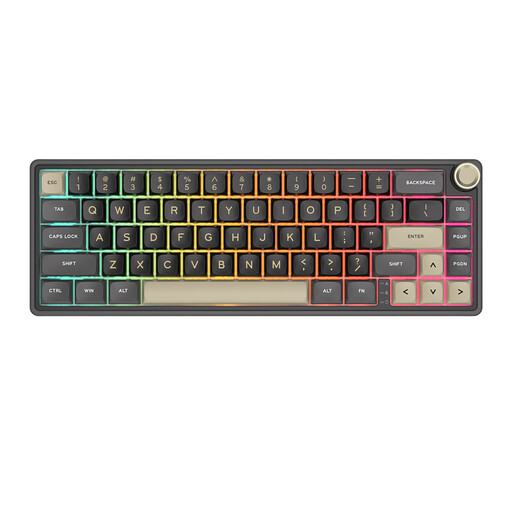
RK ROYAL KLUDGE R65, 66 keys, Chartreuse Switch
An option to consider if you’re looking for a compact keyboard for map editing and customisable key functions.
Wired mechanical keyboard; the product name lists QMK/VIA, 66 keys and Chartreuse Switch.
Joybuy
 No image available
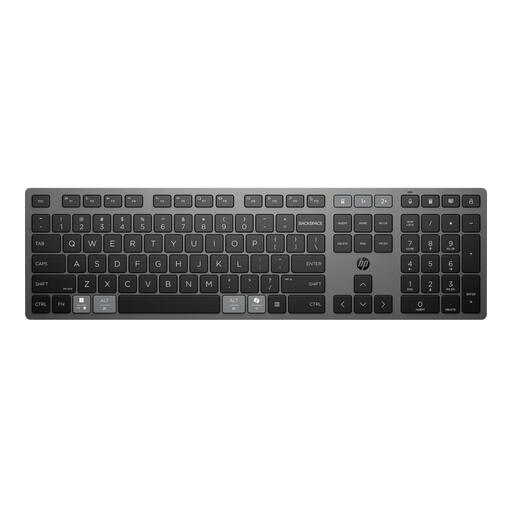
HP 725 Multi-Device Rechargeable Wireless Keyboard
An option to consider if you want to switch between devices while working on maps; check that the connection and layout suit your devices.
The product name describes a rechargeable wireless keyboard for multiple devices.
Joybuy
 No image available
Ajazz AK820 Pro 75%, Tri-Mode, Flying Fish Switch Gray
An option to consider if you’re looking for a compact model and want to compare different ways of connecting.
The product name describes a mechanical keyboard with a QWERTY US layout, wired connection, Bluetooth and 2.4 GHz.
Joybuy
 No image available
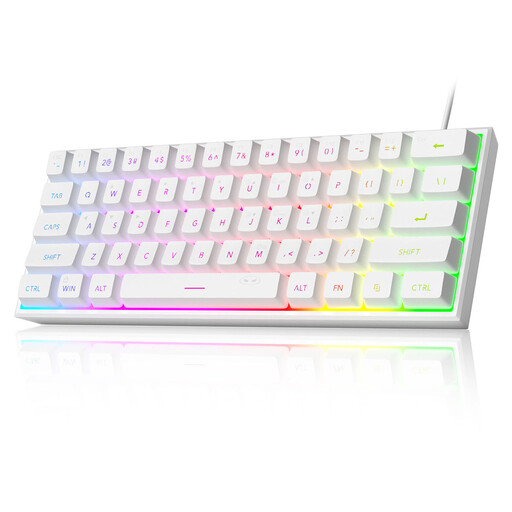
MageGee TS91, 61 keys, QWERTY US layout
A compact option to consider if you want to leave room beside the keyboard while working on maps.
The product name describes a wired model with 61 keys and a QWERTY US layout. The product description says it does not have a built-in numeric keypad.
Joybuy
 No image available
Trust Vaiya, Full-Size, QWERTY US
An option to consider if you enter a lot of numbers and want a full-size keyboard with a numeric keypad.
The product name describes a wireless keyboard with a numeric keypad, scissor keys and a QWERTY US layout. The product description says it does not have programmable keys.
Joybuy
Frequently asked questions
Do you always need a programmable keyboard for mapping?
No, not always. QGIS lets you configure keyboard shortcuts, but first check which tasks you repeat in your own software. Then make sure the keyboard and any accompanying software support those actions.
How should you set up for extended map work on a laptop?
Consider the keyboard, mouse, screen, changes of activity and breaks as parts of one workstation. For employees who work with screens for more than two hours a day, Arboportaal describes rules requiring them to be able to use a separate screen or keyboard when working on a laptop. This is not a general legal buying requirement for every individual user.
What should you check when connecting and maintaining your keyboard?
For a wireless model, check that your device supports the stated Bluetooth connection or can use the USB receiver. For a wired model, make sure the connector is compatible. Follow the instructions for your exact model when charging, replacing batteries and cleaning it.
What are your rights when you buy a keyboard online?
According to ACM ConsuWijzer, online consumer purchases usually come with a 14-day cooling-off period from the date of delivery. You’re also entitled to a legal guarantee if the product does not do what you could reasonably expect under normal use; in the Netherlands, there is no automatic fixed two-year period.


