What should you look for when buying?
Start with a keyboard layout and connection that suit your computer and Word shortcuts. Then consider your posture, how quiet you need your workspace to be, and any rules about software or receivers.
| What to consider |
What to look for |
Who should pay particular attention? |
| Revisions and shortcuts |
Compare the physical QWERTY layout, modifier and function keys, and support from your operating system and word processor. |
When reviewing changes in Word, I want to move smoothly between text and changes and use suitable key combinations; around 33% of consumers say handling revisions is their top priority. |
| Comfort when typing for long periods |
Assess the keyboard alongside screen height, available desk space and breaks; try out the layout and key feel if possible. |
When I write for long periods, I want to position my keyboard comfortably within my overall workspace; around 27% of consumers put typing comfort and posture first. |
| Key noise |
Check the exact model and compare the sound where possible; also consider the layout, size and connection. |
In a shared space, I want to type without unnecessarily disturbing others; around 20% of consumers put quiet typing at the top of their wish list. |
| Connection and privacy |
Check which connections and software are allowed in your workspace. Check revisions, comments and document properties separately before sharing a file. |
On a managed computer, I want to use an approved connection and handle confidential text carefully; around 20% of consumers say connection or privacy policies are their top priority. |
Keyboards at Joybuy
These keyboards are options for writing and reviewing, with wired and wireless versions and a range of layouts and features.
 Image unavailable
Corsair K55 CORE TKL Gaming Keyboard, US QWERTY
A wired US QWERTY version to consider if you’re looking for a keyboard described as quiet and don’t need a numeric keypad.
The product description mentions quiet membrane keys, four dedicated media keys and key customisation through Corsair iCUE. The tenkeyless layout has no numeric keypad; Windows is listed as a supported operating system.
View at Joybuy
 Image unavailable
Wired QWERTY keyboard with numeric keypad
A straightforward option for reviewing if you want a wired connection and a numeric keypad.
The product description mentions plug-and-play, a full numeric keypad, arrow keys, a navigation cluster and function keys.
View at Joybuy
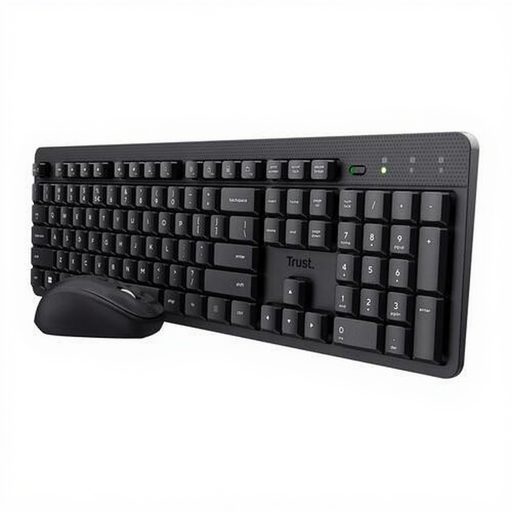 Image unavailable
Trust Ody II wireless keyboard-and-mouse set
This set is an option if you want to work wirelessly and need both a keyboard and a mouse.
The product description mentions a US QWERTY layout, a USB receiver, quiet keys, media and shortcut keys, and an adjustable typing angle. The box includes both the keyboard and the mouse.
View at Joybuy
 Image unavailable
Trust Vaiya wireless keyboard, full-size, US QWERTY
An option if you want to type wirelessly, need a numeric keypad and want to switch between multiple devices.
The product description mentions Bluetooth and a USB receiver, connection to up to four devices, quiet scissor keys and a full-size layout with a numeric keypad. Compatibility with Windows, macOS, iOS and Android is listed.
View at Joybuy
 Image unavailable
Apple Magic Keyboard with Touch ID, Dutch version
This version is designed for Mac models with Apple Silicon; check that your Mac and macOS version meet the listed compatibility requirements.
The product description mentions a QWERTY layout, Bluetooth, a rechargeable battery and a scissor mechanism. Listed compatibility is for Mac models with Apple Silicon and macOS 11.4 or later.
View at Joybuy
Frequently asked questions
Do I need a special keyboard to track changes?
No, Track Changes is a Word feature. However, check that the physical keyboard layout and key combinations suit your operating system and version of Word; Microsoft Support notes that key positions can differ between layouts.
How should I set up a laptop workspace for long writing sessions?
Treat your screen and keyboard as one workspace, and vary your posture and tasks. For employees who work at a screen for more than 2 hours a day, Arboportaal describes requirements under which the screen and keyboard are not attached to one another; this is not a general legal purchase requirement for every reader.
Does a wired or secure keyboard make a document with revisions safe to share?
No, a keyboard connection won’t remove hidden information from a document. The Dutch Data Protection Authority warns about hidden personal data in shared documents; Microsoft Support mentions comments, tracked changes and document properties, among other things. Check the version you intend to share and resolve revisions in line with the relevant document process.
What costs and rights should I check when buying online in the Netherlands?
First check whether you’re buying a standalone keyboard or a set, and whether the connection will work in your workspace. When a consumer buys from a business at a distance, the seller must provide information about the cooling-off period, among other things; according to the Dutch government, it is usually 14 days. Check the terms for the specific purchase.


