
Writers who work on long pieces
If you spend a lot of time writing and editing at a home desk, consider the key feel, layout and how easily you can adjust your working position.


Start by choosing a keyboard layout and connection that suit your computer and the work you do. Then compare the key feel, sound and space left for your mouse. A flat keyboard keeps to a familiar layout, while a wave-shaped or split model gives you more options for adjusting your hand position. None of these designs is a substitute for setting up your workspace properly or changing position as you work.
If you spend a lot of time writing and editing at a home desk, consider the key feel, layout and how easily you can adjust your working position.
If you want to leave room for a mouse or documents, weigh up a compact layout against a full-size keyboard with a numeric keypad.
If you want to change the position of your hands and keyboard, compare a fixed wave-shaped design with separate keyboard halves that can be positioned independently.
| What to consider | What should you look for? | Who might this matter to? |
|---|---|---|
| Key feel and layout | Compare how the keys feel and their physical layout with the characters you use often. | When writing long pieces, I want a key feel that suits me, with letters and punctuation in familiar places. Around 29% of consumers put key feel and layout first. |
| Hand position | Compare a fixed wave-shaped design with two separate halves that can be positioned independently. | If I want to position my hands differently, I consider how the keyboard’s shape will fit on my desk. Around 23% of consumers give hand position top priority. |
| Typing noise | Try the exact model or ask about its sound; descriptions are not a comparable measure of noise. | When I share a room at home, I want to know how audible typing will be. Around 18% of consumers prioritise a quieter typing experience. |
| Desk space | Measure the space available for your keyboard and mouse, and decide whether you need a separate numeric keypad. | If my desk is short on space, I want to leave room for my mouse or documents. Around 18% of consumers prefer a compact keyboard. |
| Connection and devices | Check the connection, operating system and layout of the exact model. | If I switch between devices while writing, I want to know which connections and switching options will work for me. Around 12% of consumers prioritise connection and switching options. |
The physical position of the keys and the input layout set on your computer are two separate things. This can make punctuation appear somewhere other than you expect.
Check the country layout of the exact model and compare it with the active input layout on your computer.
You may need time to get used to a different layout or adjust your settings.
A different keyboard shape does not guarantee that discomfort will go away or be prevented; your workspace setup and posture also play a part.
Choose a design you can position as intended at your desk, and don’t judge a keyboard by promises about its physical effects.
A compact layout may leave out keys or move functions elsewhere. This matters if you often use numbers or navigation keys.
Compare the exact key layout with the work you do. If you enter numbers often, you may need a separate numeric keypad or another solution.
The MX Keys S and Wave Keys offer different designs for typing and positioning your hands.
The KC 6000 SLIM is a wired, flat, full-size keyboard for a compatible Windows computer.
The Compact Break is designed for a compact workspace and has a break indicator.
The K3 Max is a compact, 75% mechanical keyboard for anyone weighing up layout, switches and connection options.
The Freestyle2 has two halves that can be positioned separately.
These keyboards are suited to writing at a home desk, with options for a familiar layout, multiple devices or a compact design.
 No image available
A full-size, low-profile keyboard for anyone who types long pieces and wants to switch between devices.
Rechargeable and wireless; the product information lists Bluetooth and a 2.4 GHz receiver, as well as programmable keys.
 No image available
A full-size option for anyone who values a numeric keypad and the ability to switch between multiple devices.
The product information lists scissor switches, Bluetooth and a USB receiver. This model has a US QWERTY layout; check that it suits your needs.
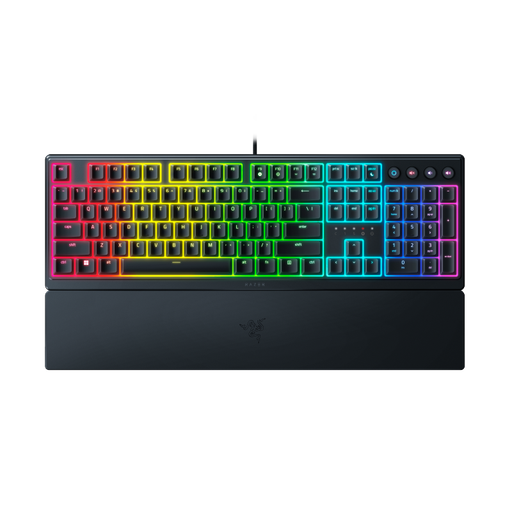 No image available
A wired, full-size, low-profile option for anyone looking for a wrist rest and a USB connection.
The product information lists mecha-membrane keys and a magnetic wrist rest. This model has a US layout and audible feedback.
 No image available
A flat keyboard with a Dutch layout and numeric keypad for entering text and numbers on a compatible Mac.
The title specifies that this model is for Mac models with Apple Silicon. The product information lists Bluetooth, a rechargeable battery and scissor switches.
 No image available
A compact, wired keyboard for anyone who wants to save space and doesn’t need a built-in numeric keypad.
The product information lists 61 keys, a USB connection and a membrane design with a mechanical feel. This model has a US QWERTY layout and no numeric keypad.
Check both the keyboard’s physical layout and the active input layout on your computer. In Windows, you can add or change input layouts; on a Mac, you can check the input source and active layout.
For employees who use a screen for more than two hours a day, Arboportaal states that the screen and keyboard must not be attached to one another. This workplace guidance is not a general purchasing requirement for everyone writing at home.
No. An ergonomic keyboard does not guarantee treatment or prevention of discomfort. Kinesis emphasises that this type of keyboard is not a medical treatment; also consider your workspace setup and vary your posture.
According to R-Go, the LED indicator is controlled by R-Go Break Software. Check in advance whether you’re able and permitted to use the software on your work computer; an indicator won’t take breaks for you.
For a standard online consumer purchase, you generally have a statutory 14-day cooling-off period after delivery; check whether an exception applies. The seller is responsible for the statutory guarantee if a product is faulty. The Authority for Consumers & Markets lists a free repair or replacement as possible solutions.