
Writers with long writing sessions
You write and revise a lot at a fixed workstation, so you’re mainly looking for a suitable key layout, key feel and hand position.


Start by choosing a keyboard with a layout and connection that suit your computer and long writing sessions. Then weigh up a compact, split or wireless design against your workspace and typing habits. A keyboard doesn’t save your script: set up local access and a recoverable backup separately on your computer.
You write and revise a lot at a fixed workstation, so you’re mainly looking for a suitable key layout, key feel and hand position.
You want to access your files while writing and be able to restore earlier versions. Choose a keyboard for text entry, and set up local files and backups separately.
You want to consider typing noise and available workspace without mistaking a manufacturer’s claim about quiet typing for a measurement taken in your room.
Start with the physical key layout and where you write. Then decide whether you need a cable, a different hand position or the ability to switch between devices.
| Consideration | What should you check? | Who should give this more weight? |
|---|---|---|
| Comfort and layout during long sessions | Check the physical key layout, how easy it is to reach the navigation keys, and how much room there is for the keyboard and mouse. Try the key feel if possible. | If you write and revise a lot of dialogue, you’ll want to reach the keys without having to keep changing the way you work. Around 36% of consumers prioritise typing comfort above all else. |
| Script continuity and offline access | Check that the script is available locally and that you can restore an earlier version. Microsoft Support describes File History for Windows; Apple Support describes Time Machine for Mac. | If you want to work on your text without an internet connection, the file must be accessible locally and have a separate recovery option. Around 29% of consumers put continuity and offline access first. |
| Typing noise in a shared space | Compare the key construction of the exact version and, if possible, try it on a similar surface. Descriptions such as ‘quiet’ aren’t a sound measurement taken in your space. | If other people work in the same room, you’ll want to know how the keyboard sounds during normal typing. Around 21% of consumers make quiet typing their top buying priority. |
| Moving between workspaces and key layout | Check the connection, power supply and physical QWERTY variant, and see whether it has the navigation keys you need. Handle file transfers and backups separately. | If you work on different devices or have limited desk space, the layout may influence your choice. Around 14% of consumers prioritise switching workspaces and layout. |
A keyboard enters text; your computer and backup setup determine whether you can restore earlier versions.
Test whether your script is available locally and whether you can restore a test file. For example, set up File History on Windows, or use Time Machine with a suitable drive on Mac.
These local backup options require suitable external storage.
According to Trust, the wired Trust Primo uses USB-C with a USB-A adapter. The Primo version sold by Joybuy is a wireless keyboard and mouse set with a USB receiver. The product name alone doesn’t make these differences clear.
Compare the full model and version name, connection, included items and physical key layout before choosing.
The supplied adapter may be needed to connect the wired Primo to your computer.
Manufacturers’ claims about sound and posture aren’t measurements taken in your room, and they don’t predict whether a keyboard will be comfortable for you.
Try the key feel and hand position if possible. Consider your whole workstation too, and don’t treat health claims as a guarantee.
Microsoft Support says that OneDrive files available online only can’t be opened without an internet connection.
Download files you need offline in advance and check that they’re available on your device. Also keep a separate recovery option.
The MX Keys S is worth considering if you’re looking for a backlit wireless keyboard that lets you switch between devices.
The KC 6000 SLIM is worth considering for a fixed Windows workstation if you want a full-size keyboard with a USB-A connection.
The wired Primo is a straightforward full-size keyboard for anyone who wants to use USB-C or the supplied USB-A adapter.
The Split Break v.2 is worth considering if you want to position the two keyboard halves separately.
The K1 Version 6 ISO is a compact mechanical option with Bluetooth and a wired connection.
This selection includes wired keyboards for a fixed writing space and wireless models for switching between devices. Check the physical layout, connection and features you need for writing and editing for each keyboard.
 No image available
A wired option for a fixed writing space if you want a numeric keypad.
Full-size layout with numeric keypad and plug-and-play connection.
 No image available
Worth considering if you’re looking for a full-size keyboard that lets you switch between several devices.
Full-size layout with numeric keypad, scissor keys, USB receiver and three Bluetooth channels. The product description mentions a rechargeable battery and use with a laptop, tablet and phone.
The description of the keystrokes as quiet is a product claim, not an independent sound measurement. Check that the US QWERTY layout suits you.
 No image available
A compact mechanical option if you want to use less desk space and try a different key feel.
75% layout with wired, Bluetooth and 2.4GHz connections. The product description mentions arrow and function keys, a TFT display, and compatibility with Windows and macOS.
The described construction and sound-dampening layers are product features, not an independent assessment of typing noise.
 No image available
A wired option for a fixed workstation if you’re looking for a full-size keyboard with dedicated navigation keys.
Full-size layout with US QWERTY and a USB-A connection. The product description mentions keys that can also be used as arrow keys.
 No image available
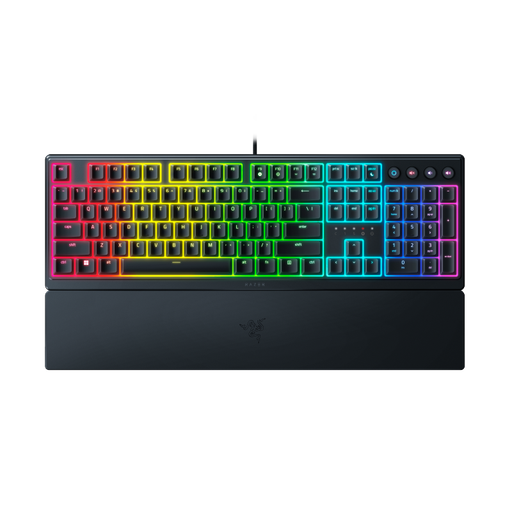
A full-size wired keyboard to consider if you’re looking for a low-profile design and a wrist rest.
The product information lists a USB connection and keys for typing and media controls.
The description mentions audible feedback, so bear this in mind if quiet typing matters in a shared space. A low-profile design or wrist rest doesn’t prove an individual ergonomic benefit.
No, you set up backups on your computer. Microsoft Support describes File History for copying file versions to an external drive or network location; Apple Support describes using Time Machine with external storage for documents and other files. Also test that you can restore a version.
Not if the file is available online only. For Windows files needed offline, Microsoft Support recommends selecting ‘Always keep on this device’ and checking before you leave that they’ve been downloaded. Having a local copy is different from having a recoverable backup.
Check the port and exact version before buying. CHERRY lists USB-A and Windows for the KC 6000 SLIM; Trust lists USB-C with a USB-A adapter for the wired Primo. For a wireless model, also check the connection, power supply and physical key layout.
According to the Dutch government, when you buy from a business online as a consumer, you can often change your mind within 14 days; terms and exceptions may apply. The Netherlands has no fixed statutory warranty period. If a product is faulty, contact the seller.
Yes, in those circumstances: Arboportaal states that if an employee works with a screen for more than 2 hours a day, the screen and keyboard must not be attached to one another. A separate screen or keyboard must be usable with a laptop. This isn’t a general rule for everyone writing at home.