
High-volume letter transcriber
You transcribe names, places and longer passages from letters, and want a familiar key layout with navigation keys that are easy to reach.


Choose a full-size keyboard if you regularly enter numbers, a compact model if you want to save space for your mouse, or a split keyboard if you want to adjust your hand position. The screen layout is controlled by Windows or macOS, not by the keyboard: Microsoft explains window snapping in Windows, while Apple Support covers Split View for supported Mac apps. Before buying, check the physical key layout, connection type and any features of the exact version.
You transcribe names, places and longer passages from letters, and want a familiar key layout with navigation keys that are easy to reach.
You keep the source image and data-entry window open side by side and use your mouse frequently, so the space beside your keyboard matters.
You want to adjust your hand position and workstation, and vary your tasks, without expecting a keyboard on its own to resolve any health issues.
Choose this if: you regularly enter dates or other numbers and want a dedicated numeric keypad.
Bear in mind: a full-size keyboard takes up more width.
Choose this if: space for your mouse matters more than having a built-in numeric keypad.
Bear in mind: a separate numeric keypad may be needed; also check how easy it is to reach the arrow and navigation keys.
Choose this if: during longer sessions, you mainly want to adjust the position of your hands and forearms.
Bear in mind: a fixed curved frame and two separately positionable halves are different designs; neither replaces breaks or a suitable workstation setup.
| What to consider | What to look for | Best suited to |
|---|---|---|
| Key layout and text entry | Check the physical country layout, navigation keys and characters you use in your documents. CHERRY offers versions with different country layouts. | When transcribing names and places, I want a familiar physical layout and navigation keys that are easy to reach. Around 36% of consumers prioritise accurate text entry for this task. |
| Hand position | Compare a fixed curved frame with two separately positionable halves, and check that the shape fits your desk. | During longer data-entry sessions, I want to be able to adjust the position of my hands and forearms, without expecting a keyboard to resolve any discomfort. Around 29% of consumers prioritise hand position when making this choice. |
| Space for your mouse and documents | Compare the width of the keyboard and consider whether you need a numeric keypad for your work. | When the source and data-entry window are side by side, I want to use my mouse without the keyboard taking up too much space. Around 21% of consumers prioritise having space for their mouse. |
| Numbers and repeated tasks | Choose a built-in numeric keypad if you use one often. For programmable actions, check that your data-entry software supports the action you want. | When I regularly enter dates or carry out repeated commands, I want a numeric keypad or an action that my software actually supports. Around 14% of consumers base their choice mainly on number entry or repeated tasks. |
Windows and macOS have built-in features for arranging supported windows side by side; you don’t need a special keyboard for this.
First decide whether you want to change your screen layout, make more room for your mouse or adjust your hand position. Microsoft explains window snapping in Windows, while Apple Support covers Split View on Mac.
CHERRY lists versions with different country layouts, as well as a separate KC 6000 SLIM FOR MAC model. A similar product-line name doesn’t guarantee the same physical keys or version.
Check the full model variant and look at the physical key layout before ordering.
A compact model and a keyboard with a built-in numeric keypad suit different data-entry needs.
Consider how often you enter dates and numbers, and how much space you need beside your keyboard.
If you later find you need a numeric keypad, a separate one may be an extra accessory to buy.
Worth considering if you’re comparing conventional, full-size keyboards such as the STREAM KEYBOARD and the standard KC 6000 SLIM.
The MX Keys S has customisable functions, while the ERGO K860 has a curved, split keyboard frame.
The Compact Break is a compact option; the Split Break v.2 has two keyboard sections that can be positioned separately.
This selection includes full-size keyboards with a numeric keypad and compact models that leave extra room for your mouse while you type.
 No image available
The full-size layout, numeric keypad and navigation cluster suit frequent number entry and moving through documents.
The description lists a wired plug-and-play connection and backlighting.
 No image available
The compact 75% layout is an option if you want to keep desk space free beside your keyboard while typing.
The product name lists a QWERTY-US layout; the description mentions a wired connection, a volume knob and hot-swappable switches.
 No image available
The 80% layout and programmable knob are worth considering if you want a compact design and need to set up a specific repeated action.
The product name lists a QWERTY-US layout and a 4000 mAh battery. The description mentions wired and wireless connection options.
 No image available
A numeric keypad and document navigation keys can be useful if you enter lots of numbers and move through documents frequently.
The product information lists Bluetooth and a rechargeable battery. This version is designed for Mac models with Apple silicon.
 No image available
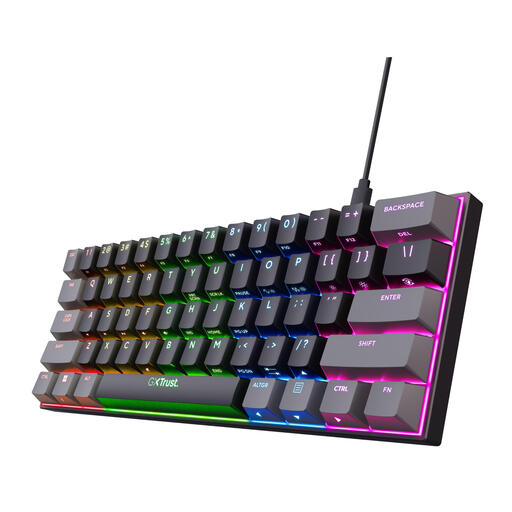
The compact 60% layout is designed for those who want to keep space free for a mouse, but it requires a different way of navigating.
The product name lists a QWERTY-US layout and Outemu Red switches. According to the description, the arrow and navigation keys are only available via the Fn layer; check that this suits your data-entry work.
No, your operating system controls how windows are arranged. Microsoft explains how to snap windows in Windows 10 and 11 using the Windows key and arrow keys; Apple Support explains Split View for supported apps on Mac. Choose a keyboard based on your data-entry needs and the desk space available.
Check the connection type of the exact version. The R-Go Split Break v.2 manual distinguishes between a wired connection and wireless pairing, so don’t assume the versions work in the same way.
Alternate screen-based tasks, change your posture regularly and take short breaks. Arboportaal recommends these as workstation practices; this isn’t proof that a particular keyboard prevents discomfort.
When you buy online from a business, you’ll often have a 14-day cooling-off period, although exceptions apply. According to the Dutch government, the Netherlands has no fixed statutory guarantee period; if a product is faulty, contact the seller. Check the terms that apply to your purchase.
For employees who work with screens for more than two hours a day, Arboportaal states, among other things, that the screen and keyboard must not be attached to each other. In this situation, laptop users must be able to use a separate screen or keyboard. This requirement for employees isn’t a general legal buying requirement for everyone who transcribes family letters at home.