Start with the key feel and layout that suit writing alongside colleagues. Then decide whether you mainly need a reliable wired connection, more room for your mouse, wrist support or the option to switch between devices. Manufacturers describe some models as quiet, but without comparable sound measurements, it’s best to judge the key feel for yourself and check the exact layout and connection.
Who is this relevant to?
Lesson planner working alongside colleagues
Writes lesson plans, assignments and messages at a shared workstation, and is particularly interested in a quiet typing experience. Trust and CHERRY describe specific models as quiet; these claims are not based on comparative sound measurements.
Lesson designer who types a lot
Spends longer working on documents and reference materials, and wants to match the keyboard layout, mouse position and any wrist support to their workstation.
Switches between work devices
Plans lessons on more than one device or often moves between workstations, so pays attention to the connection type, receiver and compatibility.
What should you look for when choosing?
First decide how important quiet typing is to you and how the keyboard will fit into your workspace. Then consider the layout, connection and how you want to switch between devices.
| What to consider | What to look for | Who is it most important for? |
|---|
| Typing noise in a shared space |
If possible, assess the typing sound for yourself. Check whether the quiet-typing claim applies to the standalone keyboard and not just to a bundle. |
If I’m writing lesson plans alongside colleagues, I want to know how the keys sound at my desk. Around 36% of consumers give quiet typing top priority. |
| Typing posture and mouse space |
A compact keyboard can free up space beside the keys; check whether you need a separate number pad. Try out a shaped layout and wrist support for yourself. |
If I’m often switching between reference materials and lesson documents, I want to use the keyboard and mouse comfortably side by side. Around 29% of consumers prioritise posture and mouse space. |
| Switching between devices |
Check whether your work devices support Bluetooth or have the required USB port, and whether the model has the switching function you want. |
If I prepare lessons on different devices or at different workstations, I want to know how to connect the keyboard to them. Around 21% of consumers give switching between devices top priority. |
| Keyboard layout and connection |
Check the physical layout, whether you want a separate number pad and the ports on your work computer; the QWERTY label alone doesn’t tell you which version you’re choosing. |
If I use lots of text, punctuation and keyboard shortcuts, I want a familiar layout and a suitable connection. Around 14% of consumers prioritise this combination. |
Common buying mistakes
-
Confusing a standalone keyboard with a keyboard and mouse set
Trust describes both a standalone Ody II keyboard and a set with the same name. The product name alone may therefore not be enough to confirm what’s included in the version you’ve chosen.
Check the full product name and the listed contents of the package before ordering.
-
Taking a quiet-typing claim as a measured comparison
A manufacturer’s description such as ‘quiet’ doesn’t tell you how the sound compares with other models in your workspace.
If possible, try the key feel for yourself, and don’t base your choice on an unverified sound ranking.
-
Not considering mouse position when choosing a full-size keyboard
A narrow keyboard can leave room to position your mouse closer. A separate number pad can be useful if you often enter figures.
First decide how often you use a number pad, then assess the keyboard and mouse together at your workstation.
-
Assuming QWERTY tells you the complete layout
The physical layout can vary between versions. For example, a US QWERTY layout is listed for one version of the Trust Ody II, while the CHERRY STREAM range comes in different layouts.
Compare the key legends on the exact version with your preference, and check that the connection suits your work computer.
Brands to consider
Trust
The standalone Ody II is worth considering if you want to type wirelessly using a USB receiver.
- Trust describes the keys as quiet and says the receiver can be stored in the keyboard.
- Note the difference between the standalone keyboard and an Ody II set. The quiet-typing description is not an independent sound comparison.
CHERRY
The wired STREAM KEYBOARD is an option for a permanent workstation.
- CHERRY lists an SX scissor mechanism and quiet typing for this model.
- ‘Whisper quiet’ is a claim made by CHERRY, not a sound level measured here. Check the layout of the version you choose.
Logitech
Wave Keys offers a shaped layout, wrist support and options for switching between compatible devices.
- Logitech lists Bluetooth, a Logi Bolt receiver and Easy-Switch.
- The ergonomic benefits are described by Logitech; there’s no basis for saying Wave Keys is quieter than the other models mentioned.
BakkerElkhuizen
The compact S-board 840 is worth considering if you want to position your mouse closer while planning lessons.
- Arboportaal explains that a narrow keyboard can leave room to position the mouse closer to your body.
- The S-board 840 has no separate number pad; BakkerElkhuizen describes number entry using an integrated keypad with NumLock.
Rapoo
The E9500M is an option if switching between devices and connection types is important to you.
- Rapoo lists Bluetooth and a 2.4GHz receiver.
- The product information doesn’t include comparable sound measurements that would allow this model to be ranked above a keyboard with an explicit quiet-typing claim.
Keyboards at Joybuy
This selection includes wired keyboards with a number pad, compact models and options for wireless use or switching between devices.
 No image available
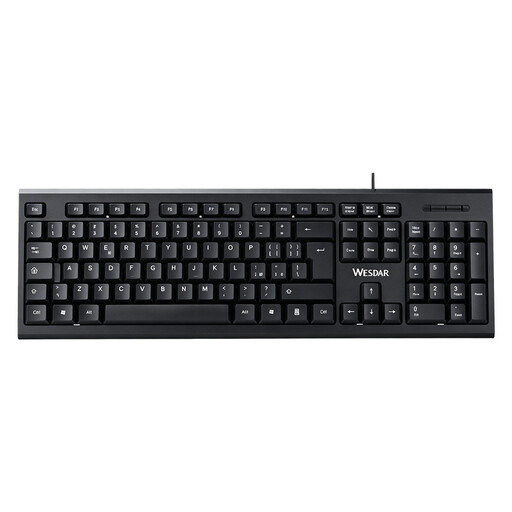
Wired QWERTY keyboard with number pad
Suited to a permanent workstation if you want a wired connection and a number pad.
Full-size; plug-and-play wired connection. Check that the physical QWERTY layout suits your preference.
View at Joybuy
 No image available
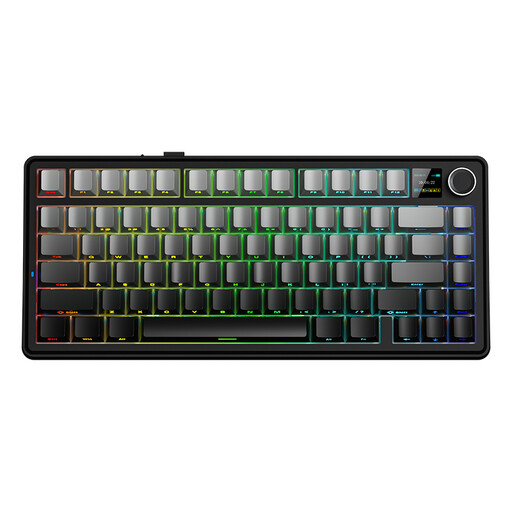
AULA F75 MAX 75% mechanical keyboard, US QWERTY, Gradient Grey, Reaper Switch
A compact layout for anyone who wants to free up desk space and needs a choice of connection types.
75%; wired, Bluetooth and 2.4GHz connections. The title lists US QWERTY; check that this physical layout suits you.
View at Joybuy
 No image available
Trust Vaiya wireless multi-device full-size keyboard, US QWERTY
An option if you want to type alongside colleagues and use the keyboard with several devices.
Full-size with a number pad and scissor-shaped keys. The description lists quiet keys and connection to up to four devices via a USB receiver and Bluetooth. Check that US QWERTY suits your preference.
View at Joybuy
 No image available
Ajazz AK820 Pro 75% mechanical tri-mode keyboard, US QWERTY
A compact layout for a shared desk, with a choice of connection types.
82 keys; wired, Bluetooth and 2.4GHz connections. The product title lists sound-dampening foam and US QWERTY; check that the layout suits your preference.
View at Joybuy
 No image available
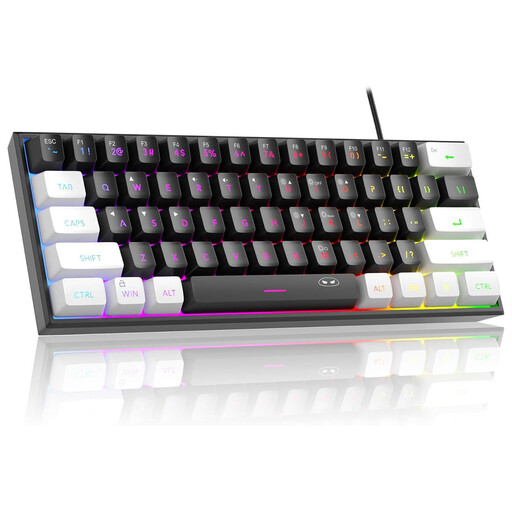
MageGee TS91 60% wired keyboard, US QWERTY
A compact wired model for anyone who values space beside the keyboard and doesn’t need a separate number pad.
60%, 61 keys and RGB lighting. The description says it has no number pad and describes the keys as having a mechanical feel. Check that US QWERTY suits your preference.
View at Joybuy
Frequently asked questions
Which keyboard should I choose if I write up lessons alongside colleagues?
Start with a model whose manufacturer describes the key feel as quiet, but assess the sound and typing feel for yourself if possible. Manufacturer claims aren’t based on comparable sound measurements, so also check the physical layout and connection.
How should I set up a workstation with a laptop and a separate keyboard?
Arrange your keyboard, mouse and screen to suit your workstation, and take breaks from screen work. Arboportaal states that for employees who spend more than 2 hours a day working at a screen, the screen and keyboard must not be attached to each other; a separate screen or keyboard must be available when using a laptop. This requirement doesn’t automatically apply to every buyer.
Do I need to charge a wireless keyboard or replace its batteries?
It depends on the model. Check the product specifications for its power source, receiver and required port; Trust says the Ody II has a USB receiver that can be stored away.
What if a keyboard I bought online isn’t right for me or develops a fault too soon?
According to ACM ConsuWijzer, online consumer purchases usually come with a statutory cooling-off period of up to 14 days after delivery, subject to exceptions. You’re also covered by the statutory guarantee if a product doesn’t perform as you could reasonably expect under normal use; the seller must then offer an appropriate solution at no cost. Check the terms that apply to your purchase.


